


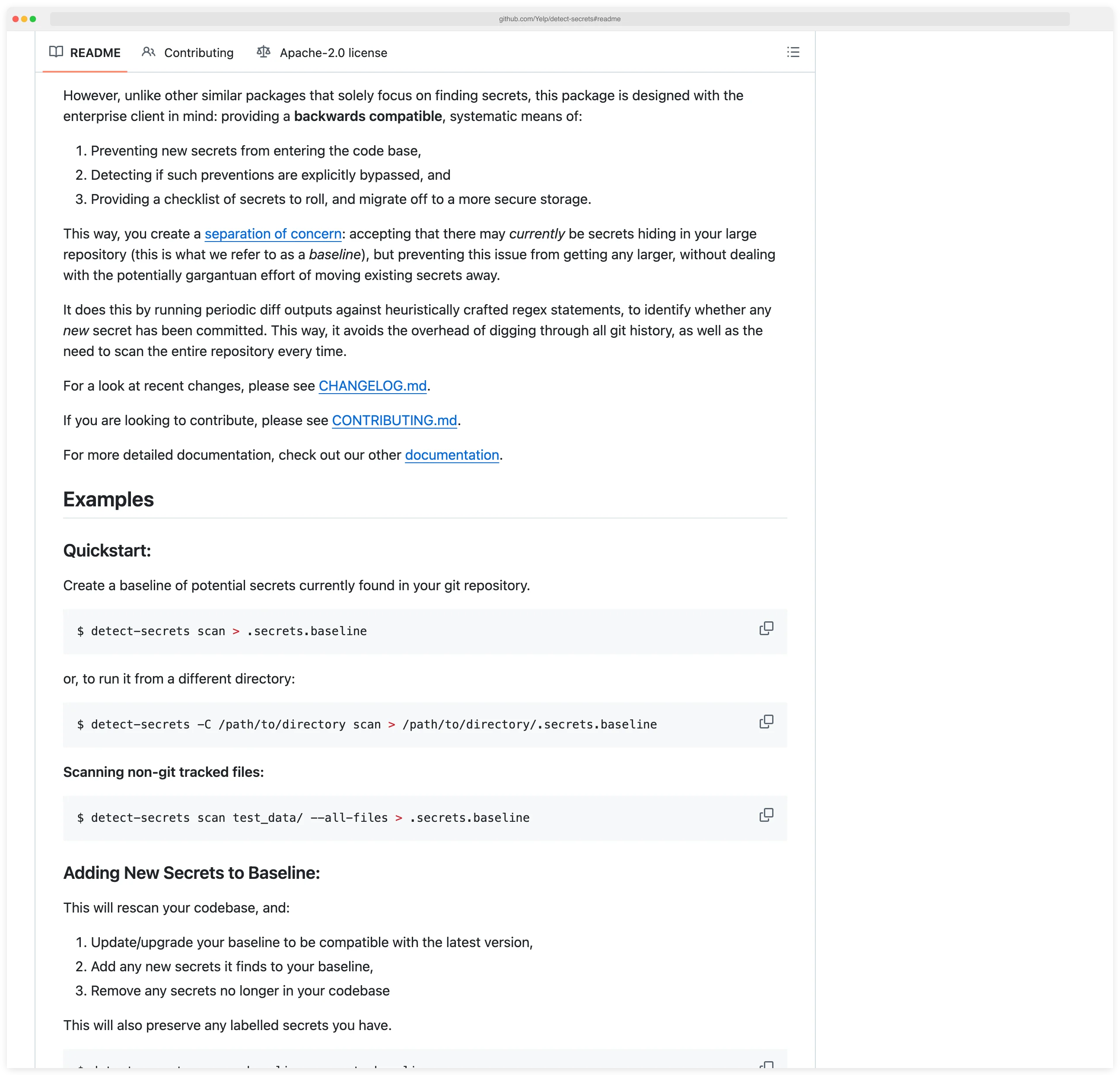
detect-secrets is Yelp’s enterprise-friendly secret scanner that uses a baseline approach to prevent new credential leaks. According to OWASP’s Secrets Management Cheat Sheet , preventing secrets from entering version control is a foundational security practice.
Unlike scanners that report all secrets, detect-secrets accepts existing secrets in a baseline file while blocking any new ones from being committed.
This pragmatic approach makes detect-secrets ideal for brownfield projects and large organizations that need immediate protection without requiring massive remediation efforts upfront.
I pair detect-secrets with pre-commit on any repo that accepts third-party contributions. Its baseline file lets me mark known-safe strings as reviewed so the scan stays quiet day to day. It does not verify secrets against live services the way TruffleHog does, but it is faster, has fewer runtime dependencies, and covers a broader pattern library out of the box.
What is detect-secrets?
detect-secrets scans git repositories and files to identify hardcoded credentials, API keys, and other secrets. The tool’s distinguishing feature is its baseline system: you create a baseline file containing hashes of all current secrets, then detect-secrets allows those secrets to pass while flagging anything new.
The scanner works by analyzing git diffs rather than scanning entire repositories on each run. This differential approach minimizes overhead and provides fast feedback in pre-commit hooks and CI pipelines.
You see only what changed, not repeated warnings about historical issues.
detect-secrets uses a plugin architecture for secret detection. Each plugin targets specific secret patterns—AWS keys, private keys, Slack tokens, etc. You can enable built-in plugins or write custom regex-based detectors for proprietary credentials.
| Capability | Details |
|---|---|
| Baseline Management | Accept existing secrets in a baseline file while blocking new ones, enabling immediate protection without full historical remediation |
| Differential Scanning | Scan git diffs instead of entire repositories to minimize overhead and provide fast feedback on changes |
| Plugin Architecture | Extensible detection system with built-in plugins for common secrets plus custom regex support for proprietary credentials |
Why secret detection in source code matters
Leaked credentials in source repositories are one of the most exploited initial-access patterns. GitHub’s secret scanning regularly catches AWS keys, Slack tokens, and API credentials in public commits within seconds of push, and historical scans against the public commit graph routinely surface millions of valid secrets per year. Once a credential lands in git history, rotation is the only fix — removal from a single commit does not erase it from clones, forks, or mirrors.
The practical problem is brownfield: most established codebases already contain old credentials buried in commit history. Asking a team to remediate every historical secret before turning on a scanner stalls adoption indefinitely. detect-secrets solves this with a baseline file that accepts what is already there and blocks anything new — protection starts on day one, remediation runs on the team’s own schedule. Pre-commit hooks block leaks before they reach version control, which is the only place a scanner can actually prevent rather than merely detect.
What are detect-secrets’s key features?
| Feature | Details |
|---|---|
| Built-in detectors | 27 plugins covering AWS, GitHub, GitLab, Slack, Stripe, Twilio, Discord, and more |
| Detection strategies | Regex-based rules, Base64/Hex entropy analysis, keyword matching |
| Entropy thresholds | Base64 default 4.5, Hex default 3.0 (configurable 0.0–8.0) |
| CLI commands | scan, audit, detect-secrets-hook |
| Output format | JSON baseline file (.secrets.baseline) |
| Installation | pip, Homebrew, or from source |
| License | Apache-2.0 |
| Verification | Optional network verification via --only-verified flag |
Baseline creation and auditing
The baseline file (.secrets.baseline) is a JSON document with hashes of every detected secret. When you re-scan, detect-secrets compares new findings against this baseline.
Secrets already recorded pass through; new ones trigger failures. You commit this file to version control alongside your code.
The audit command supports diffing two baselines and generating statistical reports. You can label each finding, and those labels persist across re-scans — useful for tracking which secrets your team has reviewed versus which still need remediation.
27 built-in detectors
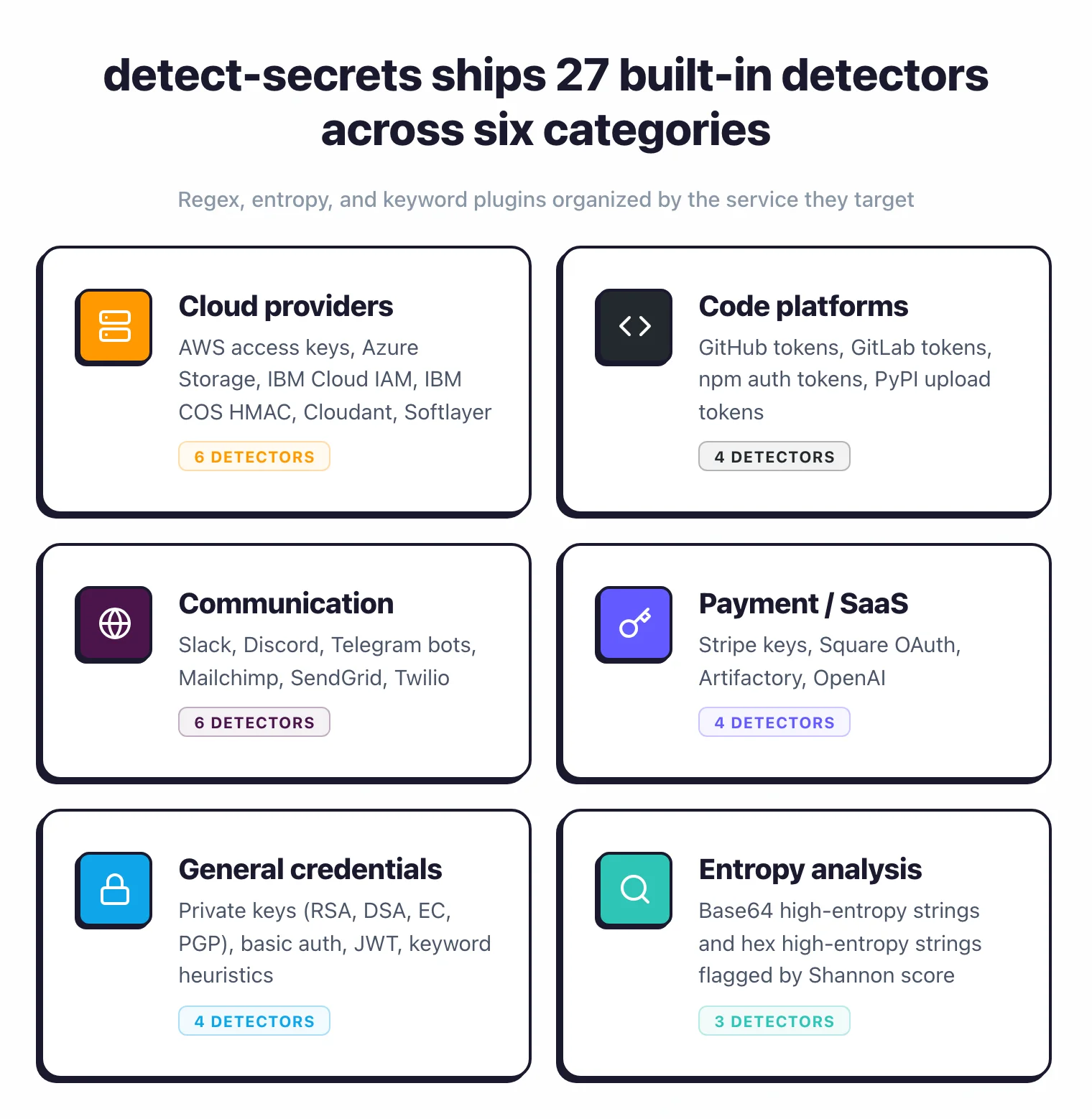
detect-secrets ships 27 built-in detectors across three detection strategies: regex-based rules for structured secrets like AWS keys and GitHub tokens, entropy detection for random-looking strings using Base64 and Hex analysis, and keyword detection that flags variable names tied to hardcoded credentials.
| Category | Detectors |
|---|---|
| Cloud providers | AWSKeyDetector, AzureStorageKeyDetector, IbmCloudIamDetector, IbmCosHmacDetector, CloudantDetector, SoftlayerDetector |
| Code platforms | GitHubTokenDetector, GitLabTokenDetector, NpmDetector, PypiTokenDetector |
| Communication | SlackDetector, DiscordBotTokenDetector, TelegramBotTokenDetector, MailchimpDetector, SendGridDetector, TwilioKeyDetector |
| Payment/SaaS | StripeDetector, SquareOAuthDetector, ArtifactoryDetector, OpenAIDetector |
| General | PrivateKeyDetector, BasicAuthDetector, JwtTokenDetector, KeywordDetector, IPPublicDetector |
| Entropy | Base64HighEntropyString, HexHighEntropyString |
Pre-commit hook integration
Install detect-secrets as a pre-commit hook to scan staged changes before commits go through. If a developer tries to commit new secrets, the hook blocks the commit and shows the offending content.
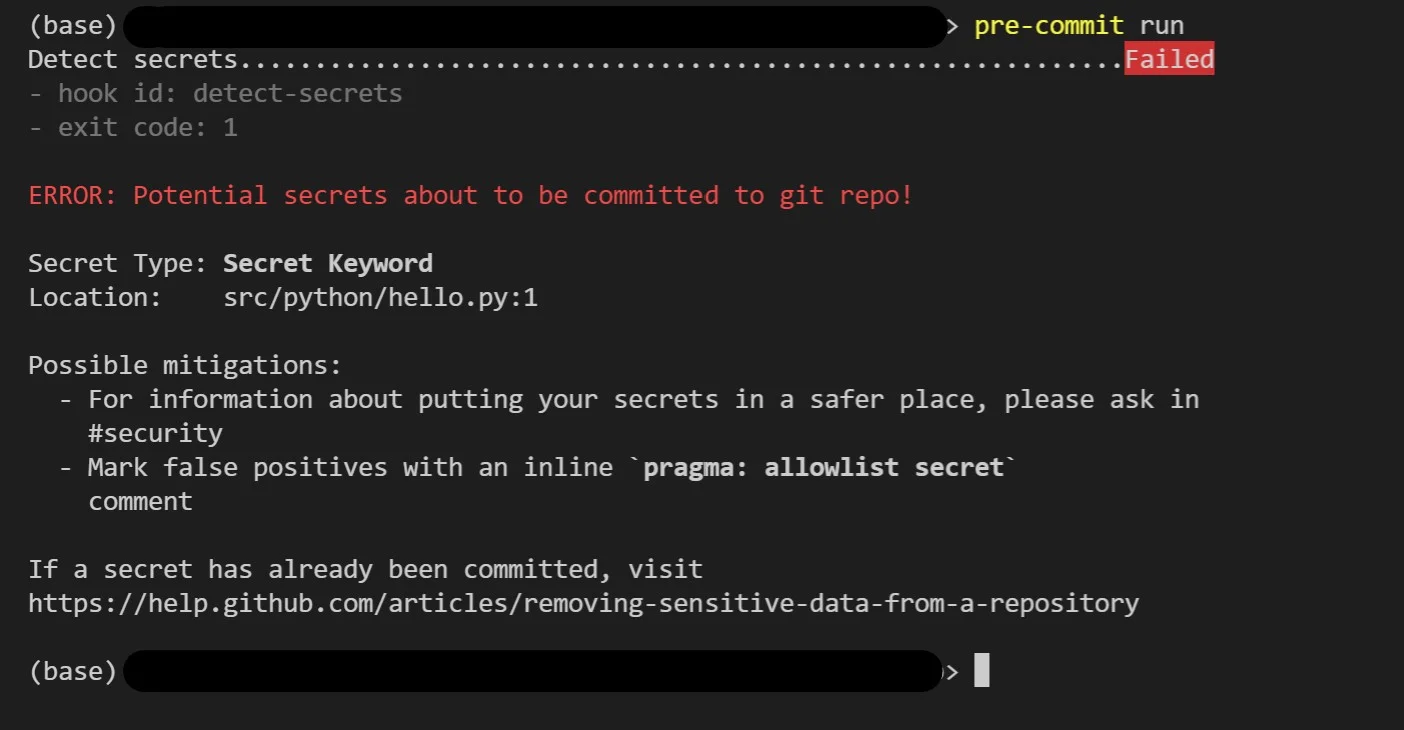
Only changes that match the baseline or contain no secrets can be committed.
The hook runs in seconds because it scans only staged changes, not the entire repository.
Inline allowlisting
Inline allowlisting lets developers suppress false positives directly in code with pragma comments. Add # pragma: allowlist secret to the end of a line, or // pragma: allowlist nextline secret before a line, to exclude specific findings.
You can also exclude files, lines, or secret values globally using --exclude-files, --exclude-lines, and --exclude-secrets regex flags.
Optional secret verification
detect-secrets can optionally verify discovered secrets by making network requests to the associated services. The --only-verified flag limits output to secrets confirmed as live credentials.
This is off by default to avoid unexpected network traffic.
CI/CD integration
Run detect-secrets in CI pipelines to enforce secret policies on pull requests. The tool exits with a non-zero status code when new secrets are found, failing the build and preventing merges.
Configure CI to scan only the PR diff (fast) or the entire branch (comprehensive). Most teams scan diffs for quick feedback.
How detect-secrets works
detect-secrets is plugin-driven source code static analysis with rule-based pattern matching for CWE-798 (hardcoded credentials). On the first run, the scan command walks the repository, hashes every match from each enabled detector, and writes the result to .secrets.baseline as JSON. Each detector is a small Python class — AWSKeyDetector, GitHubTokenDetector, KeywordDetector, Base64HighEntropyString, and 23 others — that returns a list of (line, secret) pairs.
On every subsequent run, detect-secrets compares fresh findings against the baseline by hash. Secrets already recorded pass; new ones fail the scan. The pre-commit hook narrows that comparison to staged diff lines so the check runs in well under a second on a typical commit. Two helpers round out the workflow: audit walks the baseline interactively so you can label each finding as true or false positive, and --only-verified calls the underlying API for AWS/GitHub/Slack to confirm a secret is live before flagging it. The whole pipeline is git-diff first, full-repo never — which is why it scales on monorepos where Gitleaks or TruffleHog full scans become slow.
How do I get started with detect-secrets?
- Install — Run
pip install detect-secretsorbrew install detect-secrets. For word list support, usepip install detect-secrets[word_list]. - Create a baseline — Run
detect-secrets scan > .secrets.baselinein your repository root. This generates a JSON file with hashes of all detected secrets.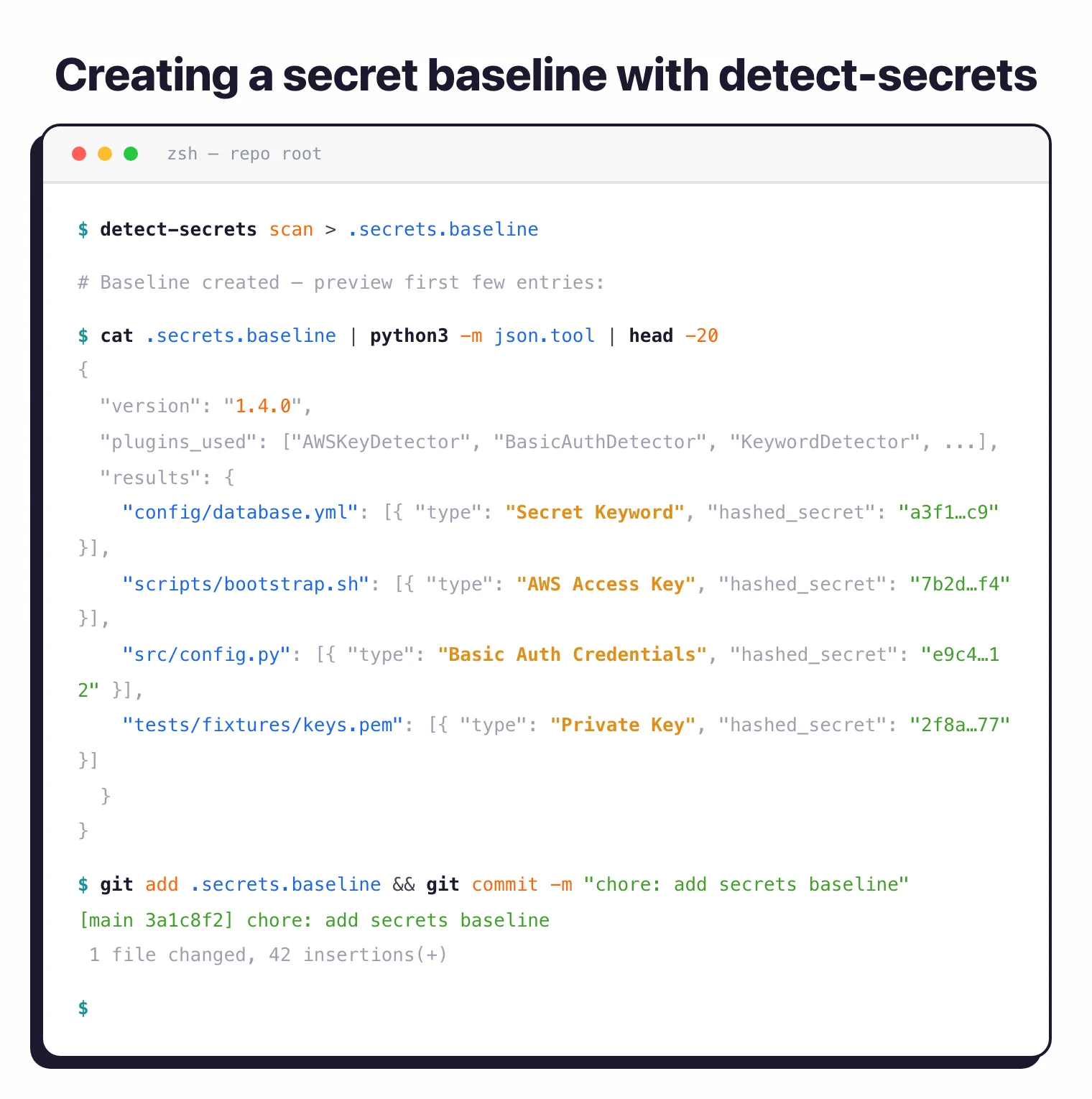
- Add the pre-commit hook — Add detect-secrets to
.pre-commit-config.yamlwithargs: ['--baseline', '.secrets.baseline']. New commits with secrets will be blocked. - Audit your baseline — Run
detect-secrets audit .secrets.baselineto review each finding. Label secrets as true or false positives to build an audit trail.
What are alternatives to detect-secrets?
Teams comparing secrets scanners to detect-secrets usually evaluate:
- Gitleaks — Go-based regex scanner with first-class git history support; preferred when you need to audit historical commits or when shell-shaped CI integration matters more than baseline-driven workflows.
- TruffleHog — entropy-plus-verification scanner that actively probes detected credentials against vendor APIs to confirm they are live; chosen when low false-positive rate beats raw scan throughput.
- GitHub secret scanning — built-in scanner for repositories on GitHub; a fit when you already pay for GitHub Advanced Security and want vendor partner verification across 200+ providers.
- GitGuardian — commercial secrets-detection-as-a-service with continuous monitoring across GitHub, GitLab, and Slack; chosen when you need a managed remediation workflow rather than a CLI.
For a wider feature comparison, the SAST tools hub and the Gitleaks vs TruffleHog guide cover overlapping ground.
detect-secrets pricing and licensing
detect-secrets is fully free and open source under the Apache 2.0 license. There is no paid tier, no SaaS upsell, and no enterprise add-on: install with pip install detect-secrets, run scans locally or in CI, and ship without a vendor relationship. The project lives at github.com/Yelp/detect-secrets
and continues to receive maintenance from Yelp’s security engineering team and external contributors.
Because the tool is library-shaped rather than service-shaped, you wire it into your own pipeline: pre-commit hooks, GitHub Actions, GitLab CI, or whatever runner you already use. The included .secrets.baseline workflow lets large legacy codebases adopt scanning without flagging every historical false positive on day one.
detect-secrets in practice: examples
Three workflows cover most real adoptions:
Initial baseline on an existing repo. Run detect-secrets scan > .secrets.baseline from the repo root, then commit the file. The first run accepts every existing finding; from this point forward only new secrets break the build. I usually pair this with detect-secrets audit .secrets.baseline immediately after, walking each finding to mark it true or false positive. The audit labels persist across re-scans, so the baseline doubles as a tracking spreadsheet for remediation work.
CI scan that fails on a new finding. Add detect-secrets-hook --baseline .secrets.baseline $(git diff --name-only HEAD~1) to the CI pipeline. On a PR that introduces a new AWS key, the hook exits non-zero and the build fails before merge. Existing baseline secrets pass through silently — no false-positive flood from the historical state.
Audit-baseline triage. When the team is ready to clean up the baseline, detect-secrets audit --diff old.baseline new.baseline shows exactly what changed between two points in time. This is how I track remediation progress quarter over quarter without rebuilding the baseline from scratch.
When to use detect-secrets
detect-secrets fits best in enterprise environments with legacy codebases that already contain secrets. The baseline approach lets you prevent new leaks immediately while remediating old ones on your own schedule.
It’s a good pick if your team needs an audit trail of reviewed secrets, works in a regulated environment, or runs large monorepos where scanning speed matters.
For broader scanning beyond git repositories (Slack, S3, Docker images), look at TruffleHog . For simpler git-only scanning without baseline management, Gitleaks is a lighter option.