


OWASP Dependency-Track is an open-source platform for continuous component analysis across software portfolios. With 3.9k GitHub stars and 167 contributors, it is an established open-source solution for SBOM-based vulnerability management.
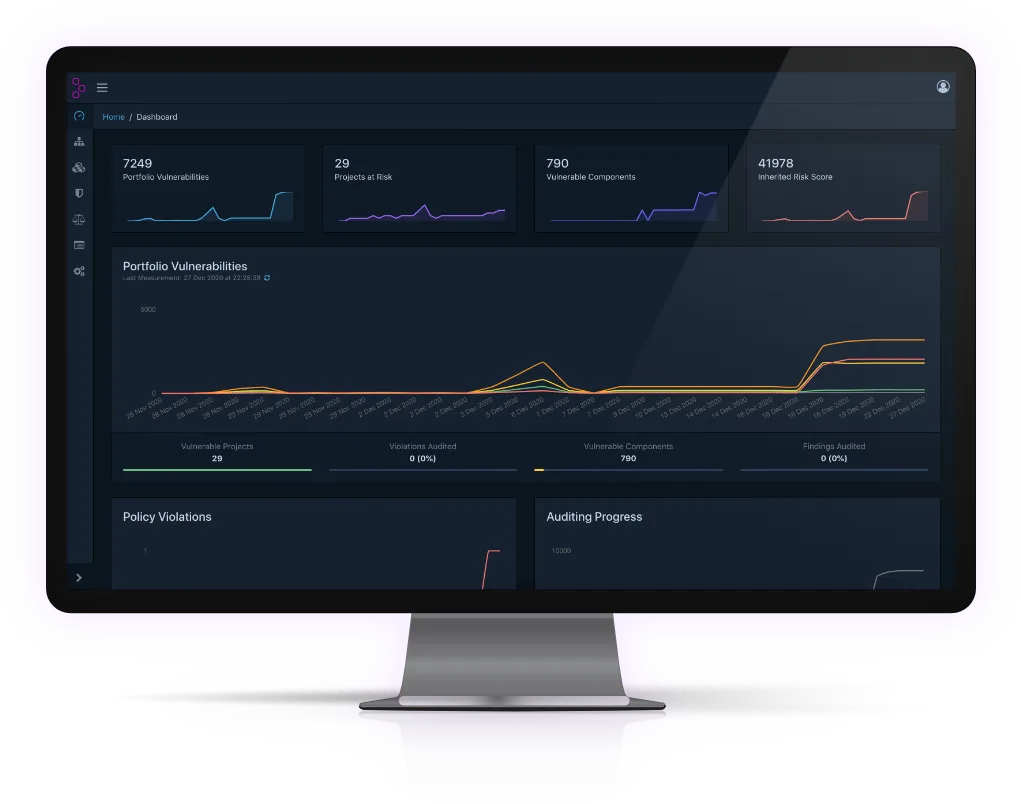
I value Dependency-Track for persistent SBOM inventory rather than point-in-time scan reports.
With Executive Order 14028 requiring SBOM generation for federal software, platforms that track SBOMs continuously have become increasingly relevant. When a new CVE is published, the platform immediately identifies every affected project without requiring rescans.
What is OWASP Dependency-Track?
Dependency-Track ingests SBOMs in CycloneDX format and continuously correlates components against NVD, GitHub Advisories, Sonatype OSS Index, OSV, and optionally Snyk.
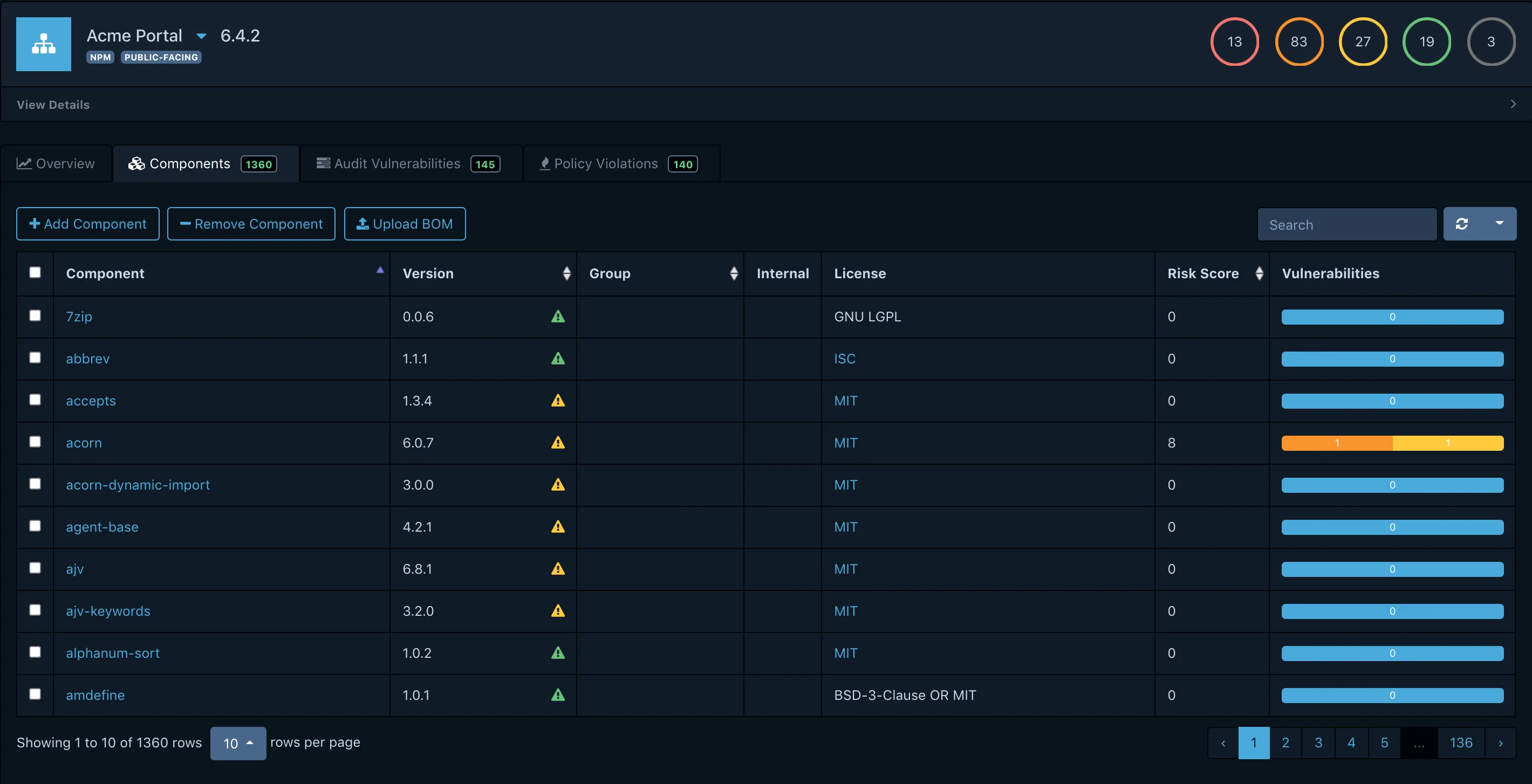
It tracks component versions, licenses, and security posture across projects, giving you a unified view of organizational risk.
| Capability | Details |
|---|---|
| SBOM Lifecycle Management | Ingests SBOMs as living documents. Tracks versions over time, maintains history of component changes, and accepts CycloneDX SBOMs from any generation tool. |
| Continuous Monitoring | Correlates your component inventory against updated vulnerability feeds around the clock. When a new CVE affects a library you use, alerts fire across all affected projects automatically. |
| Portfolio Risk Tracking | Dashboards show risk trends, vulnerable component counts, and policy violations across your entire application portfolio. Filter by project, team, tag, or component. |
What are OWASP Dependency-Track’s key features?
Vulnerability data sources
| Source | Coverage |
|---|---|
| NVD (NIST) | All CVEs in the National Vulnerability Database |
| GitHub Security Advisories | Community-reviewed advisories for GitHub ecosystems |
| Sonatype OSS Index | Java, JavaScript, .NET, and Go vulnerability data |
| OSV | Open Source Vulnerabilities across multiple ecosystems |
| Snyk (optional) | Additional vulnerability intelligence with API key |
| VulnDB (optional) | Commercial vulnerability intelligence |
Supported SBOM formats
| Format | Support |
|---|---|
| CycloneDX JSON | Full support (preferred) |
| CycloneDX XML | Full support |
| SPDX (any) | Not supported; removed in 2021 (#1053 ) |
Continuous vulnerability monitoring
Rather than scanning on-demand, Dependency-Track continuously correlates your component inventory against updated vulnerability feeds.
When a new CVE affects a library you use, alerts fire automatically across all affected projects. No rescan needed.
Multi-source vulnerability intelligence
The platform aggregates data from NVD, GitHub Security Advisories, Sonatype OSS Index, OSV, and optionally Snyk. This multi-source approach catches vulnerabilities that any single database might miss.
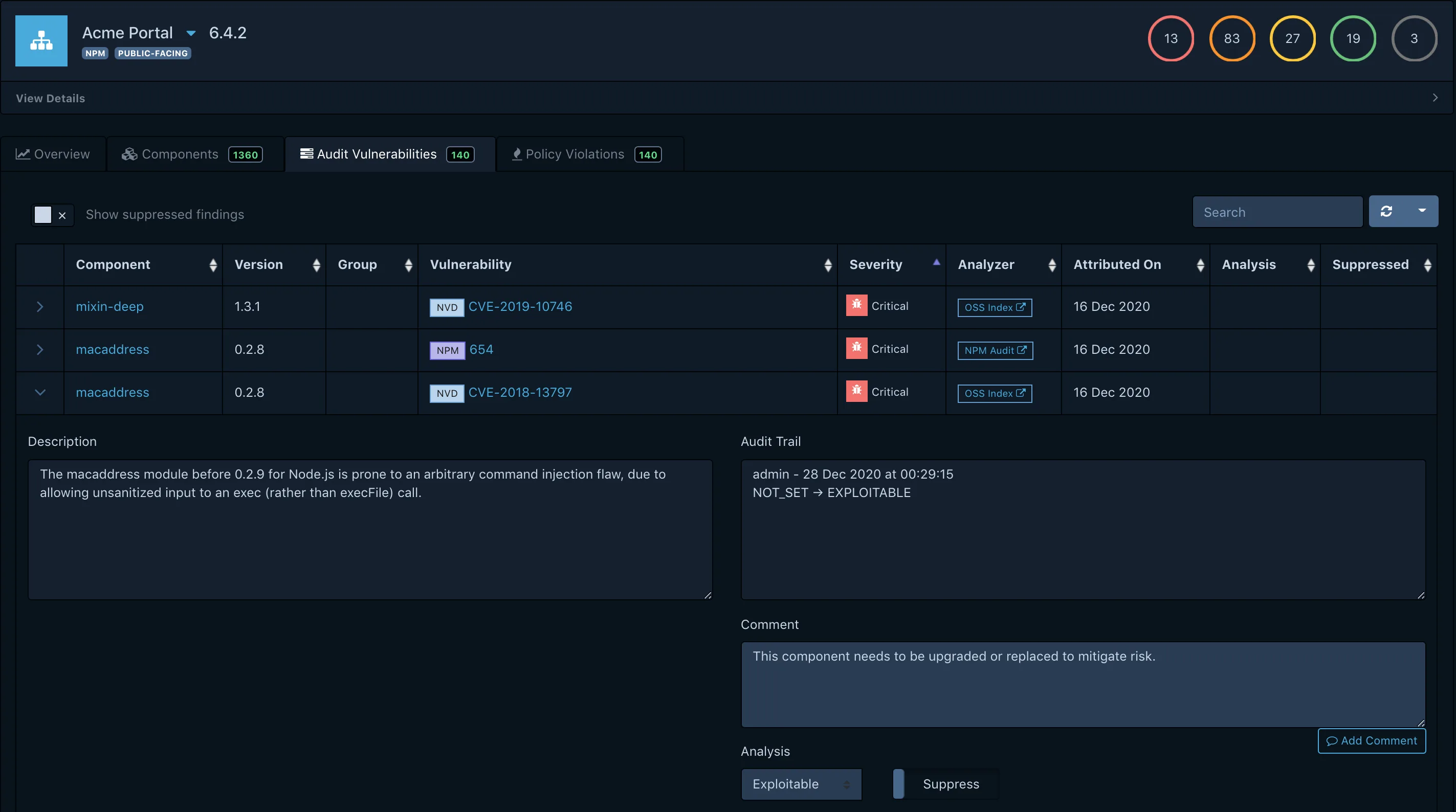
Component inventory
Policy engine
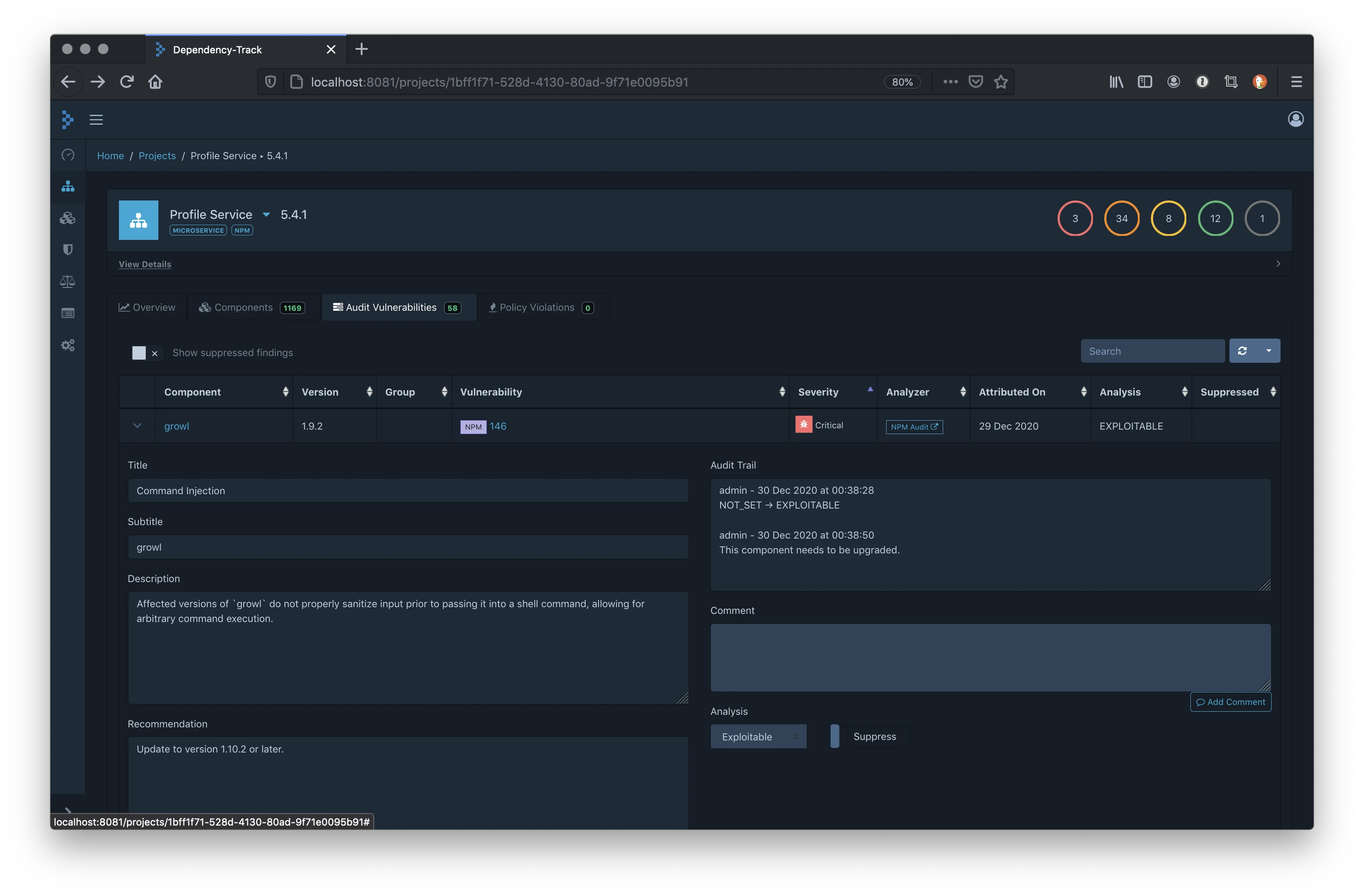
Define organizational policies for automated vulnerability triage.
Policies can suppress false positives, escalate critical findings, or require approval for components with specific risk profiles. This reduces noise and focuses attention on actionable findings.
API-first architecture
Every feature is accessible through a REST API. Webhooks notify external systems of new vulnerabilities and policy violations.
This enables deep integration with CI/CD pipelines, ticketing systems, and custom dashboards.
License compliance and CVE detection
Dependency-Track correlates components from uploaded SBOMs against NVD, GitHub Security Advisories, Sonatype OSS Index, and OSV by default, with optional Snyk and VulnDB feeds available when you bring your own API keys. Because correlation runs continuously on the persistent component inventory, a CVE disclosed a month after your last build still fires alerts against every affected project — you do not have to rebuild or rescan to get the new finding.
Licence compliance is handled through Dependency-Track’s policy engine, which reads the licence field that CycloneDX records for each component. Policies can flag individual licences (GPL, AGPL), licence families (copyleft, permissive-only), or licence expressions that combine multiple terms, and they can suppress or escalate findings the same way vulnerability policies do.
The project does not resolve undeclared licences itself — that responsibility sits with the SBOM generator (Syft, CycloneDX CLI, build plugins). If your upstream generator emits NOASSERTION for a component licence, Dependency-Track will faithfully show NOASSERTION rather than guessing. For teams that need deeper licence discovery, pair Dependency-Track with a licence-first scanner such as FOSSA or Black Duck and let each tool do what it is good at.
Installation
Deploy Dependency-Track using Docker Compose for evaluation or production:
# Create directories
mkdir dependency-track && cd dependency-track

# Download Docker Compose file
curl -LO https://dependencytrack.org/docker-compose.yml

# Start the platform
docker compose up -d

# Access at http://localhost:8080
# Default credentials: admin / admin
For production deployments with external database:
# docker-compose.yml
version: '3.8'
services:
  dtrack-api:
    image: dependencytrack/apiserver:latest
    environment:
      - ALPINE_DATABASE_MODE=external
      - ALPINE_DATABASE_URL=jdbc:postgresql://postgres:5432/dtrack
      - ALPINE_DATABASE_DRIVER=org.postgresql.Driver
      - ALPINE_DATABASE_USERNAME=dtrack
      - ALPINE_DATABASE_PASSWORD=changeme
    volumes:
      - dtrack-data:/data
    ports:
      - "8081:8080"

  dtrack-frontend:
    image: dependencytrack/frontend:latest
    environment:
      - API_BASE_URL=http://localhost:8081
    ports:
      - "8080:8080"

  postgres:
    image: postgres:15
    environment:
      - POSTGRES_DB=dtrack
      - POSTGRES_USER=dtrack
      - POSTGRES_PASSWORD=changeme
    volumes:
      - postgres-data:/var/lib/postgresql/data

volumes:
  dtrack-data:
  postgres-data:
System requirements and database choice
The official Docker deployment runs two images — dependencytrack/apiserver (the Java API server) and dependencytrack/frontend (the Vue.js UI). Per Dependency-Track’s documentation, the API server needs at least 2 GB of RAM and 2 CPU cores, with 8 GB RAM and 4 cores recommended for production traffic. The front-end is far lighter (128 MB / 0.5 core minimum, 512 MB / 1 core recommended).
The default H2 embedded database is fine for evaluation but not for production — the docs recommend moving to PostgreSQL, MySQL, or Microsoft SQL Server for any real deployment. Persistent storage lives in the dtrack-data volume shown in the second compose example above, so back that volume up alongside your database if you care about audit history.
First-launch credentials
Default admin credentials on first start are admin / admin. Dependency-Track forces a password change on first login, but on a public network you should either stand the instance up behind a VPN or set a non-default admin password via the API before exposing port 8080. API keys for automation (CI uploads, integrations) are provisioned per team under Administration → Access Management.
Uploading SBOMs
Generate SBOMs with tools like Syft, CycloneDX CLI, or build plugins:
# Generate SBOM with Syft
syft dir:./my-project -o cyclonedx-json > sbom.json

# Upload via CLI tool
dtrack-cli sbom upload \
  --server http://localhost:8080 \
  --api-key $DTRACK_API_KEY \
  --project "My Project" \
  --version "1.0.0" \
  --sbom sbom.json

# Upload via curl (PUT with project name and BOM file)
curl -X PUT http://localhost:8080/api/v1/bom \
  -H "X-Api-Key: $DTRACK_API_KEY" \
  -F "projectName=My Project" \
  -F "projectVersion=1.0.0" \
  -F "autoCreate=true" \
  -F "bom=@sbom.json"
Uploaded SBOMs are only as useful as their component data. The open-source sbomqs scorer from Interlynk can download a project’s SBOM, grade its quality, and write the score back as a project label.
CI/CD Integration
GitHub Actions
name: SBOM Upload to Dependency-Track
on:
  push:
    branches: [main]

jobs:
  sbom-upload:
    runs-on: ubuntu-latest
    steps:
      - uses: actions/checkout@v4

      - name: Generate SBOM
        uses: anchore/sbom-action@v0
        with:
          format: cyclonedx-json
          output-file: sbom.json

      - name: Upload to Dependency-Track
        uses: DependencyTrack/gh-upload-sbom@v3
        with:
          server-url: ${{ secrets.DTRACK_URL }}
          api-key: ${{ secrets.DTRACK_API_KEY }}
          project-name: ${{ github.repository }}
          project-version: ${{ github.sha }}
          sbom-file: sbom.json
GitLab CI
stages:
  - build
  - security

generate-sbom:
  stage: build
  image: anchore/syft:latest
  script:
    - syft dir:. -o cyclonedx-json > sbom.json
  artifacts:
    paths:
      - sbom.json

upload-sbom:
  stage: security
  image: curlimages/curl:latest
  script:
    - |
      curl -X PUT "${DTRACK_URL}/api/v1/bom" \
        -H "X-Api-Key: ${DTRACK_API_KEY}" \
        -F "projectName=${CI_PROJECT_NAME}" \
        -F "projectVersion=${CI_COMMIT_SHORT_SHA}" \
        -F "autoCreate=true" \
        -F "bom=@sbom.json"
  dependencies:
    - generate-sbom
Jenkins Pipeline
pipeline {
    agent any
    stages {
        stage('Generate SBOM') {
            steps {
                sh 'syft dir:. -o cyclonedx-json > sbom.json'
            }
        }
        stage('Upload to Dependency-Track') {
            steps {
                dependencyTrackPublisher(
                    artifact: 'sbom.json',
                    projectName: 'My Project',
                    projectVersion: "${BUILD_NUMBER}",
                    synchronous: true
                )
            }
        }
    }
}
Official clients and plugins
The three CI examples above use different upload paths on purpose. DependencyTrack/gh-upload-sbom@v3 is the canonical GitHub Action for Dependency-Track uploads — it wraps the REST API so you do not need a separate CLI install. The GitLab CI example uses a plain curl against the /api/v1/bom endpoint, which is the lowest-common-denominator option when your CI image does not carry a Dependency-Track client. The Jenkins example uses dependencyTrackPublisher, the official Jenkins plugin published on plugins.jenkins.io/dependency-track, which adds per-build trend graphs and configurable severity-based build failure thresholds.
Transitive dependency analysis is handled on the server side rather than in CI: once the SBOM lands, Dependency-Track walks every component it contains — direct and transitive — and runs each through the configured vulnerability feeds. Your CI job only has to generate and upload the SBOM; the transitive walk, CVE correlation, and policy evaluation all happen on the Dependency-Track server. That split is what makes “upload once, monitor forever” work.
Setup
- Deploy with Docker Compose – Run
curl -LO https://dependencytrack.org/docker-compose.yml && docker compose up -d. Access the UI athttp://localhost:8080. - Generate SBOMs – Use tools like Syft, CycloneDX CLI, or build plugins to generate SBOMs from your projects.
- Upload SBOMs – Upload via the web UI, REST API, or the
dtrack-clitool. Set up CI/CD integration to upload automatically on each build. - Configure alerts – Set up notification channels (Slack, Teams, email, webhooks) and define policies for automated triage.
When to use Dependency-Track
Dependency-Track is the right choice for organizations managing multiple applications that need centralized, continuous visibility into component risk.
Strengths:
- Continuous monitoring catches new CVEs without rescans
- SBOM-first approach built on CycloneDX
- Multi-source vulnerability intelligence (NVD, GitHub, OSS Index, OSV)
- Portfolio-wide risk tracking and policy engine
- Free and open-source (Apache 2.0)
Limitations:
- Not a scanner itself; requires external SBOM generation
- Requires infrastructure to host (Docker, Kubernetes)
- No automated fix PRs or remediation workflows
How it compares:
| vs. | Key difference |
|---|---|
| OWASP Dependency-Check | Dependency-Check is a point-in-time scanner. Dependency-Track is a continuous monitoring platform. Many teams use both together. |
| DefectDojo | DefectDojo aggregates findings from multiple security tools. Dependency-Track focuses specifically on component/SBOM tracking with deeper vulnerability correlation. |
| Grype | Grype is a fast CLI scanner for CI/CD. Dependency-Track adds the persistent tracking layer that point-in-time scanners lack. |
See also our guides on What is SCA? and software supply chain security .
Dependency-Track vs OWASP Dependency-Check
The two OWASP projects share half a name but solve different halves of the SCA problem.
| Axis | Dependency-Track | Dependency-Check |
|---|---|---|
| Input | CycloneDX SBOM uploaded by an external tool | Source tree or binary scanned directly |
| Scan model | Continuous — ingest once, re-correlate against feeds forever | Point-in-time — runs inside a build, produces a report |
| Interface | Persistent server + web UI + REST API | CLI or Maven/Gradle/Jenkins/Ant plugin |
| Runtime cost | Needs its own server, database, backups | Just a binary and a build step |
Use Dependency-Check when you want dependency scanning inside CI without hosting another service. Use Dependency-Track when you want organizational visibility — a catalog of every component in every deployed application, continuously checked against new CVEs, with policies applied centrally. Many teams run both: scan in CI with Dependency-Check or Grype, then upload the resulting SBOM to Dependency-Track so the components stay under watch after the build is over.
Sharing the OWASP umbrella is convenient for procurement (same licence, same maintainer ethos) but the two projects do not share code, and they do not need to be deployed together. If you only have budget for one, pick based on the question you are trying to answer: “is this build safe to ship?” (Dependency-Check) versus “are any of our deployed applications affected by today’s CVE?” (Dependency-Track).
Is Dependency-Track free?
Yes. Dependency-Track is free and open source under the Apache 2.0 licence, and the project does not publish a commercial tier. No hosted SaaS edition exists from the OWASP project itself — you run your own Docker or Kubernetes deployment and pay your cloud bill for compute, storage, and the database.
Support is community-driven through the project’s Slack workspace and GitHub issue tracker. Several third-party vendors (including managed-security-service providers) offer commercial support and hosted deployments on top of the open-source project, but none are OWASP-endorsed and none gate core features behind a licence key.
For cost-planning purposes, the realistic line items are a small VM or container for the API server (2–8 GB RAM), a front-end container (128–512 MB), a managed PostgreSQL instance, and a backup target for the dtrack-data volume — broadly comparable to self-hosting any mid-sized Java application.
Dependency-Track FAQ
What is the difference between Dependency-Track and Dependency-Check?
Dependency-Check is a point-in-time scanner that runs inside a build — it reads source or binaries, looks up CVEs, and emits a report. Dependency-Track is a continuous monitoring server that ingests SBOMs and watches them against vulnerability feeds over time, so a CVE disclosed after your last build still fires alerts. They are complementary: run Dependency-Check (or Grype / Syft + Grype) in CI, upload SBOMs to Dependency-Track for ongoing watch.
What SBOM formats does it support?
Only CycloneDX, in JSON or XML. SPDX support was removed in 2021, and SPDX 3.0 support is still an open request.
Generate SBOMs with Syft, CycloneDX CLI, or build-tool plugins and upload via the web UI, the /api/v1/bom endpoint, or the dtrack-cli client.
Does Dependency-Track scan source code?
No. Dependency-Track is strictly an SBOM consumer — it does not read source or binaries and cannot produce an SBOM on its own. The scanner doing the generation (Syft for containers and directories, CycloneDX Maven/npm plugins for project builds) is where the actual discovery happens.
Which vulnerability databases does it integrate with?
NVD, GitHub Security Advisories, Sonatype OSS Index, and OSV are native and enabled by default. Snyk and VulnDB are optional feeds you can turn on by providing an API key. You can mix feeds — Dependency-Track correlates findings across all enabled sources for each component.
What is the upgrade path between major versions?
Upgrades are usually a matter of pulling the newer dependencytrack/apiserver and dependencytrack/frontend images and restarting the compose stack; the API server runs database migrations on startup. Always back up your database and the dtrack-data volume before upgrading across a major version, and read the release notes for any schema or API changes that affect your automation.