

CVE Lite CLI is a free SCA scanner for JavaScript and TypeScript projects, run from the terminal against your lockfile.
It is an OWASP Lab Project, MIT licensed, and maintained in public by Sonu Kapoor.
The GitHub repository sits at 667 stars , and npm-stat records 58,493 package downloads since launch (checked 14 August 2026).
The project lists production use by French government services DINUM and DGAFP, and by the Government of British Columbia in Canada.
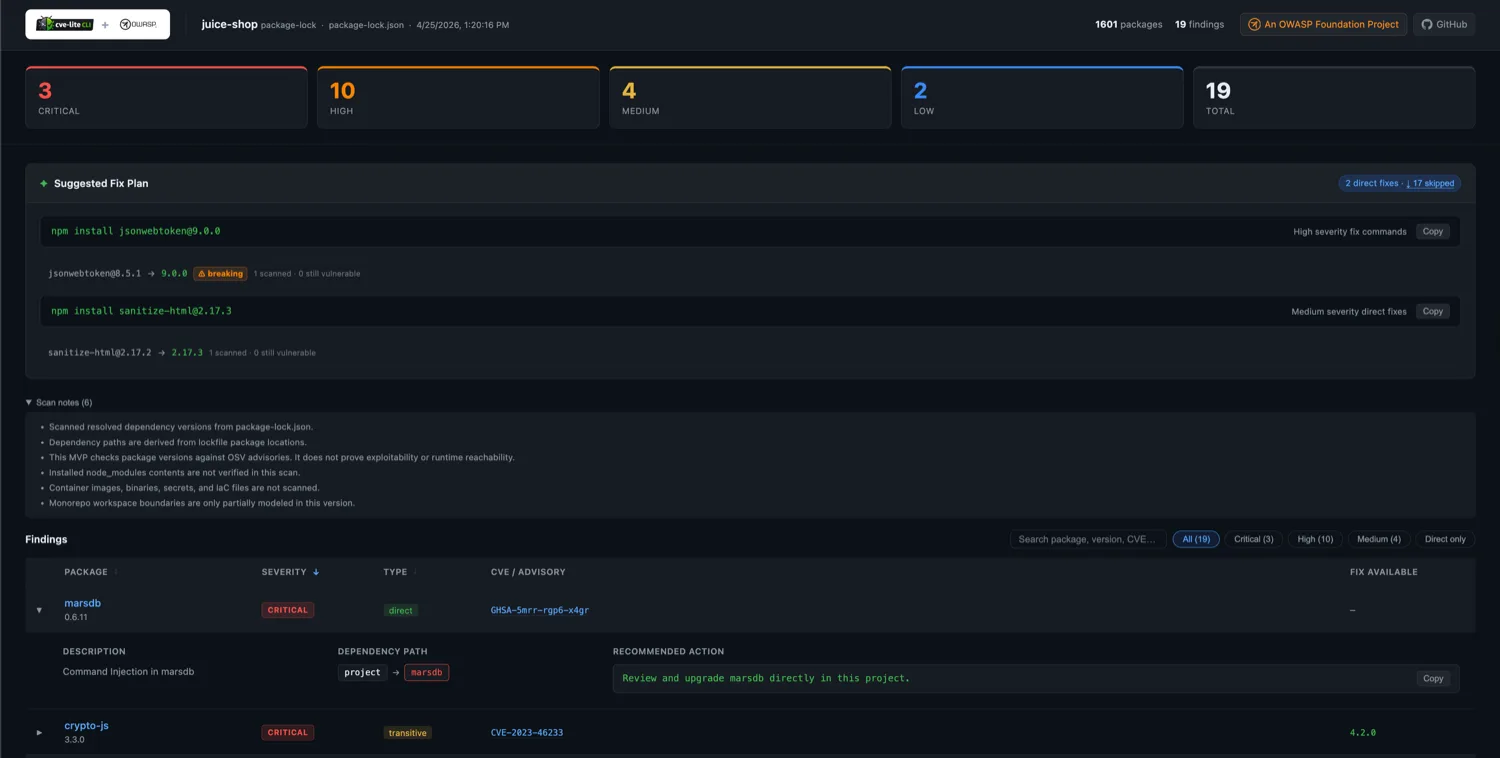
--report HTML output: severity counts, a copyable fix plan, and per-finding dependency paths.The scope is deliberately narrow. There is no hosted dashboard, no vendor-run monitoring service, and no coverage outside the JavaScript ecosystem.
What is CVE Lite CLI?
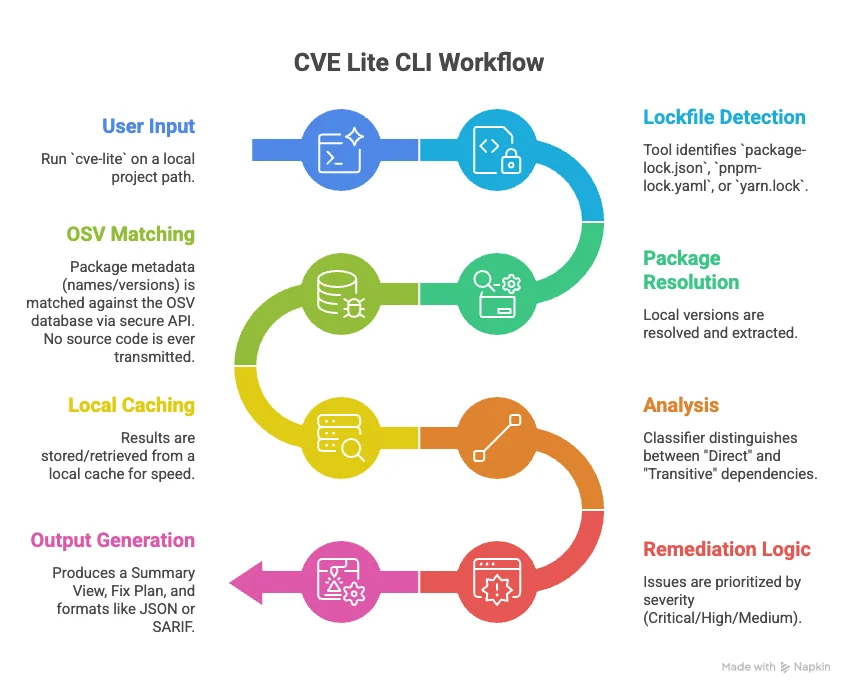
CVE Lite CLI reads resolved package versions from a supported lockfile and checks each one against the OSV database.
That means it works from lockfile state rather than the version ranges declared in package.json. Development dependencies are included unless you pass --prod-only.
Only package names and exact versions cross the network boundary. Source code, environment variables, and secrets stay on the machine, and no hosted account is involved.
The tool queries OSV rather than NVD or GHSA directly.
Its documentation gives the reasoning: NVD indexes by CPE strings that map poorly to npm package names, and OSV already ingests GHSA as a first-class feed.
| Capability | Details |
|---|---|
| Lockfile parsing | package-lock.json, pnpm-lock.yaml, yarn.lock, bun.lock, plus a package.json fallback limited to exact pinned direct dependencies |
| Advisory source | OSV API (api.osv.dev), which aggregates GHSA for the npm ecosystem |
| Finding classification | Direct, transitive, or unknown, with the full dependency path shown in verbose mode |
| Remediation | Package-manager-native commands, validated against registry data where that data is available |
| Offline mode | Advisories read from local SQLite; --offline makes zero runtime advisory calls |
| Output formats | Terminal, JSON, SARIF 2.1.0, CycloneDX 1.4, and a standalone HTML report |
| CI controls | --fail-on severity gating, --ratchet baselines, and a published GitHub Action |
| Maintenance risk | --check-maintenance flags dependency drag and deprecated direct dependencies through DM001 |
| Release cooldowns | Warns when a recommended fix falls inside the configured npm, pnpm, or Yarn cooldown window |
| Caching | Query results cached locally with a 30-minute TTL; OSV batch queries run at a concurrency cap of 5 |
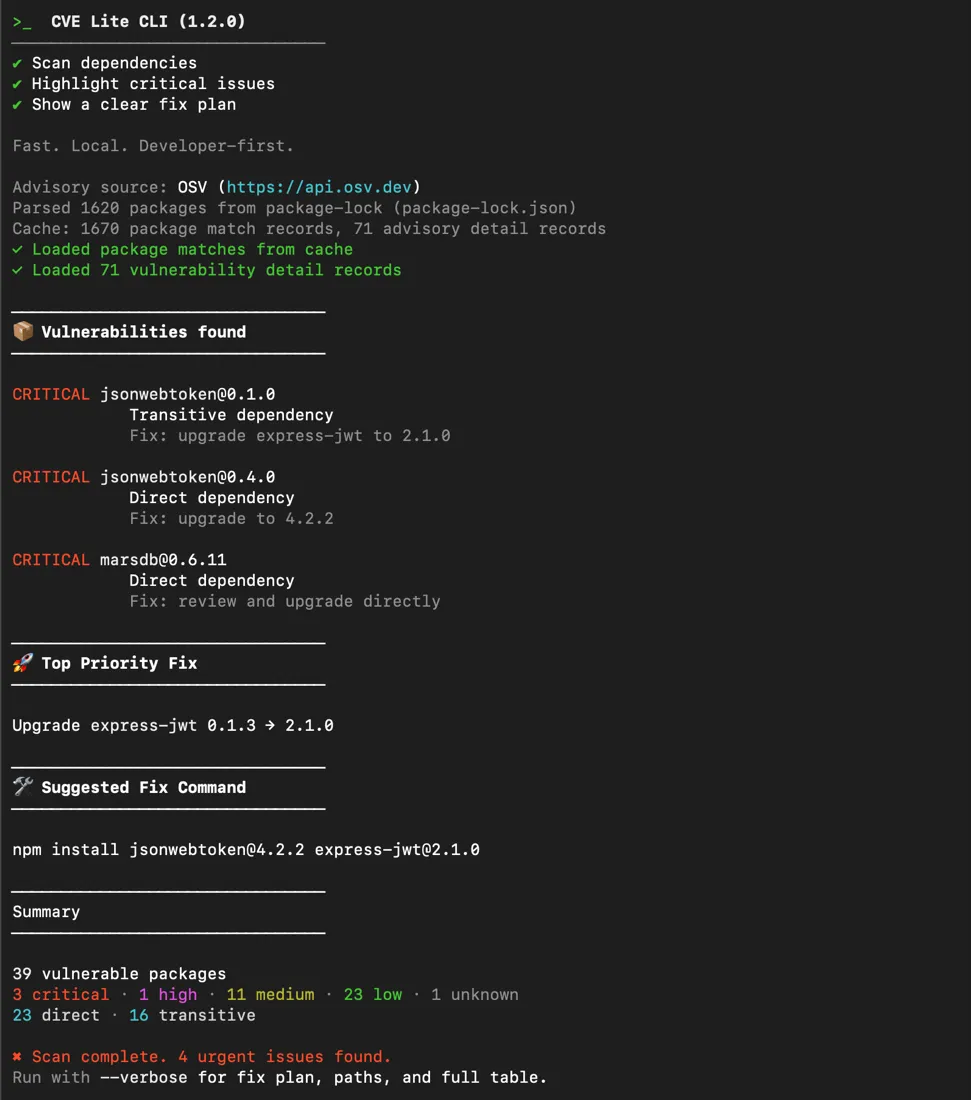
What are CVE Lite CLI’s key features?
Parent-aware transitive remediation
Upgrading a vulnerable transitive package directly rarely holds, because the parent that pinned it will pull the old version back on the next install.
When the lockfile exposes the dependency path, CVE Lite CLI identifies the parent package that controls the vulnerable child version.
For npm it separates two cases. npm update <parent> applies when the current parent range can already absorb a fixed child; npm install <parent>@<version> applies when the range itself has to move.
Direct findings go through a validation pass where registry data allows it. The target must be newer than the installed version and not itself known vulnerable.
Pre-release versions are skipped during registry-based parent checks.
If the CLI cannot validate a target, it reports the nearest parent context without printing a fix command.
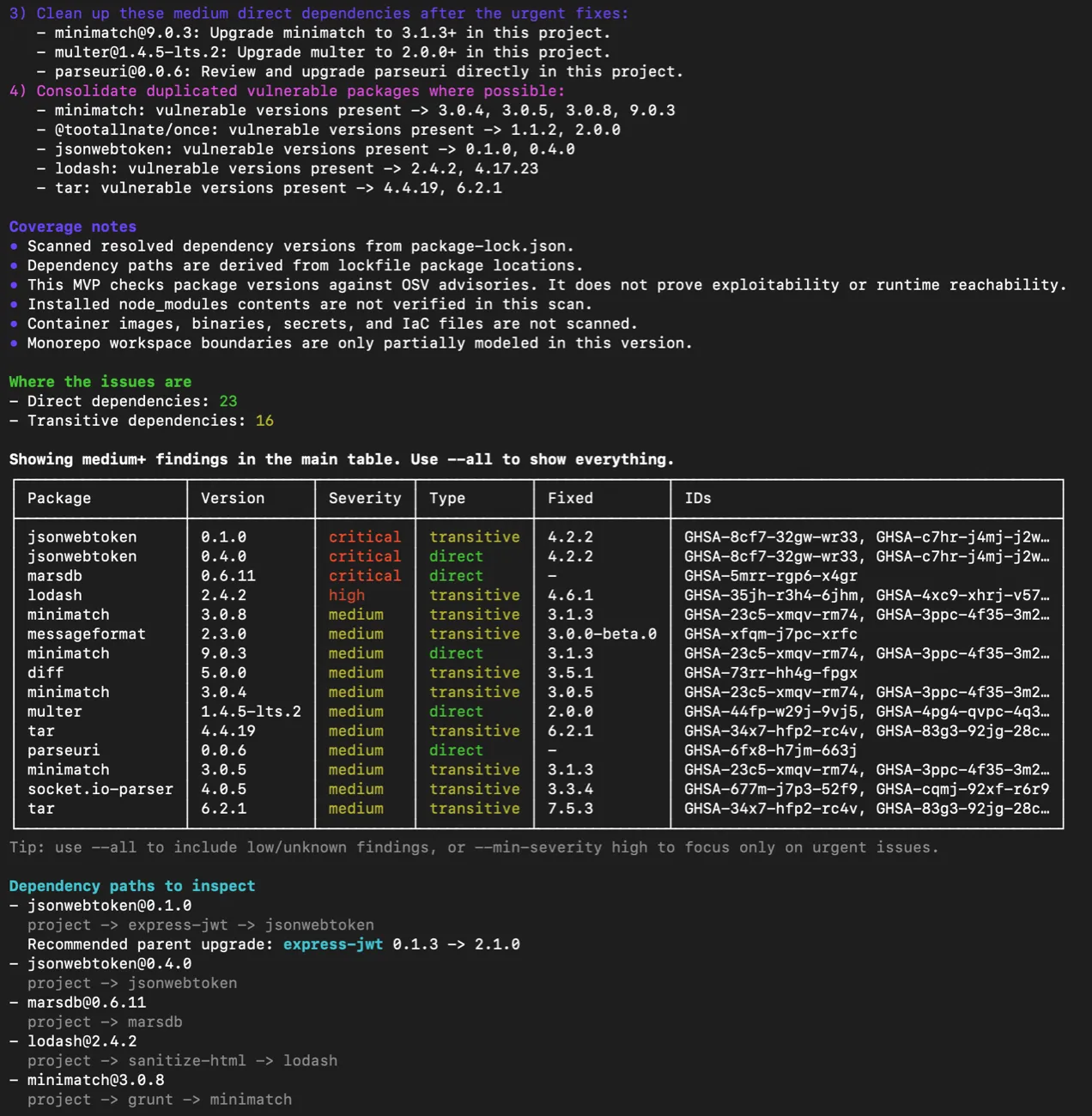
project → express-jwt → jsonwebtoken resolves to a parent upgrade, not a child one (project documentation).The coverage notes in that output are the scanner stating its own boundaries: no exploitability proof, no node_modules verification, no container or IaC scanning.
Offline advisory database
cve-lite advisories sync pulls OSV data into a local SQLite file, and --offline scans against it with no runtime advisory API calls.
The project reports one local benchmark for the sync path: about 217,065 advisory records ingested in 8.84 seconds, down from 87.53 seconds before SQLite bulk-ingest work.
For networks that cannot reach OSV at all, cve-lite advisories init creates an empty database to populate from internal advisory sources.
It refuses to overwrite an existing file, so point --output at a fresh path.
Override hygiene auditing
JavaScript package managers use overrides and resolutions to pin a transitive package to a chosen version.
Those entries can go stale as the dependency tree moves on, and the package manager may not flag the drift.
The overrides subcommand audits them against 11 documented rules
. --check-overrides folds the same audit into a normal scan, and --rule=OA007 runs a single check.
| Rule | Name | Severity | What it catches |
|---|---|---|---|
| OA001 | Orphaned target | High | Override target not present anywhere in the resolved tree |
| OA002 | Floating tag | Medium | Override pinned to latest, next, *, or invalid semver |
| OA003 | Wrong section | High | Override in the wrong package manager key, silently ignored at install |
| OA004 | Surpassed pin | Low | Installed version already higher than the concrete pin |
| OA005 | Nested ineffective | Low to critical | Nested override that is silently ignored or cannot apply |
| OA006 | Coupled platform binary | High / medium | Override fights an exact-pinned parent, so resolution is unpredictable |
| OA007 | Frozen latest | Low | Floating tag locked behind a newer registry version (needs --check-network) |
| OA008 | Materialized vulnerable copy | Critical | Vulnerable package copy still on disk despite an active override floor |
| OA009 | Stale floor | Low | Override range floor already met by all parent declarations |
| PD001 | Override-only phantom | High | Package imported in source but present only via an override pin |
| PD002 | Transitive-only phantom | Medium | Package imported in source but present only as a transitive dependency |
The tool’s own HTML report notes that it checks package versions against OSV advisories and does not prove exploitability or runtime reachability.
The --usage and --only-used flags filter findings down to packages detected as imported in source files. That is import detection, not call-graph analysis, and it does not establish exploitability.
Maintenance risk and release cooldowns
--check-maintenance runs the DM001 rule
beside the CVE scan. It reports direct dependencies that hold a transitive vulnerability below its fix through a major-version constraint.
The same check reports direct dependencies marked deprecated on npm. Packages with no release for more than two years receive a Last release context line, but age alone does not change severity.
CVE Lite CLI also reads release-cooldown settings from npm, pnpm, and Yarn projects. When a recommended fix is newer than the configured window, it adds an advisory warning without changing the exit code.
Bun lockfile scanning still works, but the cooldown check does not yet read minimumReleaseAge from bunfig.toml.
Release verification
The project has an OpenSSF Best Practices Gold badge
and four runtime dependencies: yaml, yarn-lockfile, better-sqlite3, and fflate.
Release tags after v1.12.1 are GPG signed. Published tarballs carry Sigstore-backed GitHub Artifact Attestations, while packages installed from npm carry the registry’s separate ECDSA signature.
Output formats and CI controls
--json, --sarif, and --cdx can be combined, and each writes a timestamped file. --report generates the HTML view and opens it in a browser unless you add --no-open.
| Flag | Output | Notes |
|---|---|---|
--json | Machine-readable JSON | Suppresses all other output; cannot combine with --report |
--sarif | SARIF 2.1.0 file | Timestamped; combines with --json and --report |
--cdx | CycloneDX 1.4 SBOM | Timestamped; cannot combine with --report |
--report | HTML report directory | Defaults to ./cve-report; --no-open skips the browser |
--verbose | Full terminal output | Severity table, fix plan, findings table, coverage notes |
For pipelines, --fail-on sets the severity that returns exit code 1, defaulting to critical.
--ratchet writes a baseline on first run and afterwards fails only on findings above it. In multi-folder mode each subfolder gets its own .cve-lite/baseline.json.
Corporate SSL inspection is handled with --ca-cert, and --osv-url points at an internal OSV mirror.
That flag enforces HTTPS and blocks private IP ranges by default as an SSRF guard. --allow-private-osv-url opens it for trusted internal hosts.
| Flag | Default | Purpose |
|---|---|---|
--min-severity | medium | Floor for displayed findings |
--search-depth | 4 | Directory levels searched for a lockfile |
--batch-size | 100 | Packages per OSV API request |
--fail-on | critical | Severity that returns exit code 1 |
--prod-only | off | Exclude development dependencies |
--offline | off | Read advisories from the local database only |
--fix | off | Auto-apply direct-dependency fix commands |
--check-maintenance | off | Run DM001 dependency-drag and deprecation checks |
CVE Lite CLI vs npm audit
npm audit needs no installation at all. It ships with npm, runs against the tree npm already resolved, and is the shortest path to a first answer on an npm-only project.
CVE Lite CLI covers more ground on the input side. It reads pnpm, Yarn, and Bun lockfiles as well as npm’s, which matters for monorepos and teams that have moved off npm.
The output side differs more. CVE Lite CLI classifies each finding as direct or transitive with the dependency path attached, and writes SARIF 2.1.0 and CycloneDX 1.4 files that npm audit does not produce.
Pick npm audit if your project is npm-only and you want zero setup. Pick CVE Lite CLI if you need multi-package-manager coverage, SARIF for a security dashboard, or an SBOM artifact.
CVE Lite CLI vs OSV-Scanner
Both tools query the same OSV database, so the underlying advisory data is the same. The difference is scope.
OSV-Scanner is Google’s Apache 2.0 scanner. Its docs list 13 language ecosystems and 28 lockfile and manifest formats, plus container artifact scanning for Alpine, Debian, and Ubuntu.
Its guided remediation, still documented as experimental, ranks upgrades by dependency depth, severity, and return on investment.
CVE Lite CLI does none of that. It covers JavaScript and TypeScript only, with no container scanning and no cross-ecosystem support.
What it adds instead is npm-specific depth: override and resolution hygiene across 11 rules, DM001 maintenance-risk detection, and a fully offline SQLite advisory workflow with no runtime advisory API calls.
Pick OSV-Scanner if your stack is polyglot or you scan container images. Pick CVE Lite CLI if you are JS/TS-only and want override auditing or air-gapped scanning.
CVE Lite CLI vs Dependabot
Dependabot is GitHub’s built-in option, free on every repository, covering 20+ package managers and drawing on the GitHub Advisory Database. It opens dependency pull requests without installing a scanner.
CVE Lite CLI still covers the developer-time path: it runs locally before a commit and works outside GitHub.
It can also run in CI as a first-party GitHub Action . Scheduled fix mode validates direct-dependency upgrades against OSV and opens or updates one batched pull request.
For scan-only CI, --fail-on controls the build exit code. SARIF output can be uploaded to GitHub Code Scanning with GitHub’s upload-sarif action.
Pick Dependabot for zero-install, multi-ecosystem GitHub alerts. Pick CVE Lite CLI for local JS/TS scanning, non-GitHub CI, or one scheduled PR instead of a per-dependency stream.
How much does CVE Lite CLI cost?
Nothing. CVE Lite CLI is MIT licensed with no commercial edition, no paid tier, and no seat-based pricing.
There is no hosted service attached, so there is nothing to subscribe to and no account to create. Every documented flag, including the offline database and the HTML report, is in the free package.
The practical cost is operational: you own the CI wiring, the advisory database sync in restricted networks, and the triage.
How do you get started with CVE Lite CLI?
- Install it — use the npm package
with
npm install -g cve-lite-cli, or runnpx cve-lite-clionce without installing. - Scan the project —
cve-lite .detects the lockfile and reports findings atmediumseverity and above. - Read the full picture —
cve-lite . --verboseadds the severity table, fix plan, and coverage notes. - Wire it into CI —
cve-lite . --fail-on highreturns exit code 1 on high or critical findings. - Adopt incrementally —
cve-lite . --ratchetbaselines the existing backlog so only new findings break the build.
# Install globally
npm install -g cve-lite-cli

# Or run once without installing
npx cve-lite-cli

# Scan the current directory
cve-lite .

# Full output: severity table, fix plan, findings, coverage notes
cve-lite . --verbose

# Production dependencies only, high severity and above
cve-lite . --prod-only --min-severity high

# Generate an HTML report without opening a browser
cve-lite . --report --no-open

# Sync advisories, then scan with no advisory API calls
cve-lite advisories sync
cve-lite . --offline

# CI: fail the build on high or above
cve-lite . --fail-on high

# Audit overrides and resolutions
cve-lite overrides .
--fix auto-applies fix commands for direct dependencies only in its current version, and cannot be combined with --json, --sarif, or --cdx.
When should you use CVE Lite CLI?
It fits JS/TS projects that want local or CI lockfile scanning without a hosted account, and teams running a mix of npm, pnpm, Yarn, and Bun across repositories.
The offline database also makes it a candidate for restricted networks, where the advisory file is prepared elsewhere and carried in.
The override audit is the clearest difference in the project’s published comparison with npm audit, OSV-Scanner, Snyk CLI, and Socket CLI.
If your team has been pinning transitive packages through overrides for a while, those entries are worth checking on their own.
It is a poor fit as a single scanner for a polyglot codebase, or as a replacement for a platform that tracks findings over time.
What are alternatives to CVE Lite CLI?
For the same job on a broader stack, OSV-Scanner queries the same OSV data across 11+ ecosystems and container images.
Trivy covers dependencies, container images, IaC, and secrets in one binary, which suits teams that want a single scanner rather than a JS-specific one.
Dependabot is the zero-setup option for GitHub-hosted repositories, and Snyk adds a hosted dashboard, continuous monitoring, and fix PRs on a commercial plan.
The full free-tier landscape is in my open source SCA tools guide.
What are CVE Lite CLI’s limitations?
Strengths:
- All four JS lockfile formats in one tool, including Bun
- Transitive findings resolve to the parent you can actually upgrade
- Registry-backed validation of fix targets where metadata supports it
- Offline scanning with no runtime advisory calls
- Override hygiene auditing across 11 documented rules
- SARIF and CycloneDX output for existing pipeline tooling
Limitations:
- JavaScript and TypeScript only — no Python, Java, Go, Rust, container, or IaC scanning
- No license compliance analysis
- No hosted dashboard or vendor-run monitoring between scheduled runs
--fixcovers direct dependencies only in the current version- One maintainer accounts for most commits, with a smaller contributor group around the project
- Exploitability and runtime reachability are out of scope by design
Further reading: What is SCA? | SCA in CI/CD Pipelines | Open Source SCA Tools
Frequently Asked Questions
What is CVE Lite CLI?
Is CVE Lite CLI free?
npm install -g cve-lite-cli, or run it once with npx cve-lite-cli.Which lockfiles does CVE Lite CLI support?
Does CVE Lite CLI send my code anywhere?
--offline removes the advisory call by reading from a local SQLite database instead.How does CVE Lite CLI compare to npm audit?
How does CVE Lite CLI compare to OSV-Scanner?
Can CVE Lite CLI run in air-gapped environments?
cve-lite advisories sync writes OSV data into a local SQLite database on a connected machine, and that file is then used by --offline with no runtime advisory API calls. Where OSV is unreachable entirely, cve-lite advisories init creates an empty database to populate from internal advisory sources.