


Corgea is an AI-native static application security testing (SAST) platform that detects security vulnerabilities and automatically generates code fixes for developer approval.
Founded in 2023 and backed by Y Combinator (S23 batch) with $2.6M in seed funding, Corgea takes a fundamentally different approach to static analysis:
Instead of relying solely on pattern-matching rules, it uses Large Language Models combined with AST-based static analysis to understand what code is supposed to do and find where it fails to do so securely.
The platform works in two modes: as a standalone SAST scanner (BLAST) that Corgea says holds false positives below 5%, and as an auto-remediation layer on top of existing SAST tools like Snyk , Semgrep , Checkmarx , Fortify , and Coverity .
Unlike traditional SAST tools that only flag issues, Corgea generates code fixes and delivers them as pull requests for developer review, reducing remediation effort by approximately 80% according to the company.
Product Screenshots
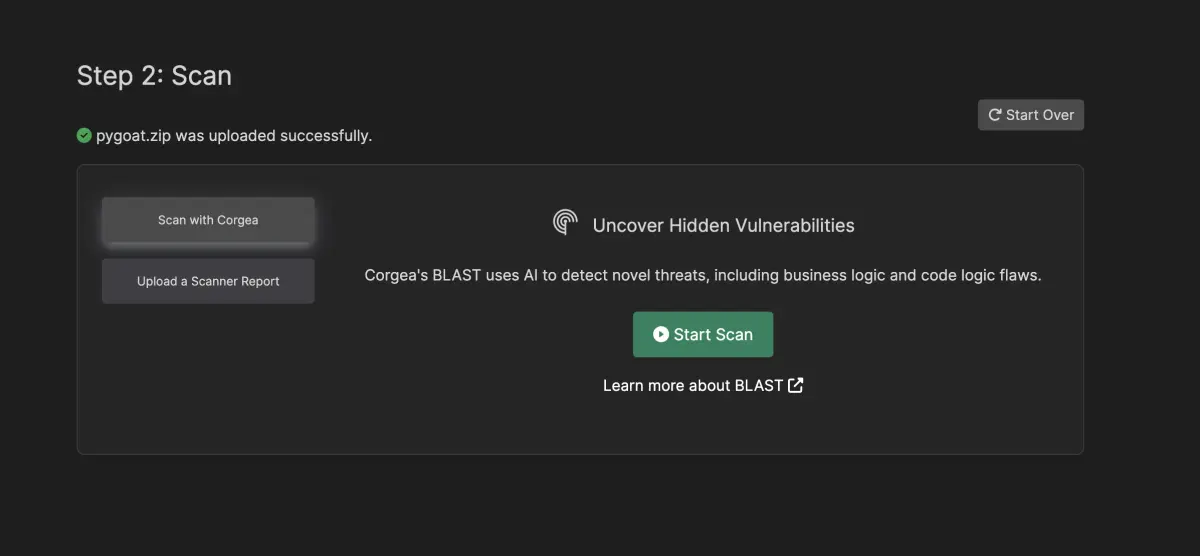
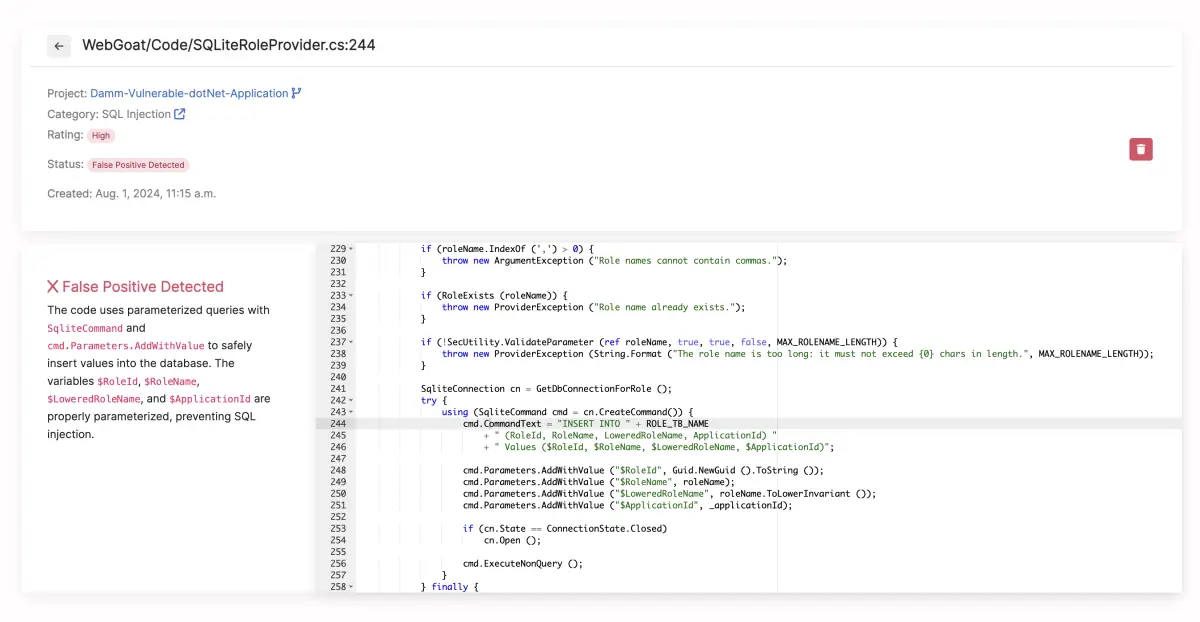
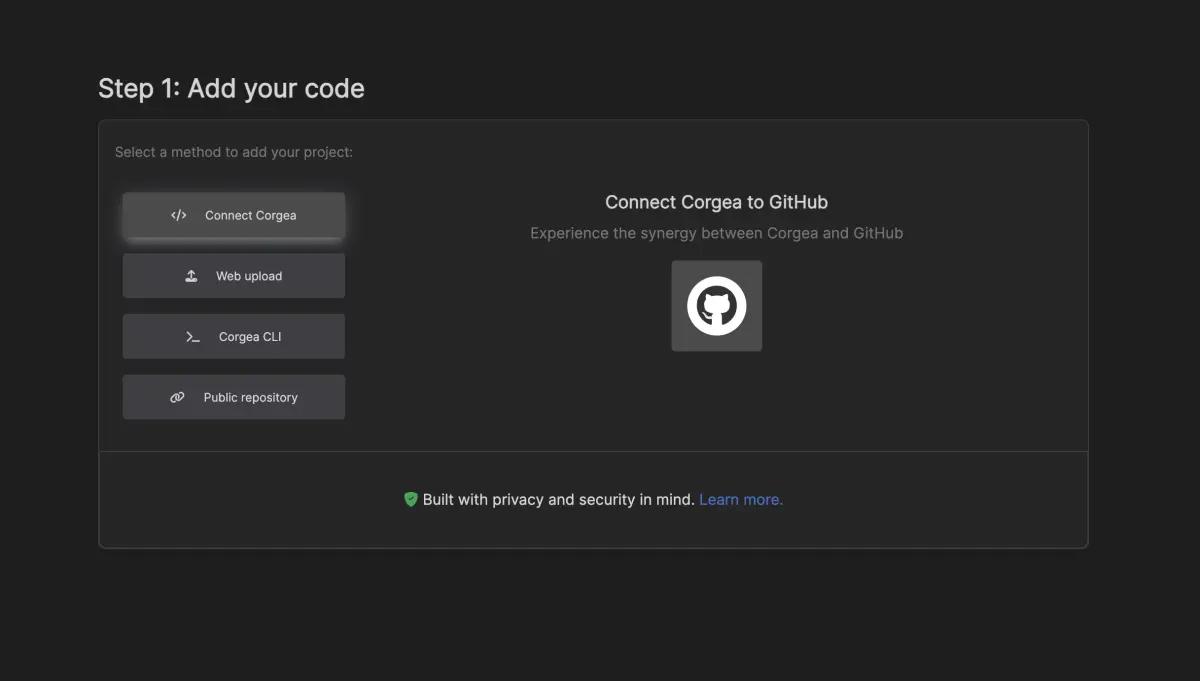
Overview
Traditional SAST tools find vulnerabilities by matching code against predefined rules.
They are fast and deterministic, but they struggle with business logic flaws and leave the fix entirely to the developer. Corgea puts conventional SAST false positive rates at 20% or higher, the baseline it markets BLAST against.
Corgea approaches the problem differently. Its BLAST scanner uses LLMs to reason about code semantics, understanding not just what the code does but what it is intended to do.
This lets it detect vulnerability classes that rule-based scanners like Semgrep or SonarQube miss: broken access control patterns, IDOR issues, and authentication logic gaps.
The auto-fix capability is what sets Corgea apart from most SAST tools. Rather than just flagging a vulnerability, Corgea writes a security patch and presents it as a PR for the developer to review and merge.
According to Corgea, this reduces remediation effort by approximately 80% compared to manual fix implementation.
| Capability | Details |
|---|---|
| BLAST AI Scanner | Combines LLMs with AST-based static analysis to detect business logic flaws, broken auth, and IDOR vulnerabilities. Corgea reports false positives below 5% versus 20%+ for traditional SAST — vendor figures, not an independent benchmark. |
| Auto-Fix Generation | Generates code fixes for detected vulnerabilities and delivers them as pull requests. Developers review and approve before anything is merged. Works with BLAST findings and imported results from other SAST tools. |
| 20+ Languages | Supports Java, JavaScript, TypeScript, Python, Go, Ruby, C#, C, C++, PHP, Kotlin, and their frameworks. Expanding language support regularly. |
Key Features at a Glance
| Feature | Details |
|---|---|
| SAST Engine | BLAST (Business Logic Application Security Testing) — LLM + AST hybrid analysis |
| Languages | 20+ including Java, Python, JavaScript, TypeScript, Go, Ruby, C#, C/C++, PHP, Kotlin |
| False Positive Rate | Below 5% (Corgea-reported), compared to 20%+ with traditional SAST |
| Auto-Fix | AI-generated code patches delivered as pull requests for developer review |
| Business Logic Detection | IDOR, broken access control, mass assignment, authentication gaps |
| Custom Policies | PolicyIQ — define security policies in natural language |
| Third-Party Import | Snyk, Semgrep, Checkmarx, Fortify, CodeQL, Coverity |
| Beyond SAST | Dependency scanning, secrets detection, container scanning, IaC scanning |
| SCM Integration | GitHub, GitLab, Azure DevOps, Bitbucket |
| Developer Tools | IDE extensions, MCP server, CLI, API access |
| Free Tier | 2 developers, 10 repos, 10 auto-fixes/month |
| Paid Plans | Growth $39/dev/mo, Scale $49/dev/mo |
What are Corgea’s key features?
BLAST scanner
BLAST (Business Logic Application Security Testing) is Corgea’s AI-native SAST engine. It differs from traditional scanners in several ways:
- Semantic understanding uses LLMs to understand code intent, not just code structure
- Business logic detection finds IDOR, broken access control, mass assignment, and authentication flaws
- Context-aware analysis through the CodeIQ engine, which builds a full picture of the codebase including service interactions, middleware, and external library usage
- Low false positives with rates below 5% according to Corgea, compared to the 20%+ typical of rule-based SAST tools
BLAST also covers standard SAST vulnerability classes (injection, XSS, insecure deserialization) alongside the business logic detections.
Auto-remediation
When a vulnerability is detected, Corgea generates a code fix:
- The AI analyzes the vulnerability context, including surrounding code and project patterns
- A security patch is generated that addresses the root cause
- The fix is delivered as a pull request with an explanation of what was changed and why
- The developer reviews, modifies if needed, and merges
This works for findings from BLAST and for imported findings from other SAST tools. Teams running Semgrep or Snyk can pipe their results into Corgea and get auto-generated fixes without switching scanners.
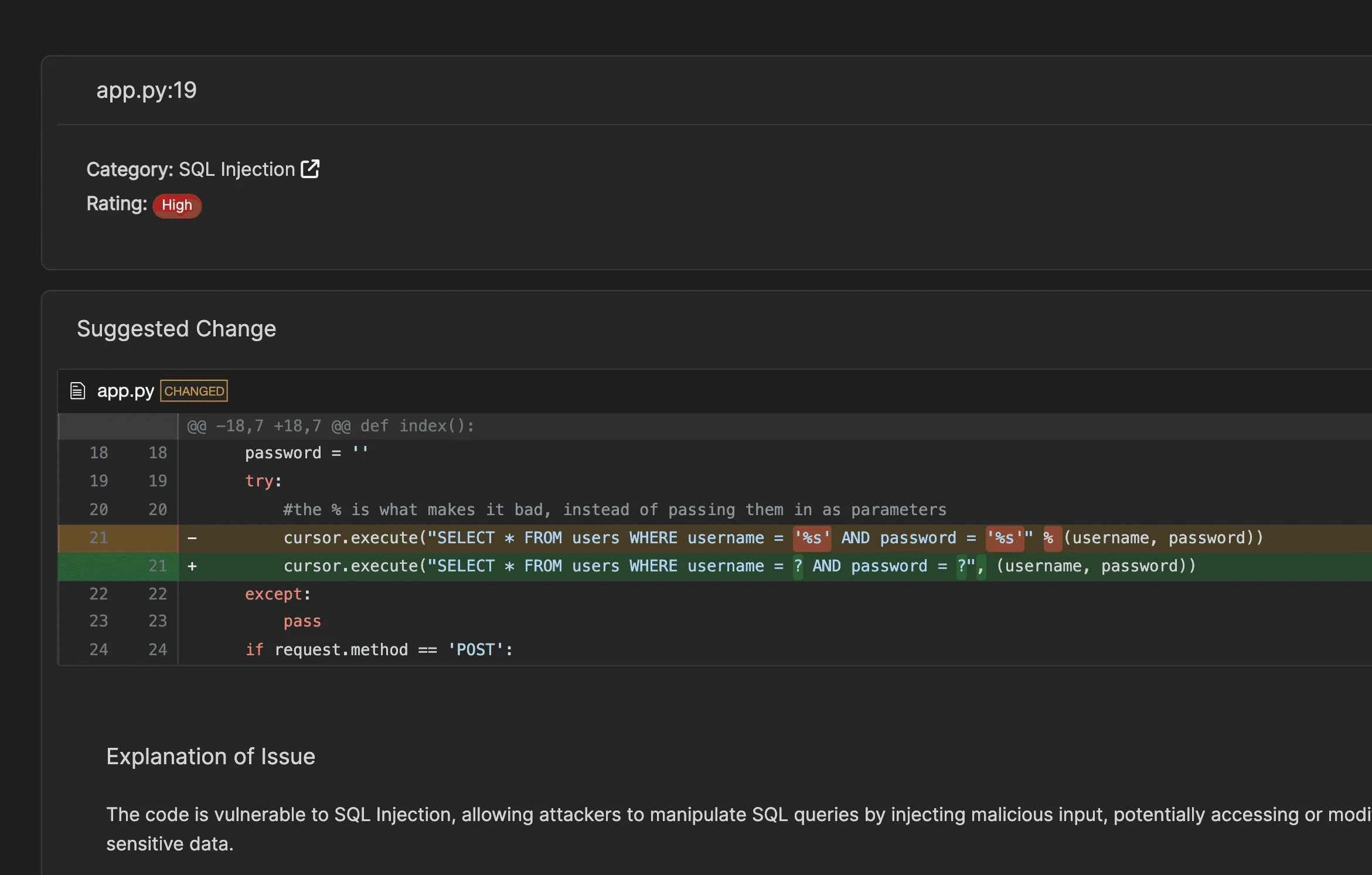
Corgea does not merge fixes automatically. Every generated patch goes through a pull request workflow where developers review the change before it enters the codebase.
This is an important distinction. AI-generated code fixes should always be verified by a human before deployment.
PolicyIQ
PolicyIQ lets security teams define custom policies in natural language instead of writing rule code. For example, a team could define a policy like “All API endpoints must verify the requesting user owns the resource being accessed” and BLAST will check for violations during scanning.
This is useful when business logic requirements are not obvious from the code alone, or when application-specific security controls need consistent enforcement across the codebase.
Third-party SAST integration
Corgea imports findings from major SAST tools:
| Scanner | Integration type |
|---|---|
| Snyk | Direct integration |
| Semgrep | Direct integration |
| Checkmarx | Direct integration |
| Fortify | Direct integration |
| CodeQL | Report import |
| Coverity | Report import |
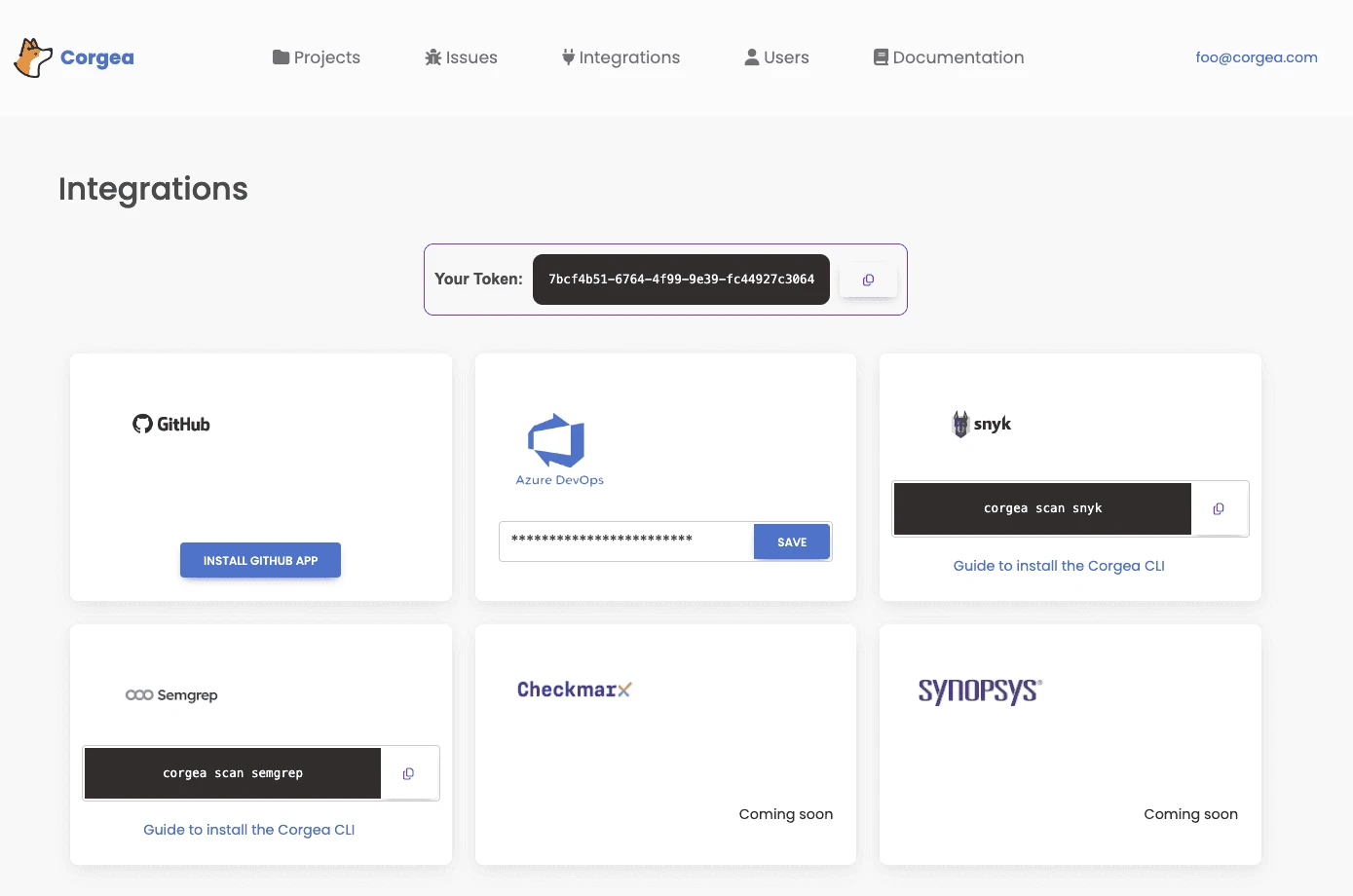
This positions Corgea as an auto-remediation layer rather than a replacement for existing SAST investments. Unlike switching to a new scanner, teams keep their current SAST tool and add Corgea to automatically generate fixes for reported vulnerabilities.
Beyond SAST
Corgea’s platform extends beyond traditional SAST:
- Dependency scanning identifies vulnerable open-source dependencies
- Secrets detection finds hardcoded credentials and API keys
- Container scanning checks container images for security issues
- IaC scanning checks infrastructure-as-code configurations for misconfigurations
- Code quality flags code quality issues alongside security vulnerabilities (Growth plan and above)
- License enforcement tracks open-source license compliance (Growth plan and above)
When should you use Corgea?
Reducing SAST remediation backlog
Many teams have thousands of unresolved SAST findings built up over months or years. Corgea can import these findings and auto-generate fixes, turning a multi-sprint backlog clearance into a series of PR reviews. This is the primary adoption path for teams already running another SAST tool.
Catching business logic vulnerabilities
Rule-based SAST tools struggle with business logic flaws because these vulnerabilities depend on application context, not code patterns. BLAST’s LLM-powered analysis can detect issues like IDOR (where a user can access another user’s data by changing an ID parameter) that pattern-matching tools miss entirely.
Developer-first security workflow
Corgea integrates into the PR workflow, scanning on each pull request and posting fixes as PR comments. This keeps security in the developer’s existing workflow rather than requiring a context switch to a separate security dashboard.
Strengths & Limitations
Strengths:
- Auto-fix generation cuts remediation effort by roughly 80% by Corgea’s own estimate, shortening the time from vulnerability detection to fix
- BLAST’s AI-powered analysis catches business logic flaws that rule-based SAST tools miss
- Works as an overlay on existing SAST tools, so you don’t need to replace current scanners
- PolicyIQ allows natural-language security policy definition
- Free tier available for individual developers and small teams
- Covers SAST, SCA, secrets, containers, and IaC in one platform
Limitations:
- AI-generated fixes need careful human review; the quality of fixes depends on LLM accuracy
- Newer company (founded 2023) with a smaller track record compared to established SAST vendors
- BLAST’s detection capabilities are harder to audit than deterministic rule-based scanners
- The “below 5% false positives” claim comes from Corgea’s own reporting; independent benchmarks are limited
- Enterprise features (custom rules, blocking rules, API access) require the Scale plan ($49/dev/month)
- The AI analysis approach means scan results may vary between runs for the same code (non-deterministic)
How do I get started with Corgea?
- Sign up for free — Create an account at corgea.com. The free tier includes BLAST scanning, dependency scanning, secrets detection, and 10 auto-fixes per month for up to 2 developers.
- Connect your repository — Link your GitHub, GitLab, Azure DevOps, or Bitbucket account. Corgea accesses your codebase to run BLAST scans and generate fixes.
- Import existing SAST findings — If you already run Snyk, Semgrep, Checkmarx, Fortify, CodeQL, or Coverity, connect those tools to import their findings. Corgea will auto-generate fixes for imported vulnerabilities.
- Review and merge fixes — Corgea delivers fixes as pull requests. Review each generated patch, verify the fix is correct, and merge. Set up PR scanning to catch new vulnerabilities on every code change.
How Corgea Compares
Corgea sits in an emerging category: AI-native SAST with auto-remediation.
Traditional SAST tools like Semgrep , SonarQube , and Checkmarx detect vulnerabilities but leave the fix to the developer. Corgea closes that gap by generating fixes automatically.
The closest comparison is to AI-augmented features within existing tools (like Semgrep Assistant or Snyk’s AI fix suggestions), but Corgea makes auto-remediation the core product rather than an add-on.
The tradeoff is transparency: rule-based SAST gives you deterministic, auditable results, while AI-powered analysis may detect more issues but with less predictable behavior.
For teams drowning in SAST backlogs or struggling with business logic vulnerabilities that rule-based scanners miss, Corgea offers a different approach worth evaluating. For teams that need deterministic, repeatable analysis with full rule transparency, traditional SAST tools remain the better fit.