

Contrast Protect, now part of Contrast ADR (Application Detection and Response), is a RASP solution that embeds lightweight sensors into application runtimes to detect and block attacks using behavioral analysis rather than signature matching. It supports Java, .NET, Node.js, Python, Ruby, and Go.
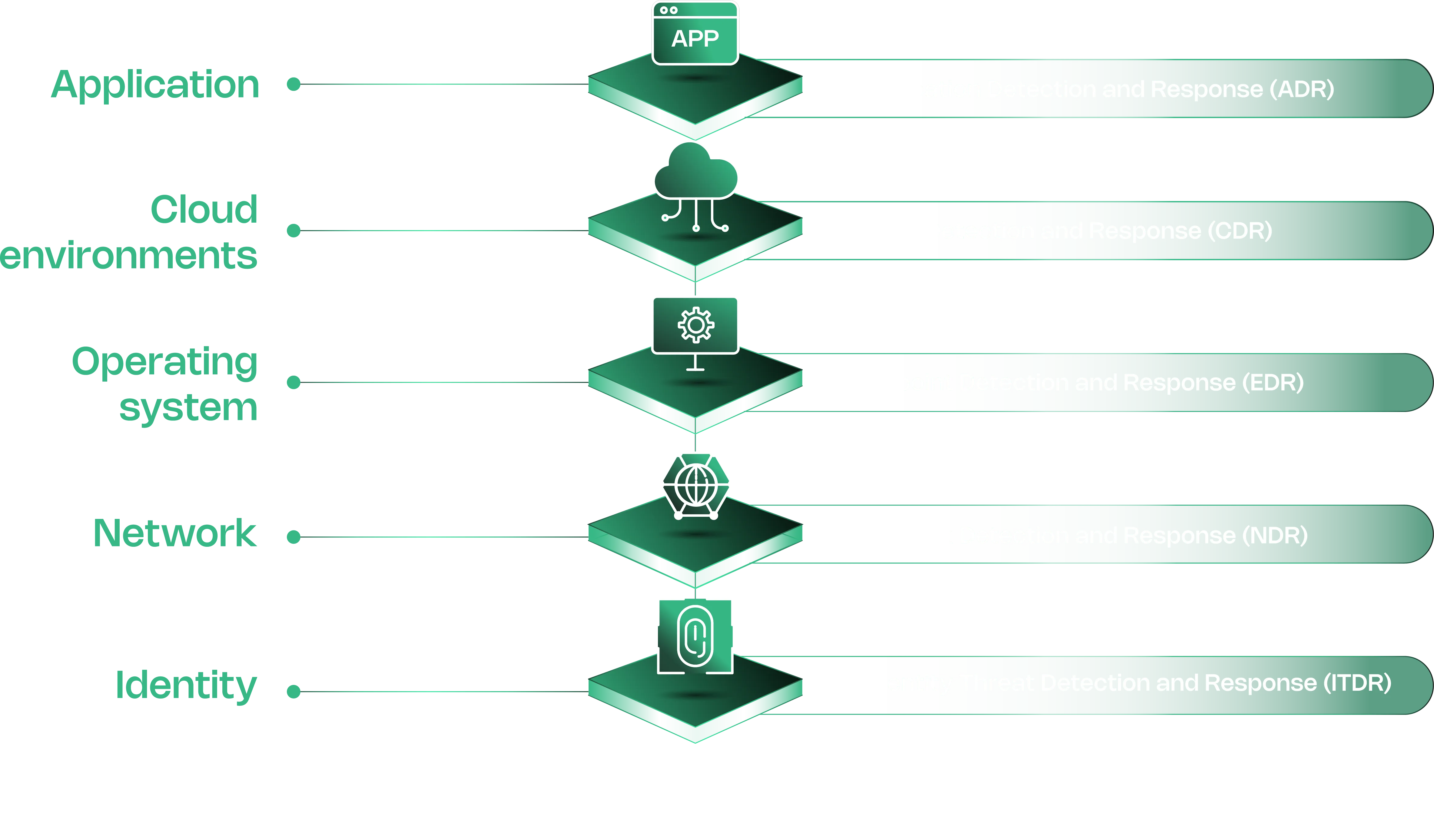
Contrast Security positions ADR as the application layer equivalent of EDR (endpoints), NDR (network), and CDR (cloud).
The sensor analyzes complete data flow within the application — SQL queries, command arguments, deserialization operations — and blocks attacks before they reach vulnerable code paths.
What is Contrast ADR?
Contrast ADR deploys sensors that share memory with the application process. Instead of inspecting HTTP traffic from outside like a WAF, the sensor watches how data moves through code at runtime.
When a request triggers a dangerous operation — say, user input concatenated into a SQL query — the sensor catches it at the point of execution.
Each alert includes the exact line of code, full stack trace, and attack payload. Security teams and SOC analysts get enough context to understand impact without digging through logs.
Key Features
| Feature | Details |
|---|---|
| Supported Languages | Java, .NET Framework, .NET Core, Node.js, Python, Ruby, Go |
| Protection Rules | 9 rule types (SQLi, XSS, command injection, deserialization, path traversal, EL injection, method tampering, unsafe upload, XXE) |
| Operating Modes | Monitor (detect/report) or Block (detect/stop) per rule per environment |
| Virtual Patching | Custom short-term rules with PCRE regex matching on URLs, parameters, values |
| CVE Shields | Block specific CVE exploits at runtime |
| IP Management | Allowlist/denylist with denylist taking precedence |
| Attack Grouping | Events from same IP within 60 minutes grouped into single attack |
| Data Retention | 30 days (on-premises), exportable to CSV/XML |
| Compliance | NIST 800-53, PCI-DSS, PCI-SSS |
| MITRE ATT&CK | Maps attack events to ATT&CK tactics |
Protect Rules
Contrast Protect ships with nine rule types, each configurable to Monitor or Block mode independently per environment (Development, QA, Production):
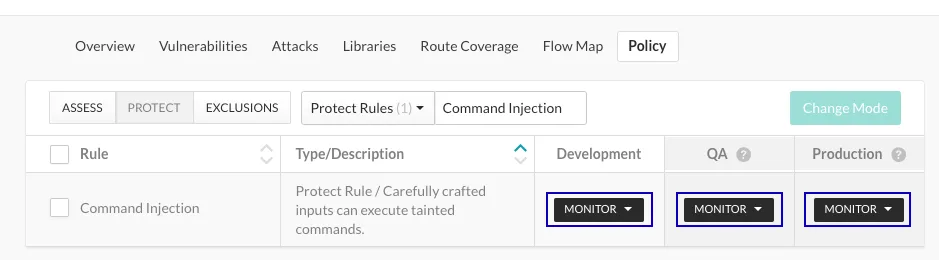
- Command Injection — Detects tainted OS-level commands including chained commands, command backdoors, and dangerous paths
- Cross-Site Scripting — Blocks injection of malicious JavaScript into other users’ browsers
- Expression Language Injection — Catches attacks targeting OGNL, SpEL, and JSP EL frameworks
- Method Tampering — Identifies exploitation of authentication/authorization systems with implicit “allow all” settings
- Path Traversal / Local File Include — Stops attempts to read arbitrary files through directory traversal
- SQL and NoSQL Injection — Detects query manipulation in both relational and document databases
- Unsafe File Upload — Blocks uploads with dangerous extensions (SVG, ASP, ASPX, SH, JAR, JAVA)
- Untrusted Deserialization — Prevents gadget chain exploits through arbitrary object deserialization
- XML External Entity Processing — Blocks XXE attacks that read files or execute remote code
Attack Event Analysis
When an attack triggers, the event detail includes source IP, affected application, server, triggered rule, severity, the suspicious value observed, and MITRE ATT&CK tactic mappings. Recommended response steps are provided for each event.
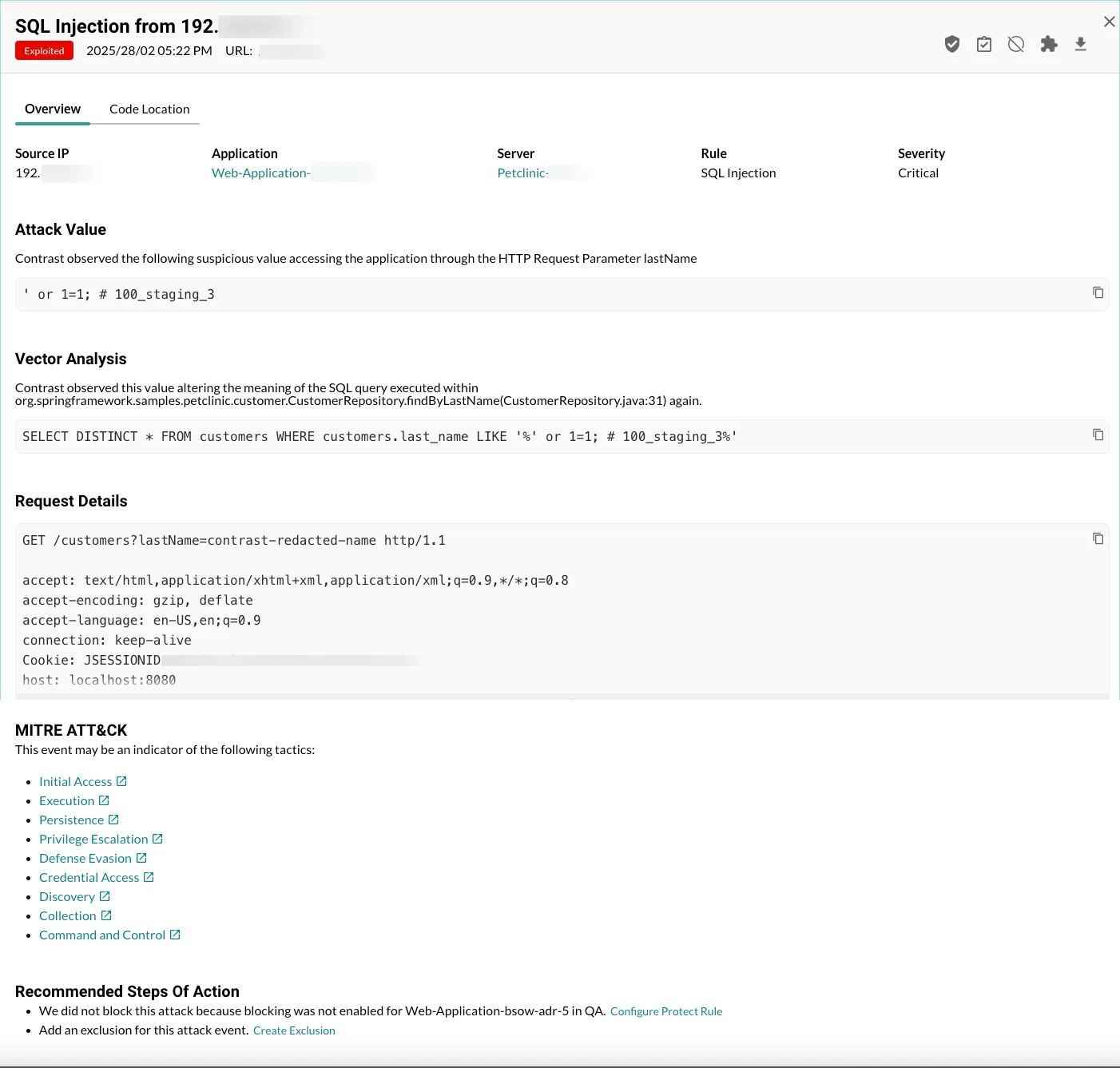
Attack events from the same IP within a 60-minute window are grouped into a single attack. On-premises deployments retain event data for 30 days, exportable to CSV, XML, syslog, or via webhooks.
Virtual Patching
Virtual patches act as custom, short-term rules that block HTTP requests matching specific criteria before the application processes them. You define matching conditions on URLs, parameter keys, or values using six comparison operators (equals, does not equal, contains, does not contain, matches, does not match) with Perl-Compatible Regular Expressions.
Organization Administrators and RulesAdmins create patches through the Policy Management section. These are useful for blocking exploitation of newly discovered vulnerabilities while permanent fixes are developed.
IP Management
Contrast Protect provides three IP management mechanisms:
- Denylist — Block all traffic from specific addresses. Denylists take precedence over allowlists.
- Allowlist — Mark trusted internal hosts (like vulnerability scanners). Protect ignores traffic from allowlisted IPs, but Assess continues monitoring normally.
- Source Names — Label attack events from known sources (like pen testers) by IP or subnet. The dashboard displays the source name instead of the raw IP during monitoring.
Integrations
 Splunk
 ServiceNow
 PagerDuty
Protect shares threat intelligence with external systems via syslog output, generic webhooks (POST requests on events), and CSV/XML exports. Alerts integrate into SIEM, XDR, SOAR, and CNAPP platforms.
Getting Started
-javaagent argument, Node.js uses @contrast/agent as a require flag. No source code changes needed.When to Use Contrast Protect
Contrast Protect fits organizations that need runtime protection beyond what a WAF provides.
The sensor-based approach catches attacks that bypass network-level defenses — especially useful for APIs, microservices, and applications behind load balancers where WAF visibility is limited.
The platform fits well when your SOC needs application-layer threat intelligence fed into existing SIEM/XDR workflows. Each alert arrives with enough context to assess impact without additional investigation.
If you need open-source WAF-style protection instead, ModSecurity provides HTTP-layer filtering. For APM-integrated runtime security, Datadog ASM combines RASP with observability data.
Frequently Asked Questions
What is Contrast Protect?
How does Contrast Protect differ from a WAF?
What attacks does Contrast Protect block?
Does Contrast Protect block attacks automatically?
What is the difference between Contrast Assess and Contrast Protect?
How much does Contrast Protect cost?
* Pricing data from Vendr — anonymized contract values from real buyer transactions.