Container security scanning is how teams find vulnerabilities, misconfigurations, and malicious behaviour in containerised applications. It runs across three distinct lifecycle stages, not one.
Most guides collapse “scanning” into a single CI step. That framing leaves gaps.
A build-time scan cannot see a CVE published tomorrow against an image sitting in your registry. A registry scan cannot see a zero-day exploit running inside a pod right now. A runtime monitor cannot retroactively block an image that should never have been built.
This guide maps each stage, the tools that cover it, and what each one actually catches. For image-hardening specifics like distroless bases and Dockerfile hygiene, see Container image security . This page is about the scanning layer on top of those foundations.
What is container security scanning?#
Container security scanning is the continuous inspection of container images and running containers for known vulnerabilities, misconfigurations, exposed secrets, and malicious runtime behaviour.
It is a sub-discipline of broader container security , focused on the detection side of the problem. Hardening reduces the attack surface before you build; scanning tells you what made it through.
The three-stage lifecycle is the defining framing. Build-time scanners parse image layers in CI and compare package versions against vulnerability databases.
Registry scanners rescan those same layers as new CVEs land. Runtime scanners observe kernel syscalls, network connections, and process trees inside live containers to detect behaviour no static analysis predicts.
Each stage uses different inputs, different tools, and catches a different class of problem. Teams that run only one stage are blind to everything the other two would have surfaced.
Why container security scanning matters#
Containers concentrate risk. A single base image can end up running in hundreds of pods across dozens of services, and whatever vulnerabilities it carries get inherited everywhere.
Sysdig’s 2023 Cloud-Native Security and Usage Report found 87% of container images in production contain at least one high or critical vulnerability. The average image carries hundreds of known CVEs, most inherited from the base layer rather than the application code on top.
The time dimension makes it worse. A container image is a frozen snapshot, but the vulnerability databases it is measured against change every day.
An image that scanned clean on Tuesday can have a critical OpenSSL CVE by Friday, and nothing in your CI pipeline will tell you, because the image already shipped.
Runtime is where the real attacks happen. Sysdig’s 2023 Global Cloud Threat Report measured attacker dwell time from initial reconnaissance to full compromise at roughly 10 minutes in cloud environments.
Static scanning cannot meet that clock. You need a detection layer that watches containers as they run.
This is why the three-stage model exists. Build scans catch the baseline. Registry scans catch disclosure lag.
Runtime scans catch the rest: zero-days, container escapes, cryptominers, lateral movement, and the behavioural drift that signals compromise.
How container security scanning works: the 3-stage lifecycle#
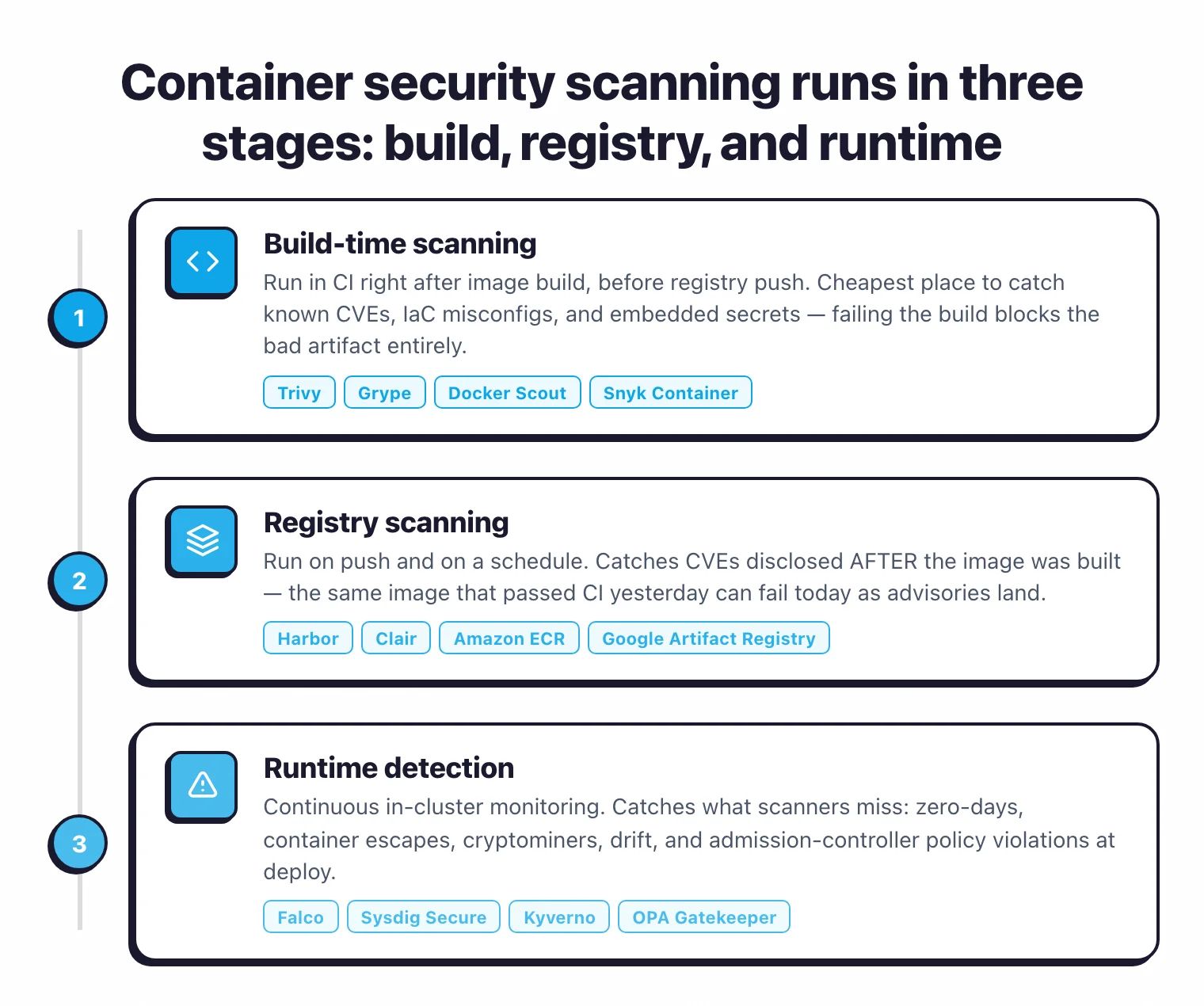
The stages are sequential in a pipeline sense but continuous in practice. An image scanned in CI also lives in a registry and will eventually run inside a cluster. All three layers apply to the same artifact over time.
| Stage | When it runs | What it catches | Primary tools |
|---|---|---|---|
| Build | In CI, before push | Known CVEs, IaC misconfigs, embedded secrets at ship time | Trivy , Grype , Docker Scout , Snyk Container |
| Registry | On push + scheduled rescans | CVEs disclosed after build, new advisories in stored images | Harbor , Clair , Amazon ECR, Google Artifact Registry, Azure Container Registry |
| Runtime | Continuously in-cluster | Zero-days, container escapes, cryptominers, drift, policy violations at deploy | Falco , Sysdig Secure , Kyverno , OPA Gatekeeper |
Each stage is described in detail below.
Build-time scanning#
Build-time scanning runs in CI, typically after the container image is built and before it is pushed to a registry. It is the cheapest and fastest place to catch known problems: the image has not shipped yet, no deploy is in flight, and failing the build blocks the bad artifact entirely.
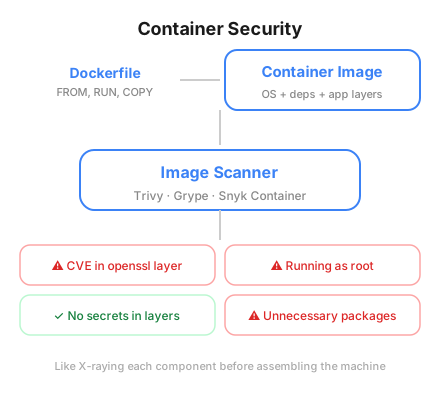
Build scanners read image layers and compare installed packages against vulnerability databases (NVD , GitHub Advisory Database, OSV, and vendor-specific feeds from Alpine, Debian, Red Hat, and others). They also inspect the image for Dockerfile misconfigurations and embedded secrets, such as API keys or certificates accidentally committed into layers.
Trivy is the default choice for most teams. Apache 2.0 licensed, it ships as a single binary, has 36,488 GitHub stars, and covers OS packages, language dependencies across 11+ ecosystems, IaC misconfigurations, and secrets in one pass. A typical GitHub Actions integration takes four lines:
- name: Scan image
  uses: aquasecurity/trivy-action@<commit-sha>
  with:
    image-ref: myapp:${{ github.sha }}
    severity: CRITICAL,HIGH
    exit-code: 1
Pin the action to a specific commit SHA. The aquasecurity/trivy-action
repo was compromised twice in March 2026 through the TeamPCP supply chain campaign, and mutable tags like @v1 or @master are no longer safe for new pipelines.
Grype is the narrower alternative. It focuses on vulnerability matching, accepts pre-generated SBOMs from Syft as input, and produces composite risk scores that blend CVSS severity with EPSS exploit probability and CISA KEV catalog status. Teams that already run SBOM generation separately usually pair Syft and Grype so the SBOM can be cached and rescanned without re-parsing the image.
Snyk Container
and Docker Scout
are the commercial-adjacent options. Snyk Container adds base-image upgrade advice (it will tell you which base image version resolves the most CVEs) and auto-fix pull requests on connected GitHub repos. Docker Scout is built into Docker Desktop, so teams already on the Docker toolchain can run docker scout cves myapp:latest with nothing extra installed.
Build-time scanning has one hard limit: it is a point-in-time snapshot. Everything after this stage has to handle what happens when the database changes or when the container actually starts running.
Registry scanning#
Registry scanning rescans images that already passed CI as new CVEs are disclosed against the packages those images contain. This is the stage most teams underinvest in, and it catches the largest volume of real findings over time.
The problem is arithmetic. A medium-sized platform team might push a few dozen images per day, while the NVD publishes more than a hundred new CVEs in the same window. An image that was clean at push time picks up new findings as the databases catch up to it, without anyone touching the image.
Harbor is the dominant open-source self-hosted registry for teams that want this layer under their own control. Apache 2.0 licensed, CNCF graduated since June 2020, it has 28.3k GitHub stars and ships with pluggable scanner adapters for Trivy and Clair . Scan-on-push is built-in, and periodic rescans run on a configurable schedule. Most teams run them daily or every four hours.
Clair , developed by Red Hat and used in Quay, is the other long-standing open-source registry scanner. It is narrower than Trivy (it targets container images specifically), but it was designed from day one as a backend service for registries rather than a CI tool, which shows in its API ergonomics.
Cloud registries — Amazon ECR, Google Artifact Registry, Azure Container Registry, and GitHub Container Registry — each ship with integrated scanning. Amazon ECR offers two modes: basic scanning (Clair-based, free) and enhanced scanning (Snyk-powered, paid), while Google and Azure use their own scanners with automatic rescans on new CVE disclosure. These are the lowest-friction option if you are already on a cloud provider and want registry scanning without running Harbor yourself.
Registry scanning does not replace build scanning; it complements it. Build scanning gives you a ship gate, registry scanning gives you a watch. Together they answer two different questions: “is this image safe to ship today?” and “which images I already shipped are unsafe now?”
For the SBOM angle on this same question (“which of my running images contain Log4j?”), see the SCA tools hub and the SBOM guide . Registry-scanned SBOMs plus a continuous monitoring platform are how teams answer portfolio-wide questions in minutes instead of days.
Runtime scanning#
Runtime scanning watches what containers actually do after they start. It is the only layer that catches attacks no static scan could predict: zero-day exploits in application code, container escape attempts, cryptominers dropped through a supply-chain compromise, and lateral movement between pods.
The technique is kernel observation. Modern runtime scanners hook into Linux via eBPF (extended Berkeley Packet Filter), a kernel mechanism that lets user-space tools observe syscalls, file access, network connections, and process execution with low overhead. Well-tuned eBPF agents typically add 1-3% CPU per node, though the cost scales with rule count and event volume.
Falco is the reference implementation. Created by Sysdig, donated to the CNCF in 2018, it reached graduated status in 2024 and has 8.9k GitHub stars. Falco observes syscalls, filters them against a rules engine, and emits alerts to stdout, HTTP endpoints, or event buses like Kafka. A rule to catch a shell spawning inside a production container reads almost like English:
- rule: Terminal shell in container
  desc: A shell was used as the entrypoint/exec point into a container
  condition: spawned_process and container and shell_procs
  output: Shell in container (user=%user.name container=%container.name)
  priority: WARNING
Sysdig Secure is the commercial platform built on Falco. It adds a managed UI, AI-assisted investigation (Sysdig Sage), MITRE ATT&CK mapping, and integration with CSPM and cloud threat detection. For teams that want the Falco detection model without the self-hosting burden, it is the natural upgrade path.
Admission controllers sit adjacent to runtime scanning and enforce policies at the boundary between the registry and the cluster. A Kubernetes admission controller intercepts every request to create or modify a workload and can reject, mutate, or accept it before it reaches etcd. This is where you block unsigned images, images from unapproved registries, images with critical CVEs, or pods running as root.
Kyverno uses declarative YAML policies and is the easier entry point for most teams. OPA Gatekeeper uses Rego, which is more expressive but steeper to learn. Both are CNCF graduated. Sigstore Policy Controller is the signature-specific option; use it alongside Kyverno or Gatekeeper when you want Cosign-signed images to be a hard deploy requirement.
Runtime scanning and admission control together form the last line of defence. Everything that slipped through build and registry scans has to be caught here, or it runs in production.
Top container security scanning tools#
Eight tools cover the bulk of real-world deployments. They are grouped by the stage each one primarily addresses. A few (Trivy, Snyk Container) span multiple stages.
Build-time#
Trivy — Apache 2.0, 36,488 GitHub stars, single binary. Scans container images, filesystems, git repos, VM images, and Kubernetes clusters for OS package CVEs, language dependencies, IaC misconfigurations, and secrets across 11+ ecosystems. The default choice for CI-stage scanning in most open-source pipelines.
Grype — Apache 2.0, 12.1k GitHub stars. Narrower than Trivy but strong on risk scoring: every finding gets a composite 0-10 score that blends CVSS, EPSS, and CISA KEV. Accepts Syft SBOMs as input so teams can cache SBOM generation between scans.
Docker Scout
— built into Docker Desktop. Zero extra installation for teams already on Docker; runs docker scout cves image:tag locally or in CI.
Snyk Container
— commercial with free tier. Adds base-image upgrade advice and auto-fix PRs that rewrite the FROM line in Dockerfiles when a newer base resolves the most CVEs.
Registry#
Harbor — Apache 2.0, CNCF graduated (2020), 28.3k GitHub stars. Self-hosted registry with pluggable scanner adapters for Trivy and Clair, scan-on-push, scheduled rescans, RBAC, image signing integration, and multi-registry replication.
Clair — Apache 2.0, 11k GitHub stars. The original open-source registry scanner, developed by Red Hat and bundled into Quay. API-first design makes it a clean backend for custom registry workflows.
Cloud registry scanners — Amazon ECR, Google Artifact Registry, Azure Container Registry, and GitHub Container Registry all ship with integrated scanning. Lowest-friction option for teams already in a cloud registry.
Runtime#
Falco — Apache 2.0, CNCF graduated (2024), 8.9k GitHub stars. eBPF-based kernel syscall monitoring with a rules engine. The reference implementation for open-source runtime detection.
Sysdig Secure — commercial, built on Falco. Managed detection with MITRE ATT&CK mapping, AI-assisted investigation, and integration with cloud posture management.
Kyverno — Apache 2.0, CNCF graduated (2020). YAML-native admission controller for blocking unsigned images, enforcing registry allow-lists, and rejecting pods that fail security policies at deploy time.
OPA Gatekeeper — Apache 2.0, Rego-based admission controller. More expressive than Kyverno, steeper learning curve, stronger fit for teams with existing OPA investments.
For a broader listing including CSPM and commercial full-lifecycle platforms, see the container security tools hub .
How to choose a scanner#
The decision splits cleanly along stage boundaries, so start there.
If you have zero container scanning today, start with build-time. Add Trivy to CI as a single GitHub Actions or GitLab CI step with a HIGH,CRITICAL severity threshold. This catches the biggest class of real findings for the least effort and gives you a baseline you can measure the other stages against.
If you already scan in CI but not in your registry, add registry scanning next. Teams running Harbor get this for free by enabling the Trivy adapter and scheduled scans. Teams on Amazon ECR, Google Artifact Registry, or Azure Container Registry get it by turning on the built-in scanner in the console. The payoff is catching CVEs disclosed after build without rebuilding images.
If you scan build and registry but have no runtime detection, you are blind to zero-days. Deploy Falco to your production clusters as a DaemonSet with the default ruleset, then tune from there. The default rules are noisy but they surface the classes of events you need to care about first. If you lack the operational bandwidth to run Falco yourself, Sysdig Secure is the managed version.
If you are running all three stages but deploys still slip past policy, add admission control. Kyverno is the easier starting point for most teams. Start with three policies: block latest tags, require images from approved registries, and reject containers running as root. Expand from there.
The team-size heuristic overlays on top of this. Teams under about 20 engineers usually land on Trivy + Harbor + Falco + Kyverno: all open-source, all CNCF or OWASP backed, total licensing cost zero. Teams at 100+ engineers often move to a commercial platform for unified dashboards and managed detection, such as Sysdig Secure, Snyk Container, Aqua Enterprise, or Prisma Cloud.
For image-hardening work upstream of scanning (distroless bases, multi-stage builds, secret prevention), see the container image security guide . For SCA context on the dependency-scanning overlap, see what is SCA and the SCA tools hub .