Why does scanning Terraform matter?#
Terraform defines your cloud infrastructure in code. A typo or oversight in a .tf file can open a security group to the internet, grant admin access to a service account, or deploy an unencrypted database. These mistakes deploy in seconds and create real exposure.
The 2025 Datadog State of Cloud Security report found that only 1% of S3 buckets are effectively public — down from 1.5% in 2024 — and 83% of S3 buckets now have Public Access Block coverage (up from 79%).
Progress on S3 is real, but Datadog found significant IAM misconfigurations remain common — many originating from Terraform resources missing proper access controls. The fix takes 30 seconds in a .tf file. The breach investigation takes months.
Manual code review catches some of these issues, but not reliably. A senior engineer reviewing Terraform can spot obvious problems, but Terraform projects grow to hundreds of files across dozens of modules.
No human consistently catches every 0.0.0.0/0 in every security group rule on every pull request.
Automated scanners check every resource against hundreds of policies on every pull request. They do not get tired, they do not miss the 50th security group, and they run in seconds. The feedback is immediate: the developer who wrote the misconfiguration sees the finding before the PR merges.
For a broader look at IaC security across all frameworks, see the What is IaC Security guide.
Tool comparison: Checkov vs KICS vs tfsec vs Trivy IaC#
Four tools dominate Terraform scanning. Here is how they compare.
Checkov#
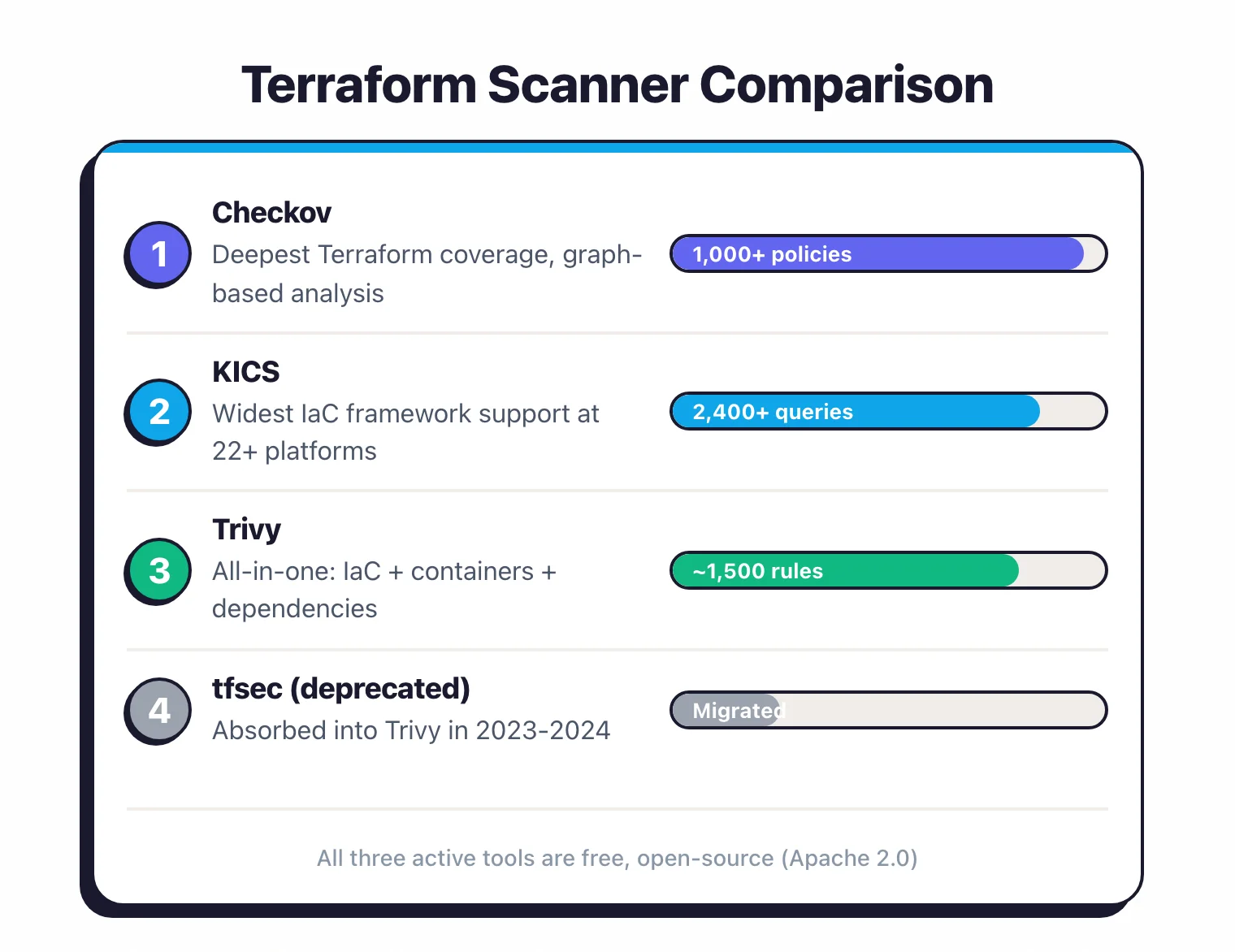
Checkov has the most Terraform-specific coverage of any open-source scanner. 1,000+ built-in policies covering AWS, Azure, GCP, Kubernetes, and more.
What sets it apart is graph-based analysis: Checkov maps relationships between resources and checks cross-resource security properties.
It can verify that an EC2 instance’s security group, in a specific subnet, in a specific VPC, is properly configured as a chain.
Custom policies in Python or YAML. YAML policies are declarative and handle 80% of custom rule needs.
Python policies give you programmatic control for complex logic. Maintained by Palo Alto Networks (Prisma Cloud). 8,500+ GitHub stars .
Best for: Teams where Terraform is the primary IaC and depth of analysis matters most.
KICS#
KICS (Keeping Infrastructure as Code Secure) covers the most IaC frameworks at 22+ platforms. 2,400+ Rego-based queries . For Terraform specifically, KICS covers AWS, Azure, GCP, and Alibaba Cloud provider resources. Built by Checkmarx. 2,600+ GitHub stars .
Best for: Teams using multiple IaC frameworks (Terraform plus CloudFormation plus Ansible plus Pulumi) who want one tool for everything. See our Checkov vs KICS comparison for a detailed head-to-head.
Trivy (absorbed tfsec)#
Trivy
absorbed tfsec (deprecated in 2023, transition completed by 2024) and took over its full rule library. Run trivy config . on a Terraform directory and you get the same coverage that tfsec provided, plus Trivy’s other scanning capabilities (container images, dependencies, secrets, Kubernetes).
If you were using tfsec, migrate to Trivy. The rules are the same, inline suppressions carry over, and you gain additional scanning capabilities. 31,700+ GitHub stars.
Best for: Teams that want one scanner for Terraform, container images, dependencies, and secrets.
Quick comparison#
| Feature | Checkov | KICS | Trivy |
|---|---|---|---|
| Terraform policies | 1,000+ | 2,400+ | ~1,500 (ex-tfsec) |
| Graph-based checks | Yes (800+) | No | No |
| Custom rule language | Python, YAML | Rego | Rego |
| Plan file scanning | Yes | Yes | Yes |
| Other IaC frameworks | 10+ | 22+ | 8+ |
| Image scanning | No | No | Yes |
| Dependency scanning | No | No | Yes |
| License | Apache 2.0 | Apache 2.0 | Apache 2.0 |
All three are free, open-source, and actively maintained.
What about Terrascan, tfsec, TFLint, and Snyk IaC?#
Three other names show up on most Terraform-scanner shortlists. Read this before assuming they belong on yours.
- Terrascan was an open-source IaC scanner from Tenable with 500+ Rego policies and a Kubernetes admission controller. The project was archived in November 2025 — the GitHub repository is read-only with no new releases. Existing users should migrate to Checkov , KICS , or Trivy .
- tfsec is no longer a standalone tool. Aqua Security merged it into Trivy in 2023; the tfsec GitHub README literally redirects users to Trivy. See the migration section below.
- TFLint is a Terraform linter with security plugins, not a security-first scanner. Useful for syntax and provider-specific checks (deprecated arguments, instance-type validation), but its security ruleset is shallower than Checkov, KICS, or Trivy.
- Snyk IaC is a commercial Terraform scanner with inline fix suggestions and Terraform plan scanning. Free tier exists; advanced features (custom Rego, drift detection) are paid. Pick it if your team already runs Snyk for SCA or container scanning.
For a free, actively maintained Terraform scanner, the choice is Checkov, KICS, or Trivy.
Migrating from tfsec to Trivy#
Aqua Security deprecated tfsec
in 2023 and merged the rule library into Trivy’s misconfiguration scanner. The tfsec repository now redirects users to Trivy, and trivy config runs the same checks tfsec used to provide.
The migration is mechanical:
# Before (tfsec)
tfsec .

# After (Trivy)
trivy config .
Check IDs carry over identically. A finding that surfaced as AVD-AWS-0086 in tfsec surfaces as AVD-AWS-0086 in Trivy. The Aqua Vulnerability Database (AVD)
IDs are the canonical taxonomy.
Inline suppressions also carry over. The legacy #tfsec:ignore:AVD-AWS-0086 comment continues to work, and Trivy also accepts #trivy:ignore:AVD-AWS-0086 in newer code.
Custom Rego policies written for tfsec require minor path adjustments (the policy evaluation context changed slightly), but the policy logic is the same.
The upside of the move is that one binary now scans Terraform plus container images, application dependencies, Kubernetes manifests, and secrets. Teams running tfsec for Terraform plus a separate container scanner consolidate down to one tool.
If a CI pipeline still calls tfsec ., it will fail on systems that no longer have the tfsec binary installed. Replace the call with trivy config . and update the GitHub Action from aquasecurity/tfsec-action to aquasecurity/trivy-action
.
How this comparison was sourced#
Tool versions, policy counts, and license metadata pulled from each project’s official repository. Terrascan archival status verified against the GitHub archive notice . tfsec deprecation verified against the official tfsec README redirect .
Scope. Pre-deployment static Terraform scanning only — live cloud account scanning, IDE plugins, and Sentinel/Terraform Cloud-only features are out of scope for this comparison.
Capability framing. Comparisons of policy counts, framework coverage, and runtime characteristics (Go binary vs Python runtime, default ruleset breadth, SARIF output) come from each scanner’s published documentation. For team-specific scan-time and finding-count differences on your own Terraform tree, run each scanner’s CLI against a representative module and compare the SARIF output side by side.
Setting up scanning in CI/CD#
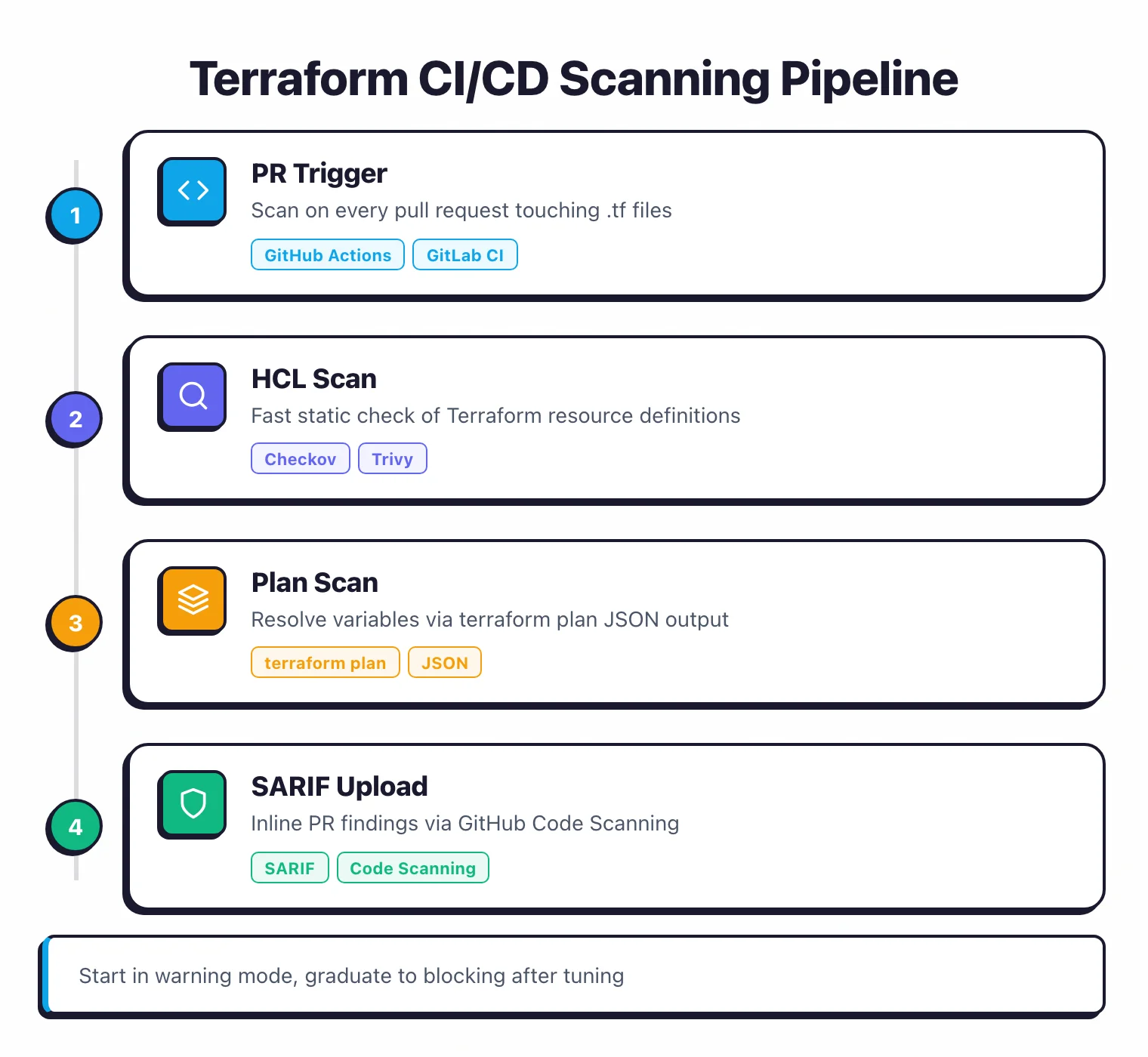
The standard setup runs the scanner on every pull request that touches .tf files. Start in warning mode, graduate to blocking.
GitHub Actions with Checkov#
name: Terraform Security Scan
on:
  pull_request:
    paths:
      - "**/*.tf"
      - "**/*.tfvars"

jobs:
  checkov:
    runs-on: ubuntu-latest
    steps:
      - uses: actions/checkout@v4
      - name: Run Checkov
        uses: bridgecrewio/checkov-action@master
        with:
          directory: ./infrastructure
          framework: terraform
          output_format: sarif
          soft_fail: true # warn, don't block (remove when ready to enforce)
GitLab CI with Trivy#
terraform-scan:
  image: aquasec/trivy:latest
  stage: test
  script:
    - trivy config --severity HIGH,CRITICAL --exit-code 1 ./infrastructure
  rules:
    - changes:
        - "**/*.tf"
        - "**/*.tfvars"
SARIF output for code scanning#
Both Checkov and Trivy produce SARIF (Static Analysis Results Interchange Format) output. Upload SARIF to GitHub Code Scanning or GitLab Security Dashboard to see findings inline on pull request diffs:
- name: Upload SARIF
  uses: github/codeql-action/upload-sarif@v3
  with:
    sarif_file: results.sarif
Plan scanning#
For more accurate results, scan the Terraform plan output instead of raw HCL:
terraform init
terraform plan -out=tfplan
terraform show -json tfplan > tfplan.json
checkov -f tfplan.json --framework terraform_plan
Plan scanning resolves variables, module references, and data sources. It catches issues that HCL scanning misses when values are computed at plan time.
The tradeoff is that plan scanning requires cloud credentials and takes longer.
Writing custom policies#
Built-in policies cover common misconfigurations. Custom policies encode your organization’s specific requirements.
Checkov YAML policies#
YAML policies are declarative and handle most custom checks. Example: require a specific tag on all S3 buckets:
metadata:
  id: "CUSTOM_AWS_1"
  name: "Ensure S3 buckets have a 'data-classification' tag"
  severity: HIGH
definition:
  cond_type: attribute
  resource_types:
    - aws_s3_bucket
  attribute: tags.data-classification
  operator: exists
Save this in a directory and pass it to Checkov with --external-checks-dir.
Checkov Python policies#
For logic that YAML cannot express:
from checkov.terraform.checks.resource.base_resource_check import BaseResourceCheck
from checkov.common.models.enums import CheckResult, CheckCategories

class S3BucketDataClassification(BaseResourceCheck):
    def __init__(self):
        name = "Ensure S3 buckets have data-classification tag"
        id = "CUSTOM_AWS_1"
        supported_resources = ["aws_s3_bucket"]
        categories = [CheckCategories.GENERAL_SECURITY]
        super().__init__(name=name, id=id,
                        categories=categories,
                        supported_resources=supported_resources)

    def scan_resource_conf(self, conf):
        tags = conf.get("tags", [{}])[0]
        if "data-classification" in tags:
            return CheckResult.PASSED
        return CheckResult.FAILED

check = S3BucketDataClassification()
Rego policies for KICS and Trivy#
Rego is the policy language for OPA (Open Policy Agent). Both KICS and Trivy accept custom Rego rules.
Rego is more expressive than YAML but takes time to learn:
package custom.terraform.s3

deny[msg] {
    resource := input.resource.aws_s3_bucket[name]
    not resource.tags["data-classification"]
    msg := sprintf("S3 bucket '%s' is missing data-classification tag", [name])
}
If your team already uses OPA for Kubernetes admission control or other policy enforcement, Rego-based tools keep everything in one language.
Common Terraform misconfigurations#
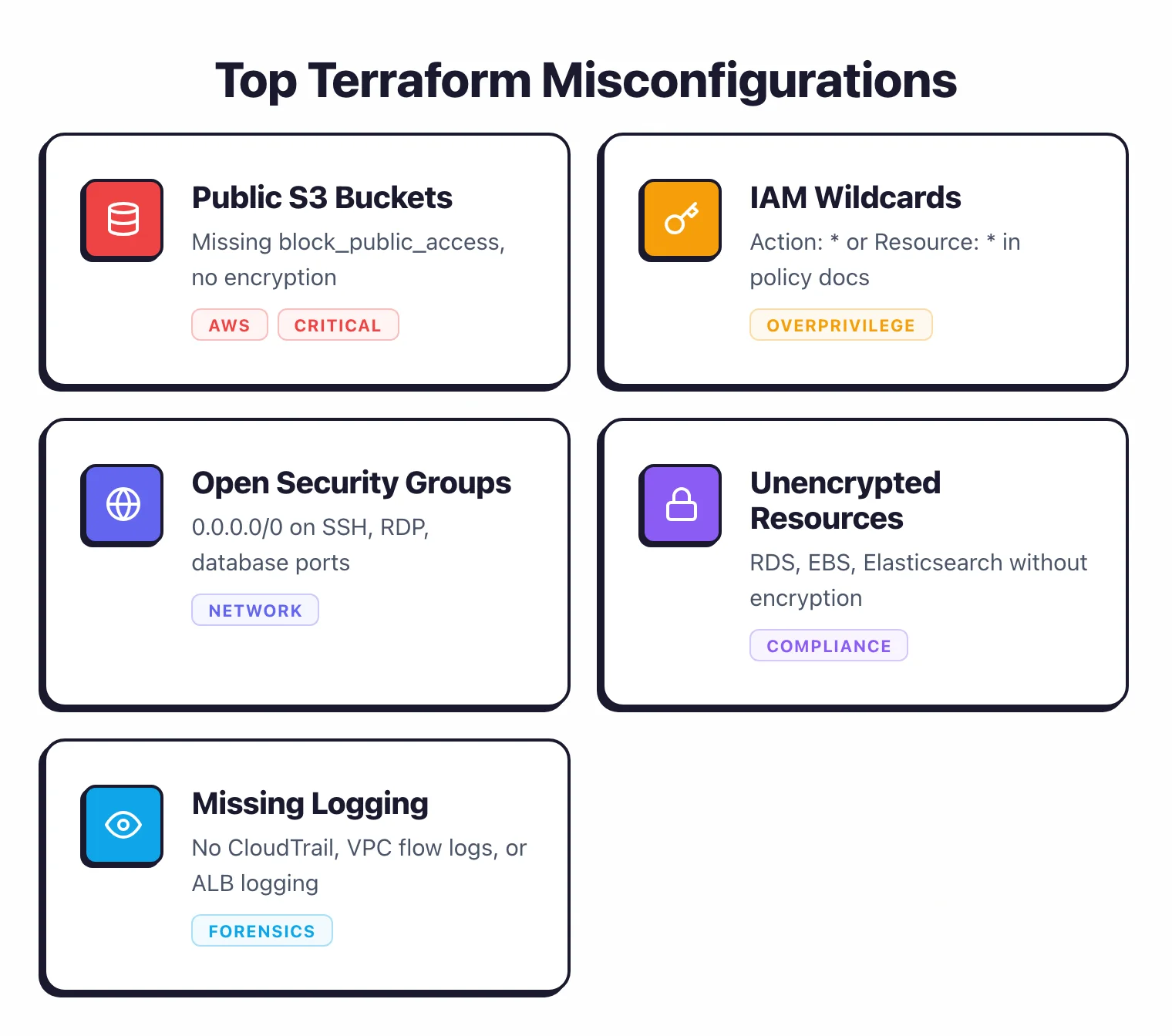
These are what scanners flag most, and what causes most cloud breaches.
S3 bucket misconfigurations#
Missing block_public_access, disabled encryption, no versioning, no access logging. Every Terraform scanner has 10+ rules just for S3.
The number of S3-related breaches makes this the single most important resource type to get right.
# Bad: missing public access block
resource "aws_s3_bucket" "data" {
  bucket = "my-data-bucket"
}

# Fixed: public access blocked, encryption enabled
resource "aws_s3_bucket" "data" {
  bucket = "my-data-bucket"
}

resource "aws_s3_bucket_public_access_block" "data" {
  bucket                  = aws_s3_bucket.data.id
  block_public_acls       = true
  block_public_policy     = true
  ignore_public_acls      = true
  restrict_public_buckets = true
}

resource "aws_s3_bucket_server_side_encryption_configuration" "data" {
  bucket = aws_s3_bucket.data.id
  rule {
    apply_server_side_encryption_by_default {
      sse_algorithm = "aws:kms"
    }
  }
}
IAM policy wildcards#
"Action": "*" or "Resource": "*" in IAM policy documents. These grant far more access than any workload needs.
Scanners flag both action and resource wildcards. The fix is to enumerate specific actions and restrict resources to specific ARNs.
Security groups open to the world#
Ingress rules with cidr_blocks = ["0.0.0.0/0"] on ports like 22 (SSH), 3389 (RDP), 3306 (MySQL), 5432 (PostgreSQL). Restrict these to known IP ranges or VPN CIDR blocks.
Unencrypted resources#
RDS instances without storage_encrypted = true, EBS volumes without encryption, Elasticsearch domains without node-to-node encryption. Most compliance frameworks require encryption at rest. The Terraform fix is a single boolean attribute.
Missing logging#
CloudTrail not enabled, VPC flow logs not configured, ALB access logging disabled. Without logs, you cannot detect or investigate incidents.
Scanners verify that logging resources exist and reference the correct destinations.
How do you handle false positives and suppressions?#
Every scanner produces some false positives. Handling them well is the difference between a useful tool and alert fatigue.
Inline suppressions#
Add comments to your Terraform files to suppress specific checks:
# Checkov
#checkov:skip=CKV_AWS_18:Access logging not needed for static assets bucket

# Trivy (tfsec legacy format also works)
#trivy:ignore:AVD-AWS-0086
Always include a reason. Suppressions without explanations become security debt that nobody understands.
Config file exclusions#
For checks that do not apply to your environment, suppress them globally in a config file:
# .checkov.yaml
skip-check:
  - CKV_AWS_144 # S3 cross-region replication (single-region deployment)
  - CKV_AWS_145 # S3 default encryption with CMK (using SSE-S3)
Baseline approach#
On existing projects with hundreds of findings, establish a baseline. Run the scanner once, export all current findings, and only flag new findings on subsequent runs.
Checkov supports this with --baseline. This lets you adopt scanning immediately without fixing every historical issue first.
Review cycle#
Review suppressions quarterly. Requirements change, and a suppression that was valid six months ago may not be valid now.
Treat suppressed checks as accepted risk that needs periodic re-evaluation.
Policy as Code with Sentinel and OPA#
Beyond individual scanner rules, you can implement governance-level policies that apply across your entire Terraform workflow.
HashiCorp Sentinel#
Sentinel
is HashiCorp’s policy-as-code framework, embedded in Terraform Cloud and Terraform Enterprise. Sentinel policies run after terraform plan and before terraform apply, so they have access to the full planned state.
Sentinel can enforce organization-wide rules: all resources must have cost-center tags, no EC2 instances above a certain size without approval, all databases must be in specific regions. It operates at the governance layer above individual resource checks.
The limitation is that Sentinel only works with Terraform Cloud/Enterprise. If you run Terraform OSS with your own CI, Sentinel is not available.
Open Policy Agent (OPA)#
OPA evaluates Terraform plan JSON against Rego policies. It works with any Terraform workflow (OSS, Cloud, or Enterprise). Tools like Conftest wrap OPA with a developer-friendly CLI:
terraform show -json tfplan > tfplan.json
conftest test tfplan.json --policy ./policies/
OPA policies can be shared across Terraform, Kubernetes, CI/CD pipelines, and other systems. If your organization standardizes on OPA, using it for Terraform governance keeps everything in one framework.
What to enforce at the governance level#
- Required tags on all resources (cost-center, owner, environment, data-classification)
- Allowed cloud regions (data residency compliance)
- Maximum instance sizes without approval workflows
- Banned resource types (e.g., no public-facing RDS instances)
- Required encryption methods (CMK vs service-managed keys)
For more on IaC security tools, see AppSec Santa’s IaC security tools page and Cloud Infrastructure Security hub .