


cloud-audit is an open-source AWS security scanner that runs as a Python CLI. It authenticates against a live AWS account and reports what is actually deployed, not what your Terraform says should be deployed.
That distinction is the whole point of the tool. Most of the IaC security tools I track — Checkov , KICS , tfsec — parse configuration files before anything reaches AWS.
cloud-audit inverts that. It calls AWS APIs, finds the misconfigurations that survived your pipeline, and attaches both a CLI command and a Terraform snippet to findings that carry remediation.
The project is MIT-licensed with no paid tier. Mariusz Gebala maintains it as a one-person project under the HAIT banner, with 68 GitHub stars and 29 PyPI releases as of August 2026.
Help Net Security covered the tool in March 2026 , when it shipped 45 checks across 15 AWS services. Version 2.4.0 has more than doubled that.
I reviewed the v2.4.0 source tree instead of taking the README at face value, including the CLI’s registered check list. Two of the headline counts differ from what the project advertises, and the discrepancies are noted below.
What is cloud-audit?
cloud-audit is a read-only AWS security scanner that evaluates 110 documented checks across 25 AWS services and attaches remediation code to its findings.
On this site it sits in the IaC security category next to the pre-deployment scanners it complements: Checkov and KICS audit the Terraform you plan to apply, while cloud-audit audits the live account state those deploys produced.
The check set covers IAM, S3, EC2, VPC, RDS, KMS, CloudTrail, CloudWatch, GuardDuty, Lambda, ECS, DynamoDB, Secrets Manager, SSM, Bedrock, SageMaker, and Bedrock AgentCore, among others.
The 110 figure is the project’s own documented count. Running cloud-audit list-checks on v2.4.0 prints 120 checks with 120 distinct identifiers, so the README undercounts its own tool.
Scanning needs no deployed agent and no persistent scanning infrastructure. The AWS-managed SecurityAudit policy is documented as sufficient for every check, including the IAM escalation analysis.
Beyond flat findings, the tool correlates results. It groups related issues into attack chains, ranks root-cause fixes by how many chains each one breaks, and can preview a fix’s impact before you apply anything.
| Capability | What it covers |
|---|---|
| 110 checks, 25 services | IAM, S3, EC2, VPC, RDS, KMS, CloudTrail, Lambda, ECS, DynamoDB, Bedrock, SageMaker, AgentCore, and more. Documented figure; list-checks prints 120 in v2.4.0. |
| 31 attack-chain rules | Correlation detectors that turn isolated findings into exploitable paths: internet-exposed admin instances, CI/CD-to-admin takeover, SSRF credential theft. |
| IAM escalation analysis | Privilege-escalation methods spanning 9 categories, including PassRole abuse, trust-policy abuse, permission-boundary bypass, and AssumeRole lateral movement. |
| Remediation on findings | The remediation data model requires a Terraform field, so a finding that carries a remediation carries both AWS CLI and Terraform HCL. |
| 6 compliance frameworks | CIS AWS v3.0 and SOC 2 Type II (stable); ISO 27001:2022, HIPAA, NIS2, BSI C5:2020 (beta). |
What are cloud-audit’s key features?
Four capabilities do the work: attack-chain correlation across 31 rules, IAM privilege-escalation analysis, CLI-plus-Terraform remediation on findings, and scan-to-scan drift tracking.
Attack-chain correlation
The feature that separates cloud-audit from a plain check-runner is correlation. The v2.4.0 correlation module holds 31 detector functions, matching the project’s stated rule count.
Each detector looks for a combination that is dangerous in aggregate. A public security group may be low-signal alone; a public security group plus an admin IAM role plus IMDSv1 on the same instance is an attack path.
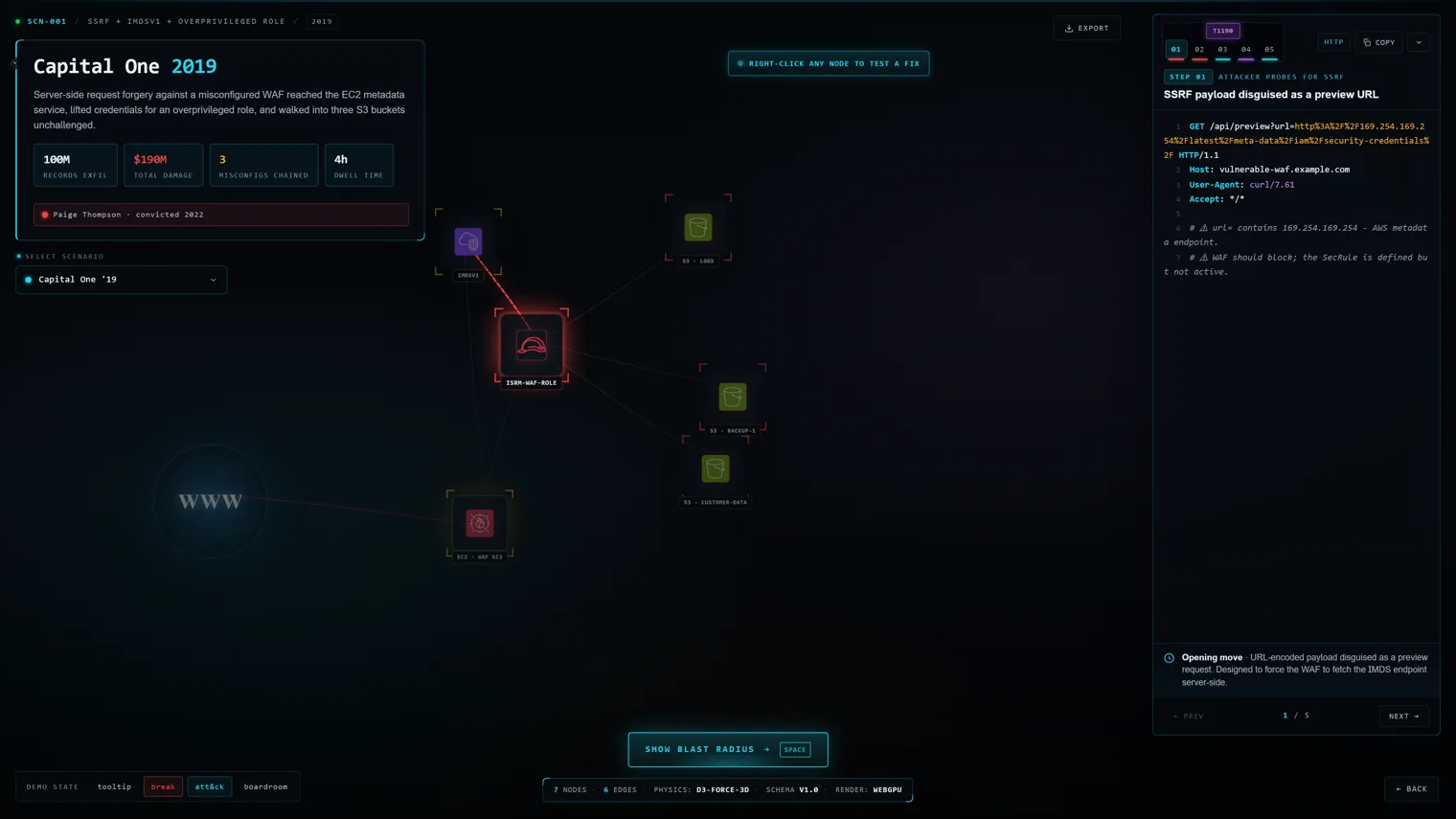
The remediation planner then inverts that graph. It reports lines like “fix 4 root causes, break 22 attack chains” and ranks quick wins by effort against chains broken.
IAM privilege-escalation analysis
cloud-audit resolves IAM principals from the account authorization details and tests them against a library of escalation methods.
The project reports 64 methods across 9 categories. The v2.4.0 iam_analyzer module defines 60 methods across all 9 category values, so treat 64 as the vendor figure and 60 as what the module itself carries.
A scan --verify mode (“Proof Mode”) checks each candidate escalation path against the AWS IAM policy simulator and flags the ones a principal can actually perform. That is the part that separates theoretical paths from live ones.
Remediation output
Every remediation in the data model carries three things: an AWS CLI command, a Terraform HCL snippet, and a documentation link. The Terraform field is required, not optional.
The v2.4.0 source carries 119 Terraform snippet assignments against 120 registered checks, so “Terraform on every finding” is close to but not universal. Findings without a remediation attached will not carry one.
An --export-fixes flag writes all remediations to a single commented bash script using set -e, intended to be reviewed and selectively uncommented rather than run wholesale.
Reporting and drift tracking
Four output formats ship in-box: SARIF for GitHub Code Scanning, JSON for machine consumption, Markdown you can post into a pull request yourself, and HTML for client-facing reports.
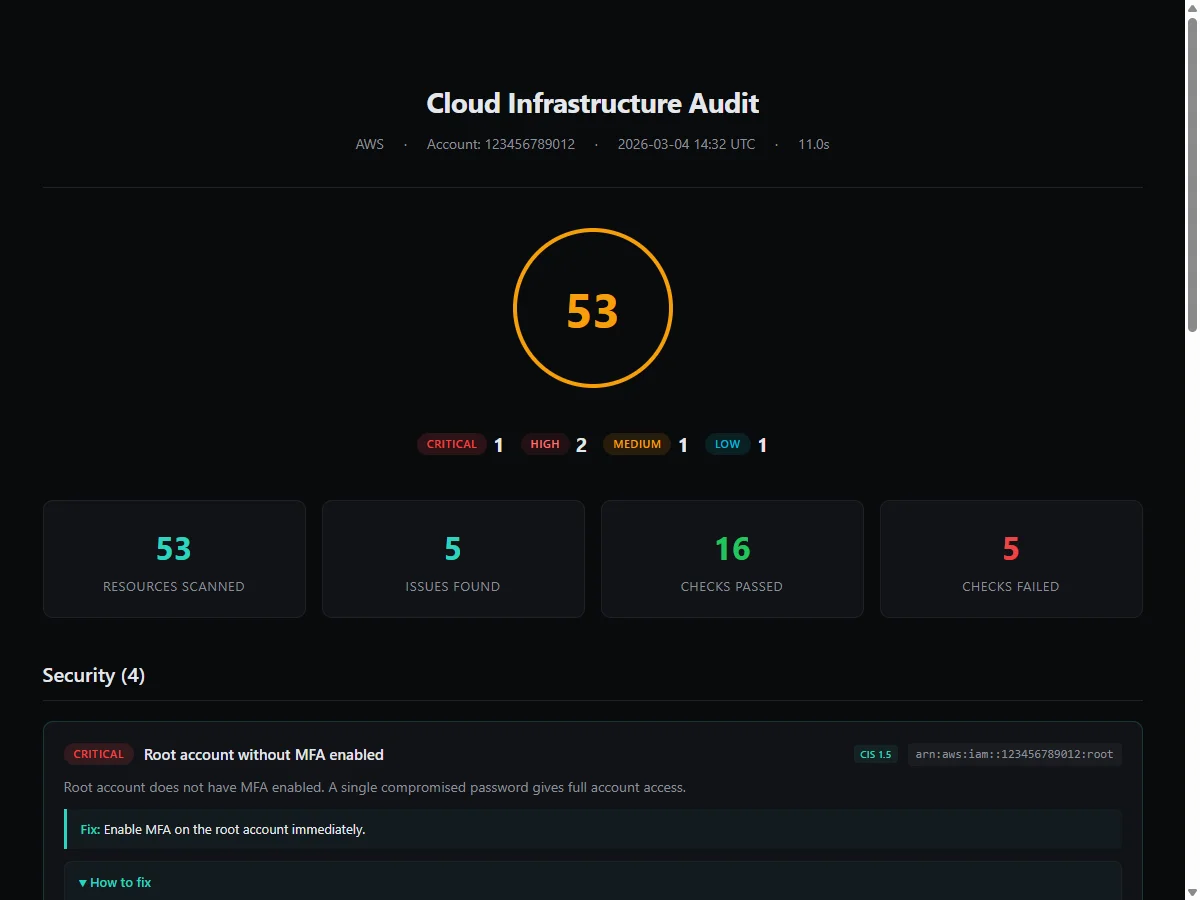
Two commands handle change over time. cloud-audit diff compares two scans to surface ClickOps drift, and cloud-audit trend tracks the health score across scans.
Both commands exist in the v2.4.0 CLI, alongside simulate, blast-radius, exposure, threat-feed, demo, and the compliance commands.
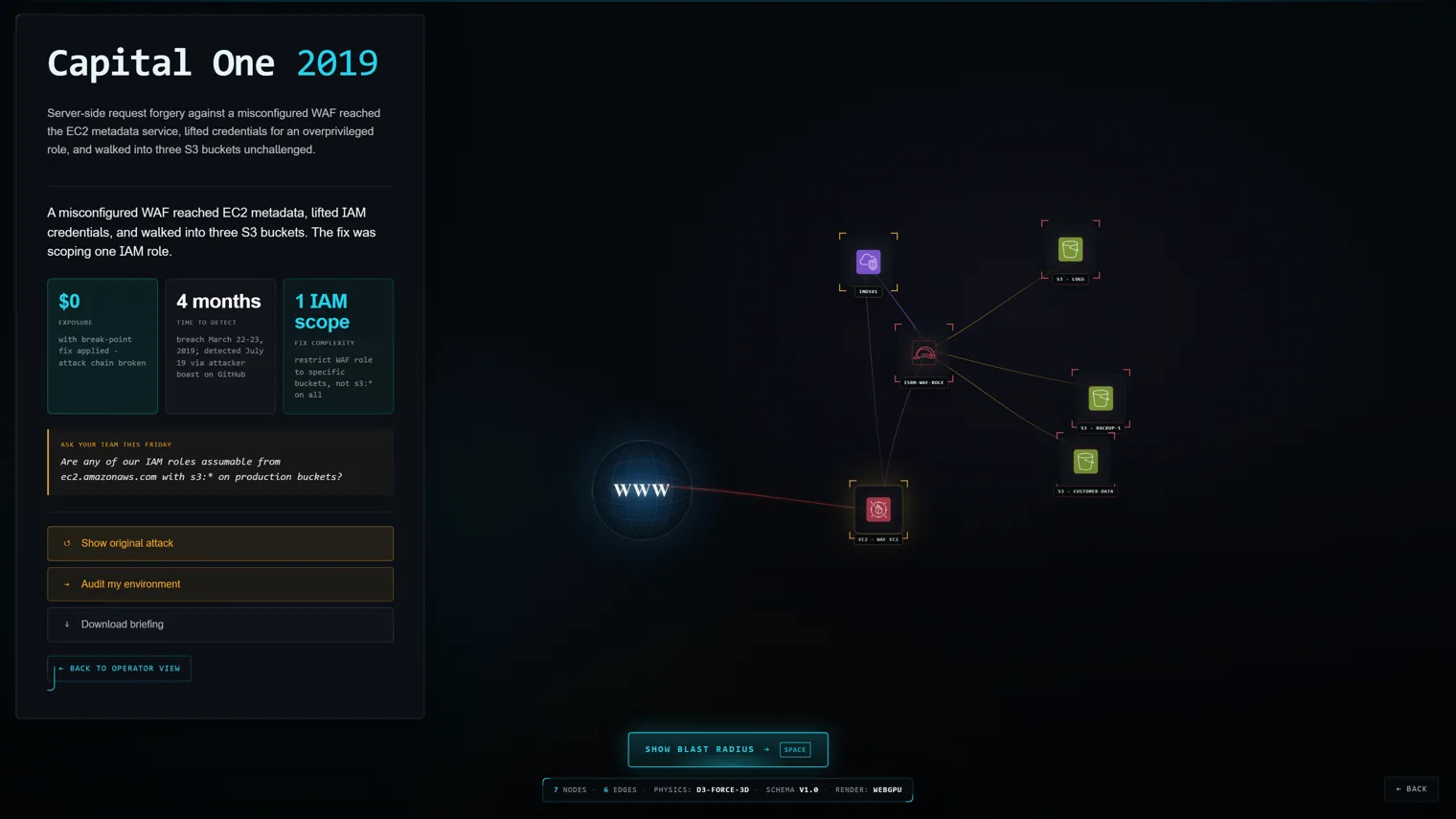
The threat-feed command runs 10 detectors, registered as TF-001 through TF-010 in the v2.4.0 source, that flag configurations matching recent AWS abuse patterns.
cloud-audit vs Checkov
This is the comparison that matters most, and it is not really a head-to-head. The two tools scan different things at different points in the lifecycle.
Checkov is a pre-deploy policy-as-code scanner. It parses Terraform, CloudFormation, Kubernetes manifests, Helm charts, ARM, Bicep, Ansible, and more, with over 1,000 built-in policies backed by Palo Alto Networks.
Checkov’s advantage is breadth and timing. It runs in a pull request, gates a merge, and covers every major cloud provider plus Kubernetes — none of which cloud-audit attempts.
cloud-audit runs after deployment against a live AWS account. That gives it a class of visibility Checkov structurally cannot have: resources created in the console, drifted attributes, and anything provisioned outside the IaC pipeline.
It also sees runtime-adjacent posture: whether GuardDuty is enabled, whether CloudTrail log validation is on, whether an IAM principal can escalate to admin today. A repository scanner has no view of any of that.
The correlation layer is the other split. Checkov’s graph policies check cross-resource relationships within a template; cloud-audit’s 31 chain rules correlate findings across services in a running account.
Pick Checkov if you want to block bad infrastructure before it ships and you need coverage across Terraform, Kubernetes, and multiple clouds.
Pick cloud-audit if you need to know what is wrong in AWS right now, including everything that never went through Terraform. Most teams that adopt one eventually want both.
cloud-audit vs Prowler
Prowler is the incumbent open-source AWS security scanner and the closest direct peer. Both are Python, both are read-only, both target live AWS accounts.
Prowler’s advantage is scale and maturity. Its open-source repository carries hundreds of checks across AWS, Azure, GCP, and Kubernetes, with a large contributor base and years of production use behind it.
That breadth cuts both ways. Running Prowler across a full account produces a large finding set, and triaging it is real work. That is the problem cloud-audit was built to avoid.
cloud-audit’s pitch is a deliberately narrow check set with remediation attached. The project documentation frames every check around one question: would an attacker exploit this? Help Net Security reported the same design intent from the maintainer in March 2026.
The correlation and root-cause ranking is where cloud-audit differentiates rather than competes. Both tools rank findings; cloud-audit’s documented workflow additionally collapses correlated findings into the handful of fixes that close the most attack paths.
Maturity is the honest counterweight. cloud-audit is a single-maintainer project created in March 2026 with 68 stars; Prowler has a company and a community behind it.
Pick Prowler if you need maximum coverage, multi-cloud support, and its longer history and larger contributor ecosystem. Pick cloud-audit if you want a short prioritised list with copy-paste fixes and can accept a young, one-person codebase.
cloud-audit vs Wiz
Wiz is a commercial CNAPP. Comparing it to a free CLI is a budget question before it is a capability question.
Wiz agentlessly scans cloud workloads across AWS, Azure, GCP, and Kubernetes, correlating vulnerabilities, identities, network exposure, and secrets into a graph that drives its toxic-combination analysis. It ships with a UI, RBAC, ticketing integrations, and vendor support.
cloud-audit reproduces a narrow slice of that idea — cross-service correlation into attack chains — for one cloud, from a terminal, for free. There is no dashboard, no multi-account inventory, no continuous monitoring, and nobody on call.
The overlap is conceptually real, though. Both build a relationship graph and both rank issues by exploitability rather than raw severity. cloud-audit’s blast-radius command and Wiz’s attack-path graph answer the same question at very different scales.
What Wiz will not do is attach a Terraform snippet to nearly every finding (119 of cloud-audit’s 120 registered checks carry one) and let you run the whole thing from a laptop with a SecurityAudit role in five minutes.
Pick Wiz if you have a security budget, multiple clouds, and need continuous monitoring with organisational reporting. Pick cloud-audit if you have one AWS estate, no budget, and want an actionable prioritised list this afternoon. For the wider commercial field, see Prisma Cloud , Orca Security , and Sysdig Secure .
How much does cloud-audit cost?
Nothing. cloud-audit is MIT-licensed with no paid tier, no seat cap, no per-check billing, and no licence key.
The PyPI classifiers and the repository licence both confirm MIT. Every check, all 6 compliance frameworks, the MCP server, and every output format are in the free package.
There is one nuance worth stating plainly. The maintainer runs a cloud consultancy, HAIT, that sells AWS infrastructure audits and CI/CD work, and offers a free 30-minute AWS security review as its lead magnet.
Those are consulting engagements, not a commercial edition of the tool. Nothing in the CLI is gated behind them, and the MIT licence on the repository and the PyPI classifiers both say so.
| What | Cost |
|---|---|
| cloud-audit CLI (every check) | Free, MIT |
| Compliance frameworks (all 6) | Free, included |
| MCP server, SARIF/HTML/JSON/Markdown reports | Free, included |
| Author’s AWS audit and remediation services | Paid consulting — priced on request, not published |
How do you get started with cloud-audit?
The fastest path is pip and an AWS profile that already works. There is also an offline demo if you want to see the output shape before pointing it at a real account.
- Install it. Run
pip install cloud-audit, orpipx install cloud-auditfor an isolated install. The container image on GitHub Container Registry is the third option. Python 3.10 or newer is required. - See the output first. Run
cloud-audit demoto generate a full sample report offline, with no AWS credentials involved. - Grant read-only access. Attach the AWS-managed
SecurityAuditpolicy to the role or user you will scan with. The project documents it as sufficient for every check. - Scan. Run
cloud-audit scan. Add--profile prod --regions eu-central-1to target a specific account and region, or--regions allfor every enabled region. - Wire it into CI. Emit SARIF with
cloud-audit scan --format sarif --output results.sarifand upload it viagithub/codeql-action/upload-sarif. Gate the build with--min-severity high.
For AI-assisted workflows, claude mcp add cloud-audit -- uvx --from cloud-audit cloud-audit-mcp registers an MCP server exposing 6 read-only tools.
simulate command runs locally against saved scan data without making AWS calls.When should you use cloud-audit?
The clearest fit is a team running AWS without a dedicated cloud security function, where a CNAPP is not in the budget and the existing IaC scanner only covers what went through Terraform.
It also fits consultants and contractors well. The HTML report is explicitly built as a client-facing deliverable, and the CLI-plus-Terraform remediation gives you something to hand over rather than a findings list.
A third case is post-deploy verification. If you already run Checkov or Trivy in CI, cloud-audit answers the question those tools cannot: did what shipped match what was reviewed?
The drift use case follows from that. cloud-audit diff between two scans surfaces console changes that never touched your IaC repository. That is the failure mode that makes pre-deploy scanning look better than it is.
Skip it if you run multi-cloud. Coverage is AWS only, so Azure or GCP estates need something else entirely.
Skip it too if you need continuous monitoring, alerting, or organisational rollups. This is a scanner you invoke, not a platform that watches.
What are the alternatives to cloud-audit?
The alternatives split by what you are actually trying to scan, so the honest answer depends on whether you want pre-deploy or post-deploy coverage.
| Tool | Licence | Scans | Best for |
|---|---|---|---|
| Prowler | Apache 2.0 | Live AWS, Azure, GCP, Kubernetes | The direct peer: far more checks, multi-cloud, larger community |
| ScoutSuite | GPL-2.0 | Live AWS, Azure, GCP, and others | Multi-cloud auditing with an HTML report, maintained by NCC Group |
| Checkov | Apache 2.0 | IaC files (pre-deploy) | Policy-as-code gating in CI with 1,000+ built-in policies |
| Trivy | Apache 2.0 | IaC, containers, SBOM, secrets | One binary covering four scanning categories |
| KICS | Apache 2.0 | IaC files (pre-deploy) | Rego-based queries with the widest IaC format coverage |
| Wiz | Commercial | Live multi-cloud, workloads, identities | Continuous CNAPP monitoring with vendor support |
| Prisma Cloud | Commercial | Live multi-cloud plus IaC | Enterprise wrap of Checkov with centralised policy management |
If you want a like-for-like replacement, Prowler is the one to evaluate first. If you want to cover the pre-deploy half of the problem instead, start from the IaC security tools category page.
What are cloud-audit’s limitations?
Five limits matter before you adopt it: AWS-only coverage, a single maintainer, no continuous monitoring, a narrow check set, and four of six compliance frameworks still in beta.
AWS only. There is no Azure or GCP provider in v2.4.0. The source tree has a provider abstraction and the maintainer has discussed Azure as a future target, but today this is a single-cloud tool.
It is a one-person project. GitHub shows one dominant contributor with 112 commits, a dependency bot, and two drive-by contributors. The repository was created in March 2026.
Activity is genuinely healthy for its age: 29 commits in the trailing 90 days and 29 PyPI releases. Bus factor is still a real consideration for anything you wire into a release gate.
No continuous monitoring. cloud-audit is invoked, not resident. There is no alerting, no multi-account inventory, and no UI beyond terminal output and generated reports.
Check depth is deliberately narrow. Even at the 120 the CLI registers, that is a fraction of what Prowler or a commercial CSPM covers. That is the design intent, not an oversight, but it means cloud-audit is not a compliance-completeness tool despite shipping 6 frameworks.
Framework maturity varies. Only CIS AWS v3.0 and SOC 2 Type II are marked stable. ISO 27001:2022, HIPAA, NIS2, and BSI C5:2020 are beta, so treat their output as directional rather than audit-ready.
Frequently Asked Questions
What is cloud-audit?
list-checks prints 120 — including IAM, S3, EC2, VPC, RDS, KMS, CloudTrail, Lambda, Bedrock, and SageMaker. Version 2.4.0 correlates individual findings into attack chains using 31 rules and analyses IAM privilege-escalation paths across 9 categories. Remediated findings include both an AWS CLI command and a Terraform snippet: 119 of the 120 registered checks carry one. The project is MIT-licensed and maintained by Mariusz Gebala.Is cloud-audit free?
pip install cloud-audit, pipx install cloud-audit, or the container image on GitHub Container Registry. The maintainer separately runs a cloud consultancy that sells AWS infrastructure audits and offers a free 30-minute security review, but those are consulting engagements, not a commercial edition of the tool. Nothing in the CLI is gated behind a licence key.How is cloud-audit different from Checkov or KICS?
Does cloud-audit modify my AWS account?
SecurityAudit policy covers every check, including IAM escalation analysis. Remediation output is generated for you to review and apply yourself — the --export-fixes flag writes a commented bash script that Help Net Security described as designed to be selectively uncommented before execution. The simulate command runs locally against saved scan data and makes no AWS calls.Which compliance frameworks does cloud-audit support?
scan --compliance <id>. CIS AWS Foundations Benchmark v3.0 and SOC 2 Type II are marked stable. ISO 27001:2022, HIPAA, NIS2, and BSI C5:2020 are marked beta. All six framework definitions ship as data files in the v2.4.0 source tree. Compliance output is available in HTML and Markdown alongside the standard scan report.Can cloud-audit run in CI/CD?
cloud-audit scan --format sarif with github/codeql-action/upload-sarif. A --quiet flag returns exit codes only — 0 for clean, 1 for findings, 2 for error — and --min-severity gates the build on severity. The repository ships example workflows for a basic scan, a daily diff, and a post-deploy scan.