


Checkov is a static analysis tool that scans infrastructure-as-code files for misconfigurations before deployment. It covers Terraform, CloudFormation, Kubernetes, Helm, ARM templates, Bicep, Dockerfiles, Serverless framework, Ansible, Kustomize, and OpenTofu.
Checkov is the open source policy-as-code engine originally built by Bridgecrew before its acquisition by Palo Alto Networks’ Prisma Cloud, so Bridgecrew IaC scanning queries still point here.
Palo Alto Networks maintains it as part of Prisma Cloud, under the Apache 2.0 license. Over 80 million downloads since its 2019 launch.
The tool runs from the command line. Point it at a directory of IaC files and it returns passed and failed checks with file locations, line numbers, and code snippets for each failure.
Non-zero exit codes on failures mean it slots into CI/CD gates without extra scripting.
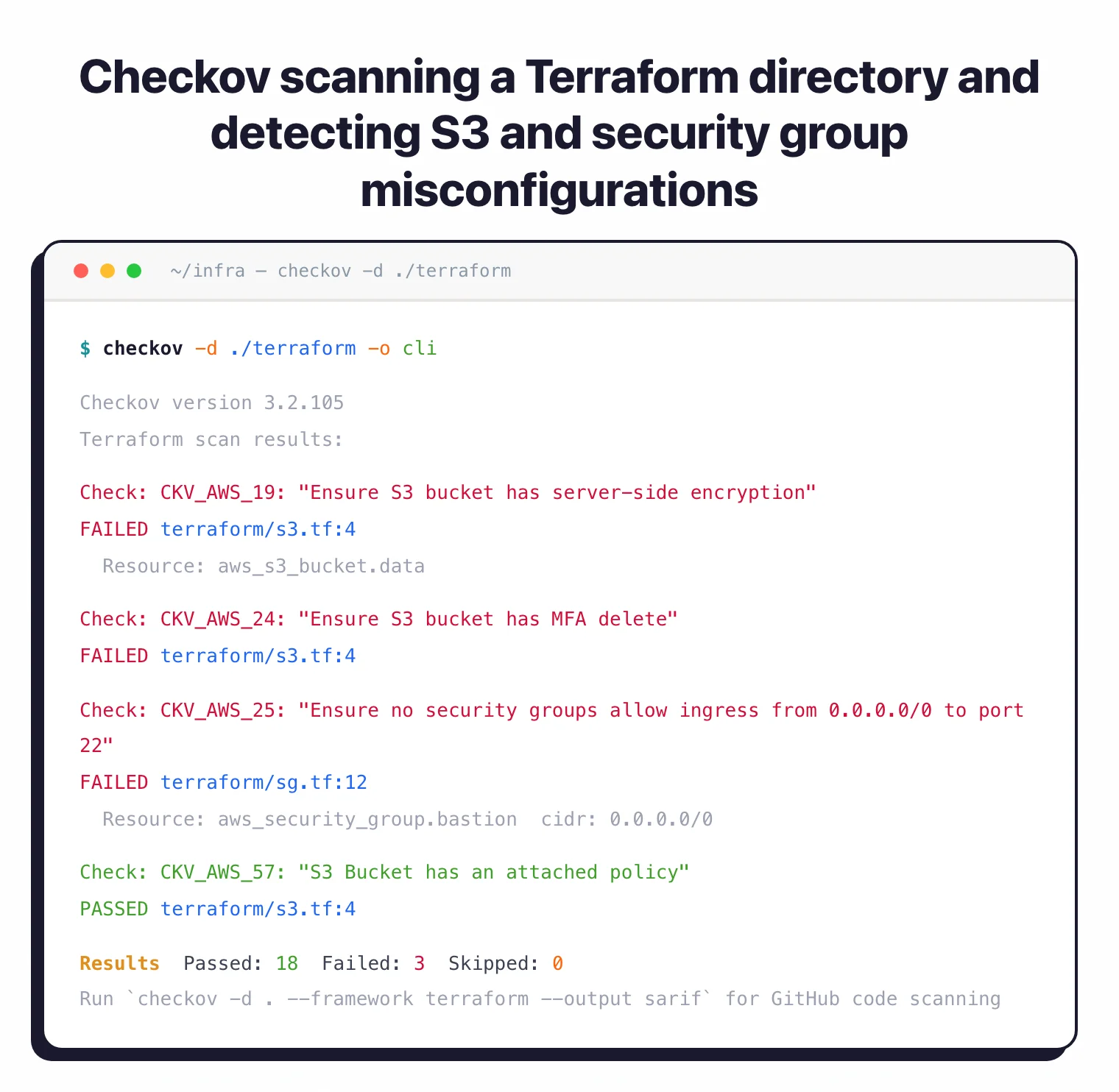
What is Checkov?
Checkov started as a Terraform-focused scanner and grew into a multi-framework IaC security tool. Bridgecrew built the original version.
Palo Alto Networks acquired Bridgecrew in 2021 and folded the project into Prisma Cloud. The open-source CLI stayed free.
Three things set Checkov apart from other IaC security tools :
| Capability | Details |
|---|---|
| 1,000+ Built-in Policies | Attribute checks and graph-based checks covering AWS, Azure, GCP, and OCI. Compliance mappings for CIS Benchmarks, SOC 2, HIPAA, and PCI DSS included out of the box. |
| Graph-Based Analysis | Checks relationships between resources, not just individual attributes. Catches misconfigurations that single-resource scanners miss entirely. |
| Custom Policies in Python or YAML | Write your own checks using Python classes or declarative YAML syntax. Version 3.0 added 36 new operators and JSON path support. |
What are Checkov’s key features?
| Feature | Details |
|---|---|
| Built-in policies | 1,000+ checks (attribute + graph-based) |
| Supported IaC frameworks | Terraform, CloudFormation, Kubernetes, Helm, ARM, Bicep, Ansible, Kustomize, OpenTofu, Serverless, AWS CDK, Dockerfile |
| Cloud providers | AWS, Azure, GCP, OCI |
| Compliance frameworks | CIS Benchmarks , SOC 2, HIPAA, PCI DSS, AWS Foundations Benchmark |
| Custom policy formats | Python and YAML |
| Output formats | CLI, JSON, JUnit XML, SARIF, CSV, CycloneDX, GitHub Markdown |
| CI/CD integrations | GitHub Actions, GitLab CI, Jenkins, Azure Pipelines, BitBucket Pipelines, CircleCI, Argo Workflows |
| Secrets detection | Known formats + entropy analysis + live API key verification |
| Python versions | 3.9 through 3.12 |
| License | Apache 2.0 |
Graph-based policies
Graph-based policies are the real differentiator. A standard attribute check verifies that an S3 bucket has encryption enabled.
A graph-based check verifies that an EC2 instance connects to a network interface in a VPC-attached subnet. Single-resource checks miss that kind of misconfiguration entirely.
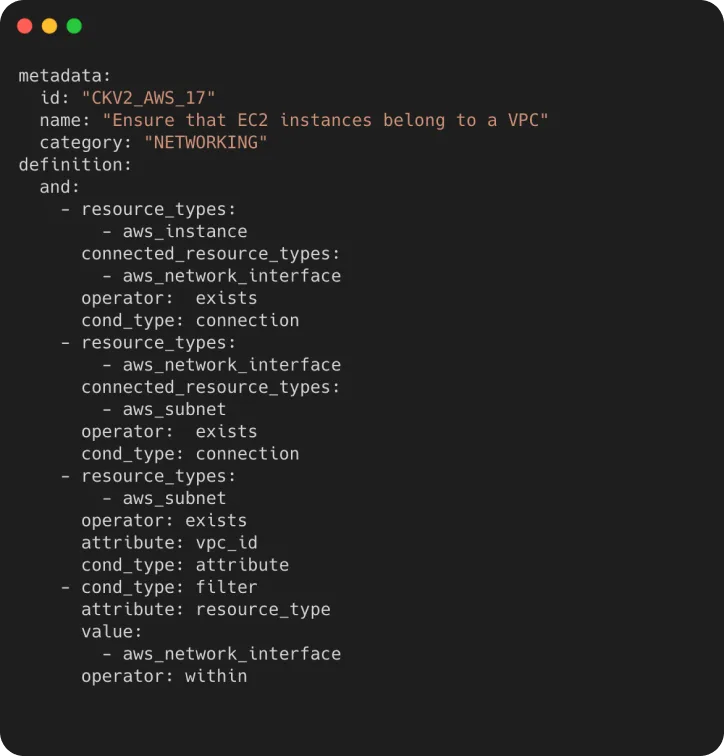
Checkov 3.0 added 800 graph-based policies. It also introduced 36 new operators including a SUBSET operator that simplifies nested logic, and JSON path support via the jsonpath_ prefix for matching deep attribute structures.
Note: Attribute checks inspect one resource at a time. Graph checks follow connections between resources. If your Terraform code has an EC2 instance, a network interface, and a subnet, a graph check verifies all three are wired together correctly. This is why Checkov catches misconfigurations that KICS or simpler attribute-only scanners can miss.
Custom policies
Custom policies come in two flavors. Python policies inherit from base check classes and define resource types, expected values, and check logic:
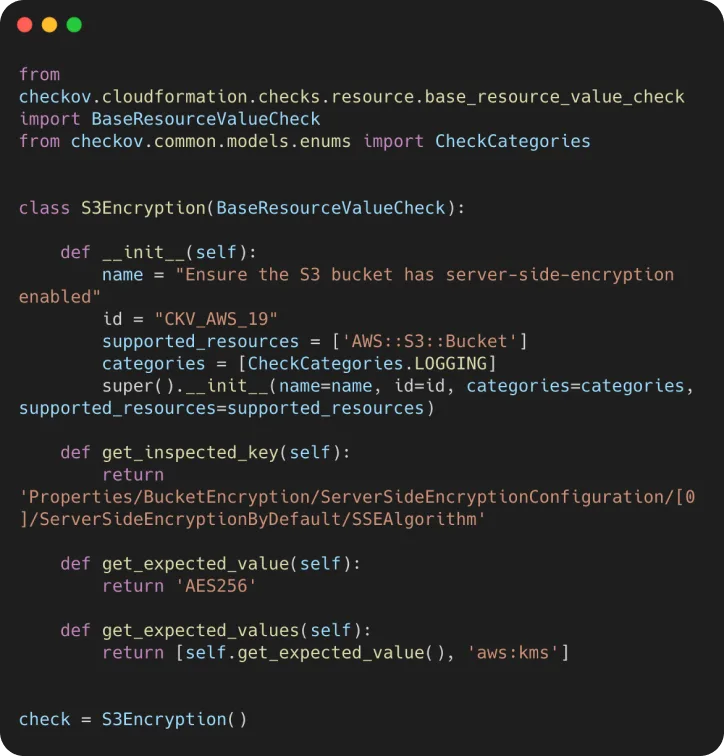
YAML policies use a declarative syntax with operators for attribute checks, connection checks, and filters. Easier to write for teams that don’t want Python in their policy pipeline.
metadata:
  id: "CKV2_CUSTOM_1"
  name: "Ensure S3 bucket has versioning"
  category: "GENERAL_SECURITY"
definition:
  cond_type: "attribute"
  resource_types:
    - "aws_s3_bucket"
  attribute: "versioning.enabled"
  operator: "equals"
  value: "true"
Secrets detection
Checkov also handles secrets detection. It recognizes known credential formats like AWS access keys, Azure storage keys, and GitHub tokens.
It detects randomized secrets through entropy analysis and can verify keys against live APIs to cut down on false positives.
CI/CD integration
CI/CD integration works through native actions and Docker images. GitHub Actions uses the official bridgecrewio/checkov-action.
GitLab CI runs the bridgecrew/checkov Docker image. Jenkins, Azure Pipelines, BitBucket Pipelines, CircleCI, and Argo Workflows are all supported.
 GitHub Actions
 GitLab CI
 Jenkins
 Azure Pipelines
 Bitbucket Pipelines
 CircleCI
 AWS
AWS Azure
Azure GCP
GCP OCI
OCIOutput formats: CLI text, JSON, JUnit XML, SARIF, CSV, CycloneDX, and GitHub Markdown. SARIF feeds directly into GitHub code scanning alerts.
JUnit XML works with CI dashboards. CycloneDX produces software bill of materials data.
Pro tip: Run checkov -d . -o sarif and upload the results to GitHub code scanning. Failed checks show up as annotations on pull requests, right next to the code that triggered them.
How do I get started with Checkov?
- Install Checkov — Run
pip install checkov,brew install checkov, or pull the Docker imagebridgecrew/checkov:latest. Requires Python 3.9-3.12 for pip installs. - Scan a directory — Run
checkov -d /path/to/terraform. Checkov auto-detects the framework and runs all applicable policies. Add--framework terraformto limit to a specific framework. - Review results — Each failed check shows the check ID, description, file path, line numbers, and the offending code snippet. Passed checks get a one-line summary.
- Suppress false positives — Add
#checkov:skip=CKV_AWS_19:Reason hereas an inline comment, or use--skip-check CKV_AWS_19on the command line. A.checkov.yamlconfig file works for persistent settings. - Add to CI/CD — Use
bridgecrewio/checkov-actionfor GitHub Actions or the Docker image for other platforms. Non-zero exit codes block merges when checks fail. Use--soft-failduring rollout to log without blocking.
Prisma Cloud integration
Prisma Cloud integration adds centralized policy management, runtime scanning across five cloud providers, drift detection between IaC definitions and deployed resources, and automated pull request annotations. All optional. The standalone CLI works fine without any paid subscription.
How much does Checkov cost?
The Checkov CLI is free under Apache 2.0. There is no paid tier for the open-source binary itself, no scan limits, and no telemetry call-home that gates results. Install via pip, Homebrew, or Docker and run as many scans as you want against any size repository.
Paid value sits inside Prisma Cloud Code Security, the Palo Alto Networks platform that wraps Checkov with a managed control plane. Code Security is sold as part of the broader Prisma Cloud subscription rather than a standalone Checkov licence, and Palo Alto Networks does not publish list pricing — pricing is quote-based and depends on cloud workload counts. If you need a number, ask Palo Alto sales or check vendor marketplaces (AWS, Azure) for indicative annual contracts.
What you get for paying: centralised policy management across teams, drift detection between IaC definitions and deployed cloud resources, cross-repo dashboards, automated PR comments backed by Bridgecrew-grade run-time signal, and SSO/SAML for the UI. The standalone CLI does none of that — it scans, prints, and exits.
What are alternatives to Checkov?
Four open-source IaC scanners cover the same ground from different angles. tfsec was the original Terraform-only scanner and is now maintained inside Aqua Security’s Trivy project; choose it for lightweight Terraform-only scans where Checkov’s breadth is overkill.
KICS from Checkmarx uses Rego-based queries and supports more file formats including Helm chart security, Kubernetes manifest scanning, Crossplane, and Pulumi; pick it when format coverage matters more than policy count.
Trivy from Aqua Security bundles IaC misconfiguration scanning into the same binary that handles container images, dependencies, and SBOMs — convenient if you want one scanner for the whole stack rather than one tool per layer.
Snyk IaC is the commercial pick with a developer-first UX, native Terraform plan support, and tight IDE integration; it costs money but it ranks issues by exploitability and pulls in cloud context. For a longer side-by-side, see the IaC security tools hub , Checkov vs KICS , or Checkov vs Trivy .
When to use Checkov
Teams running Terraform, CloudFormation, or Kubernetes get the most from it. The policy count is one of the largest of any open-source IaC scanner.
Graph-based checks give it depth that simpler attribute-only scanners don’t have. Works best as a pre-commit hook or CI/CD gate.
Good fit if you need:
- The widest built-in policy coverage without writing custom rules
- Cross-resource relationship checks (graph-based policies)
- Compliance mappings for CIS, SOC 2, HIPAA, or PCI DSS
- Secrets detection alongside IaC scanning
- A tool that runs standalone without a paid platform
For a broader view of IaC security strategy, see the cloud infrastructure security guide . Consider Trivy if you want IaC, container, and dependency scanning in a single binary.
Consider KICS if you prefer Rego-based policies or need broader file format coverage beyond IaC. For software bill of materials (SBOM) generation to complement IaC scanning, see cdxgen .