The best free DAST tools in 2026 are ZAP, Nuclei, Nikto, and Wapiti — covering web application vulnerability scanning without license costs.
What free DAST tools can (and can’t) do#
Free DAST tools scan running web applications for security vulnerabilities by sending malicious inputs and analyzing responses. They find SQL injection, cross-site scripting, directory traversal, server misconfigurations, and dozens of other vulnerability classes (OWASP Top 10 ) without seeing your source code.
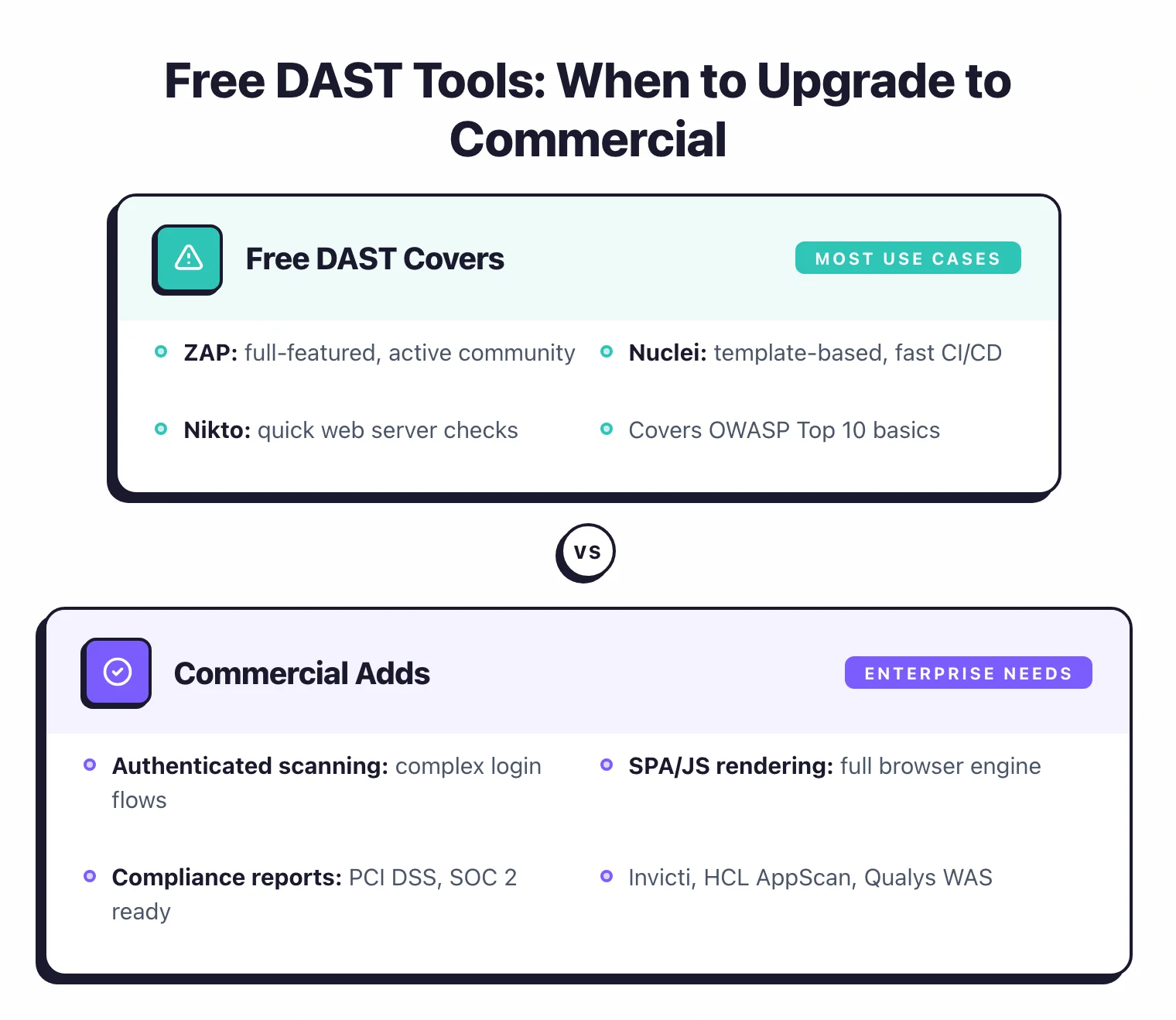
The catch is scope. ZAP covers most of what you need for traditional web application scanning. Nuclei excels at targeted checks against known vulnerabilities.
But no single free tool matches the breadth of a commercial scanner like Invicti or Burp Suite Professional.
Here is what works well with free tools:
- Standard vulnerability detection. SQL injection, XSS, SSRF, path traversal, command injection, header misconfigurations. The common classes are well covered.
- CI/CD integration. ZAP and Nuclei both have Docker images and CLI modes designed for pipeline use.
- API scanning. ZAP imports OpenAPI specs. Nuclei has HTTP templates that hit API endpoints directly.
- Authenticated scanning. ZAP supports session tokens, cookie-based auth, and script-based authentication.
Here is where free tools struggle:
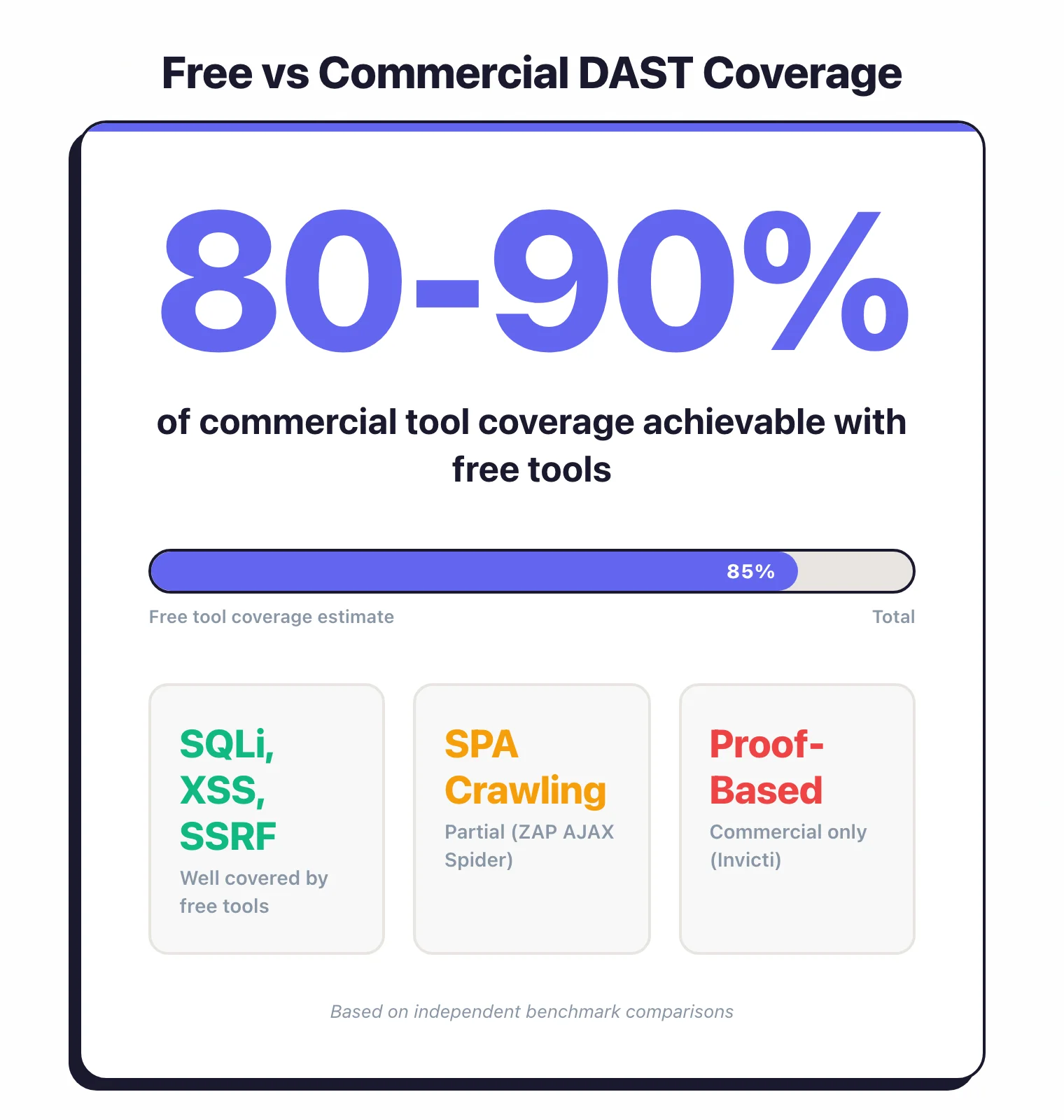
- SPA crawling. JavaScript-heavy applications need a browser-based crawler. ZAP’s AJAX Spider handles some of this, but commercial tools do it better.
- False positive verification. Commercial tools like Invicti use proof-based scanning to confirm vulnerabilities automatically. Free tools report findings without confirmation, which means more manual triage.
- Enterprise management. No centralized dashboard, no multi-application tracking, no role-based access. You are managing scan results in CLI output or ZAP’s local GUI.
For a single development team scanning their own applications, free tools cover 80-90% of what matters. For a security team managing dozens of applications across an organization, the management overhead of free tools becomes the bottleneck.
Tool-by-tool breakdown#
ZAP (Zed Attack Proxy)#
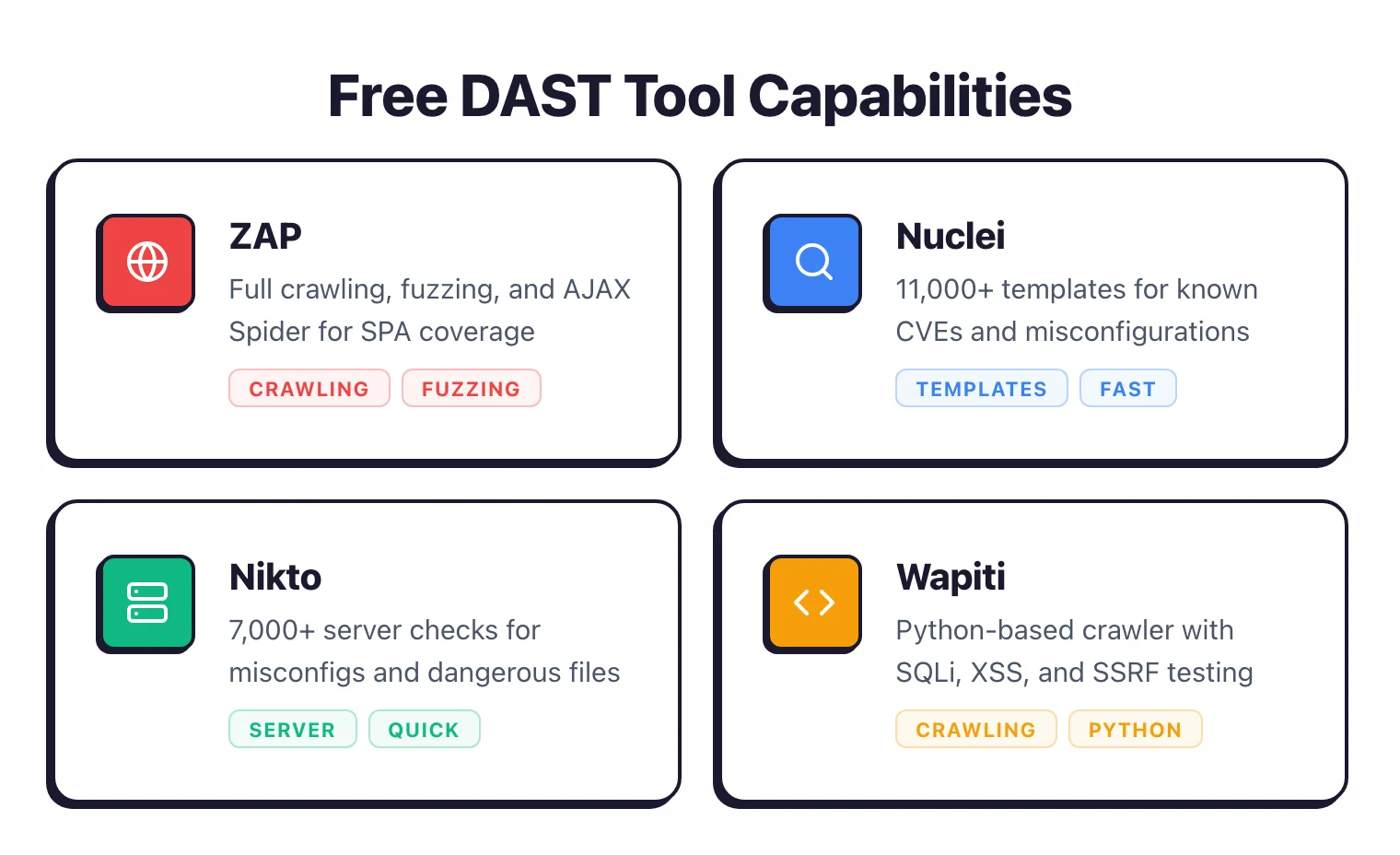
ZAP is the default choice for free DAST. Originally an OWASP project, it moved to the Software Security Project in 2023, and in September 2024, its core developers joined Checkmarx. Apache 2.0 licensed, no restrictions.
ZAP works as a proxy between your browser and the target application. It intercepts traffic, crawls the application, and runs active scans against discovered endpoints.
It has both a desktop GUI for manual testing and a CLI/Docker mode for automation.
Strengths: broadest scan coverage among free tools, active community, extensive add-on marketplace, supports authenticated scanning, handles AJAX-heavy pages with its AJAX Spider . Weekly Docker image updates include the latest scan rules.
Weaknesses: full scans are slow (1-8 hours for medium applications), scan tuning requires experience, AJAX Spider misses some SPA routes, and the GUI feels dated.
Best for: general-purpose web application scanning, both manual and automated.
Nuclei#
Nuclei by ProjectDiscovery takes a different approach. Instead of crawling and fuzzing, it runs targeted checks defined in YAML templates.
The community maintains over 11,000 templates in the nuclei-templates repository covering CVEs, misconfigurations, exposed panels, default credentials, and more.
Strengths: fast (scans complete in minutes, not hours), templates are easy to write and share, active community adding new CVE templates within days of disclosure, excellent for known vulnerability scanning.
Weaknesses: does not crawl or discover endpoints on its own, does not fuzz for unknown vulnerabilities (XSS, SQLi), limited authenticated scanning. You need to combine it with a crawler or use it alongside ZAP.
Best for: scanning for known CVEs and misconfigurations at scale.
Nikto#
Nikto is a veteran web server scanner, around since 2001 . It checks for outdated server software, dangerous default files, and common misconfigurations.
Think of it as a server hardening checker rather than an application vulnerability scanner.
Strengths: fast, simple, checks 7,000+ potentially dangerous files and server issues, good for quick infrastructure assessments.
Weaknesses: does not test application logic, no crawling, no form interaction, high false positive rate. It checks for the existence of files and headers, not whether your application is vulnerable to injection attacks.
Best for: quick server hardening checks and identifying obvious misconfigurations.
Wapiti#
Wapiti is a Python-based web vulnerability scanner that crawls applications and fuzzes discovered parameters. It tests for SQL injection, XSS, SSRF, command injection, XXE, and file inclusion.
Strengths: solid crawling engine, tests multiple vulnerability classes, actively maintained, good HTML reporting.
Weaknesses: smaller rule set than ZAP, limited API scanning support, less community tooling and documentation, slower scan engine.
Best for: a lightweight alternative when ZAP feels too heavy for your needs.
Arachni (archived)#
Arachni was a strong Ruby-based scanner with good SPA handling. The project was archived in 2020 and is no longer maintained.
Mentioning it because it still appears in search results and comparison lists. Do not use it for new projects. Use ZAP or Nuclei instead.
w3af (limited maintenance)#
w3af (Web Application Attack and Audit Framework) is a Python-based scanner that was popular in the early 2010s. Development has slowed significantly.
The tool still works but has compatibility issues with modern Python versions and lacks recent vulnerability checks.
If you are choosing a free tool today, ZAP and Nuclei are the better options.
Feature comparison table#
| Feature | ZAP | Nuclei | Nikto | Wapiti |
|---|---|---|---|---|
| Crawling | Yes (Standard + AJAX Spider) | No | No | Yes |
| SQL injection | Yes | Template-based | No | Yes |
| XSS detection | Yes | Template-based | No | Yes |
| API scanning | Yes (OpenAPI import) | Yes (HTTP templates) | No | Limited |
| Authenticated scanning | Yes | Limited | Basic | Yes |
| CI/CD integration | Docker, CLI, GitHub Actions | Docker, CLI, GitHub Actions | CLI | CLI |
| Scan speed | Slow (1-8 hours) | Fast (minutes) | Fast (minutes) | Medium |
| Custom rules | Scan rules, scripts | YAML templates | Limited | Python modules |
| SPA support | AJAX Spider | No | No | No |
| Active community | Yes | Yes | Moderate | Moderate |
| License | Apache 2.0 | MIT | GPL | GPL |
Best free DAST for API testing#
API testing is where free DAST tools show the biggest gaps compared to commercial options, but you can still get good coverage.
ZAP imports OpenAPI/Swagger specifications and tests each endpoint with its standard attack payloads. It handles REST APIs well.
GraphQL support exists through add-ons but requires more manual configuration. For authentication, ZAP supports bearer tokens, API keys in headers, and OAuth flows through its script-based auth.
Nuclei templates can target specific API endpoints directly. You write a YAML template that sends a request to an endpoint with a malicious payload and checks the response.
This works well for testing known patterns but does not discover endpoints on its own.
For a practical setup: generate your OpenAPI spec from your application code, import it into ZAP, run the active scan. Then run Nuclei with API-focused templates for additional coverage.
Between the two, you cover endpoint fuzzing and known vulnerability checks.
If your team works primarily with APIs rather than traditional web applications, consider StackHawk . It is commercial with a 14-day free trial, and includes API scanning with OpenAPI import and CI/CD integration.
Best free DAST for CI/CD pipelines#
Both ZAP and Nuclei are built for pipeline integration. Here is how to approach it.
ZAP in CI/CD#
ZAP’s Docker images are the standard approach. The zap-baseline.py
script runs a quick passive scan (2-5 minutes) that catches misconfigurations and information disclosure without active attacks.
The zap-full-scan.py
runs a complete active scan that takes much longer.
Most teams use the baseline scan on every pull request and the full scan on a nightly schedule. ZAP publishes official GitHub Actions, and the CLI output can be formatted as JUnit XML for integration with test reporting tools.
Scan time is the main challenge. A full ZAP scan on a medium application can take hours.
For pull request gates, limit the scan scope to changed endpoints or use the baseline scan only.
Nuclei in CI/CD#
Nuclei is faster in pipelines because template-based checks complete in seconds to minutes. Run it as a post-deployment step with templates targeting your technology stack.
A Nuclei scan against a freshly deployed staging environment finishes before most test suites complete.
Nuclei outputs JSON, SARIF, and Markdown formats. SARIF output integrates with GitHub code scanning alerts, putting findings directly in the Security tab.
Practical pipeline setup#
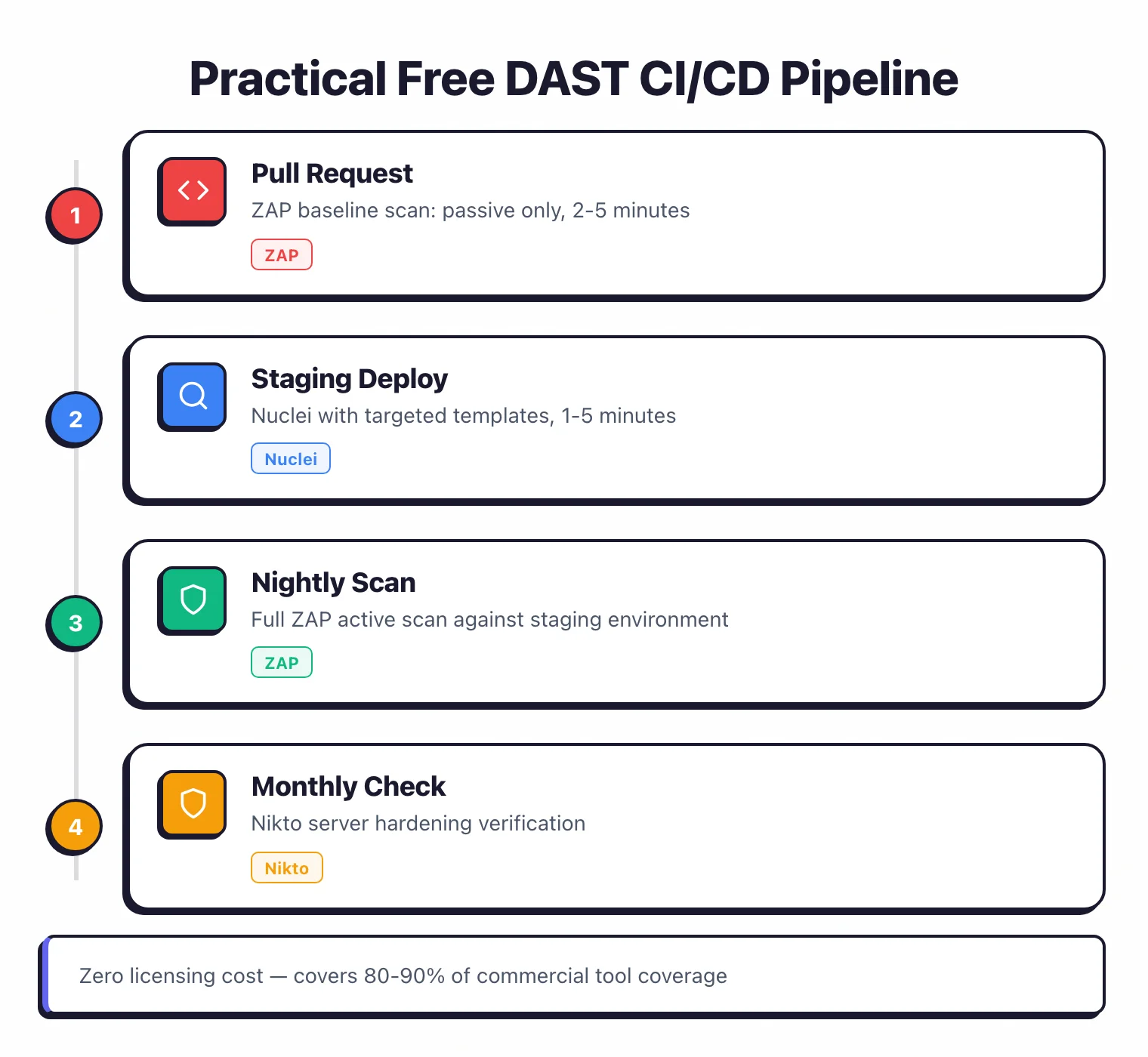
- Pull request: ZAP baseline scan (passive only, 2-5 minutes)
- Staging deploy: Nuclei with targeted templates (1-5 minutes)
- Nightly: Full ZAP active scan against staging (scheduled, not blocking)
This gives fast feedback on every change while still running deep scans regularly.
How do you combine free tools for better coverage?#
No single free tool covers everything. The strongest free DAST setup combines tools that complement each other.
ZAP + Nuclei is the most effective pairing. ZAP handles crawling, endpoint discovery, and fuzzing for unknown vulnerabilities (injection, XSS).
Nuclei handles known CVE detection and misconfiguration checks with its template library. There is minimal overlap because they use fundamentally different approaches.
Add Nikto for a quick server-level check if your team manages web server configurations directly. It catches things like exposed .git directories, default admin panels, and missing security headers that ZAP might not prioritize.
For teams that also run SAST , the combination of static and dynamic testing covers both code-level and runtime vulnerabilities. See our SAST vs DAST comparison for guidance on where each fits.
A realistic workflow:
- Run ZAP baseline scan in CI on every pull request
- Run Nuclei against staging after each deployment
- Schedule a full ZAP active scan weekly against staging
- Run Nikto monthly as a server hardening check
- Triage results in a shared tracker (even a spreadsheet works for small teams)
This costs nothing in licensing and covers the same vulnerability classes as most commercial tools. The tradeoff is manual effort: you are managing four tools, interpreting results without proof-based verification, and building your own reporting.
When should you consider commercial DAST?#
Free tools work well until they don’t. Here are the signals that it is time to evaluate commercial options.
Your application is heavily JavaScript-based. Single-page applications built with React, Angular, or Vue need a scanner that renders JavaScript and interacts with the DOM.
ZAP’s AJAX Spider handles basic cases, but commercial tools like Invicti , Bright Security , and Burp Suite Professional do it more reliably.
False positive triage is eating your time. If your team spends more time verifying findings than fixing them, proof-based scanning pays for itself.
Invicti automatically confirms vulnerabilities by safely exploiting them and showing evidence. That eliminates most false positives without manual review.
You need centralized management. Once you scan more than a handful of applications, tracking results across separate tool outputs becomes unmanageable. Commercial platforms provide dashboards, trend reporting, and team management.
Compliance requires it. Some audit frameworks expect specific reporting formats. PCI DSS ASV scans must come from approved vendors.
SOC 2 auditors may want structured evidence that free tools do not generate natively.
Your team does not have DAST expertise. ZAP is powerful but has a steep learning curve.
Commercial tools like StackHawk and Bright Security are designed for developers who are not security specialists.
Better defaults, simpler configuration, and guided remediation reduce the learning investment.
For a detailed look at commercial options, see the full DAST tools comparison.