

Azure is Microsoft’s cloud platform for production applications — and securing an Azure-hosted application means going beyond application code. Resource group permissions, Azure Storage account ACLs, NSG rules, AKS cluster configurations, Key Vault access policies, and Entra ID role assignments are all part of the attack surface.
This guide covers the AppSec tools most relevant to Azure environments: Checkov for IaC scanning, Microsoft Defender for Cloud for native posture management, Wiz and Prisma Cloud for CNAPP, Trivy for container scanning on AKS, PurpleKnight for Entra ID security, and Qualys WAS for web application scanning.
This is the Azure sibling of the AWS AppSec tools guide and GCP AppSec tools guide .
The Azure AppSec landscape#
Securing an application hosted on Azure involves four distinct layers, each requiring different tooling.
**1. IaC scanning (shift-left). ** Before any Azure resource is created, Bicep, ARM, or Terraform templates should be scanned for misconfigurations.
Checkov catches NSG overpermissions, unencrypted storage accounts, and AKS misconfiguration before deployment.
**2. Cloud posture management (runtime). ** After resources are deployed, the live subscription needs ongoing monitoring.
Microsoft Defender for Cloud and Wiz assess running Azure resources against CIS benchmarks, regulatory frameworks, and known vulnerability databases. For comparisons between CNAPP platforms, see Wiz vs Prisma Cloud .
**3. Identity security. ** Entra ID (formerly Azure AD) is the identity backbone of every Azure deployment.
Service principal permissions, legacy authentication protocols, and admin role assignments are persistent attack vectors that general CNAPP tools underserve. PurpleKnight fills this gap specifically.
**4. Application code security. ** The application code running on Azure App Service, AKS, Azure Functions, or Azure Container Apps still needs SAST , SCA , and secrets scanning — Azure infrastructure tools are not a substitute for code-level analysis.
Semgrep , Snyk , and Gitleaks address the application layer. For container image scanning on AKS, see Trivy alternatives and the container security tools overview.
Most Azure security incidents trace to misconfigured Entra ID permissions, overly permissive storage accounts, or default NSG rules left open. The IaC and identity tools are where Azure-specific AppSec investment pays off most.
Top AppSec tools for Azure#
1. Microsoft Defender for Cloud#
Microsoft Defender for Cloud is Azure’s native cloud security posture management (CSPM) and cloud workload protection platform. It connects to Azure subscriptions via built-in Azure RBAC with no additional agent required for posture management.
The free tier — called Foundational CSPM — provides Secure Score : a continuously updated assessment of your Azure environment against the CIS Microsoft Azure Foundations Benchmark . It surfaces recommendations like enabling MFA enforcement, restricting public access to storage accounts, enabling JIT VM access , and applying Azure Security Benchmark controls .
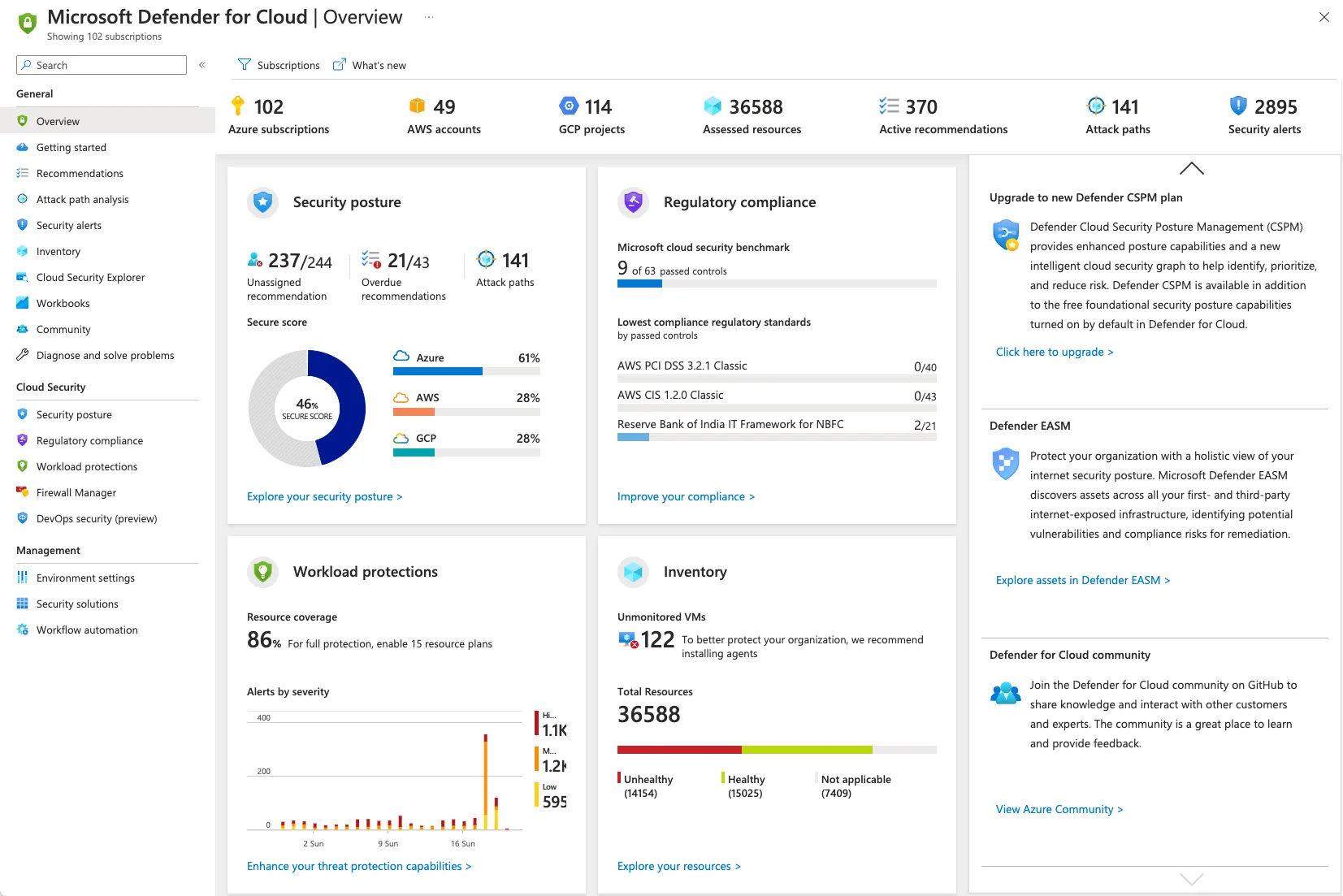
The paid Defender plans add threat detection for specific workload types: Defender for Servers (file integrity monitoring, vulnerability assessment, EDR integration), Defender for Containers (runtime threat detection for AKS, ACR scanning, Kubernetes data plane protection), Defender for App Service (detection of command injection, data exfiltration, and lateral movement), and Defender for Key Vault (detection of unusual access patterns).
Best fit: Any Azure-native team starting their cloud security program. The free tier has zero setup cost and provides immediate value. Teams already in the Microsoft ecosystem benefit from direct integration with Microsoft Sentinel , Azure Monitor, and Microsoft Defender XDR.
2. Wiz#
Wiz is the leading third-party CNAPP for Azure. It connects agentlessly to Azure via a service principal with read-only permissions and inventories resources across all subscriptions in minutes.
Wiz is best known for its Security Graph — a visual representation of attack paths that chains together misconfigurations, exposed secrets, vulnerabilities, and identity relationships to show which paths a real attacker could follow to reach critical assets. An NSG misconfiguration alone may be low severity; combined with an exposed storage account containing connection strings, it becomes critical.
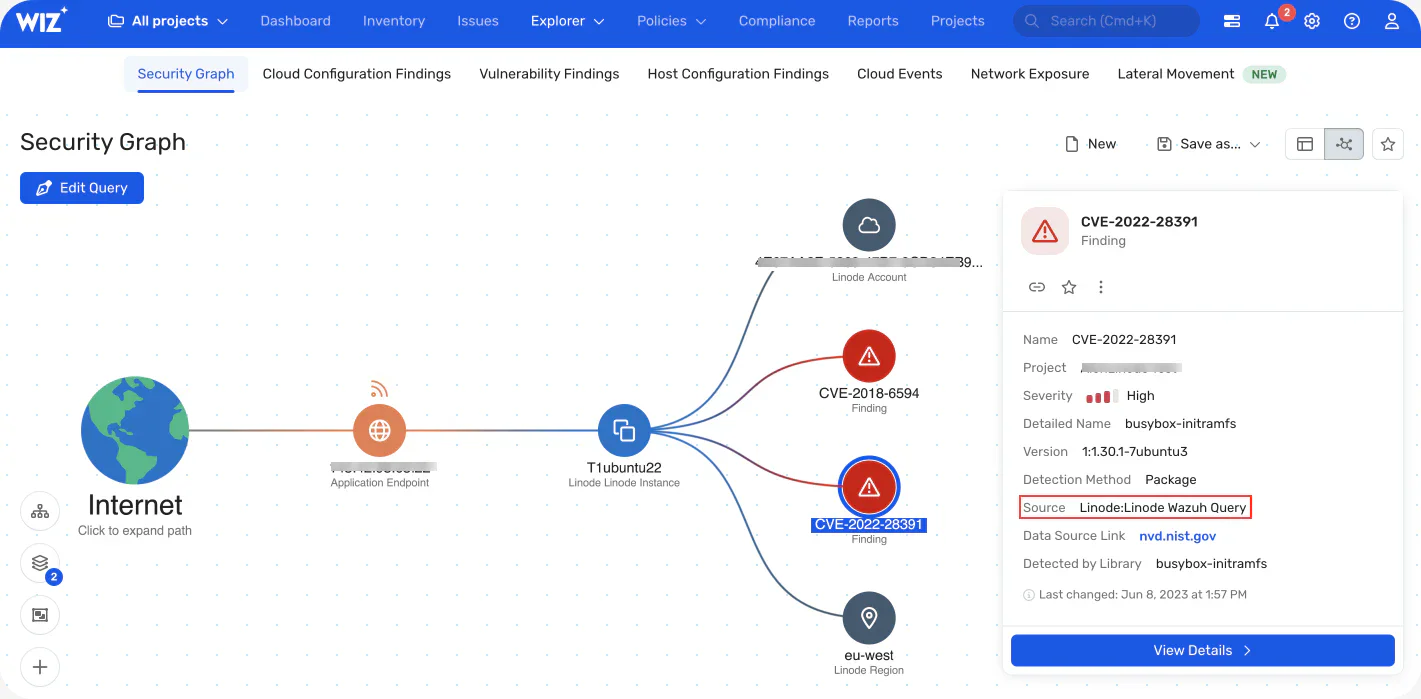
Wiz also provides CSPM, vulnerability assessment for Azure VMs and container images, Kubernetes security for AKS, and data security posture management (DSPM) for Azure Storage and Azure SQL. For multi-cloud organizations running Azure alongside AWS or GCP, Wiz provides a single pane of glass that no native tool can match.
Best fit: Mid-to-large organizations with complex Azure environments or multi-cloud footprints where attack path visualization justifies the commercial cost.
3. Prisma Cloud#
Prisma Cloud (formerly Palo Alto Prisma Cloud, previously Twistlock for containers) covers Azure CSPM, CWPP (cloud workload protection), IaC scanning, and container security in a single commercial platform.
For Azure specifically, Prisma Cloud provides continuous misconfiguration scanning across Azure subscriptions, compliance reporting against CIS Azure benchmarks, PCI DSS, SOC 2, and HIPAA, and workload protection for Azure VMs and AKS pods. Its IaC module scans Bicep, ARM, and Terraform files with severity-rated findings that map back to specific Prisma Cloud policies.
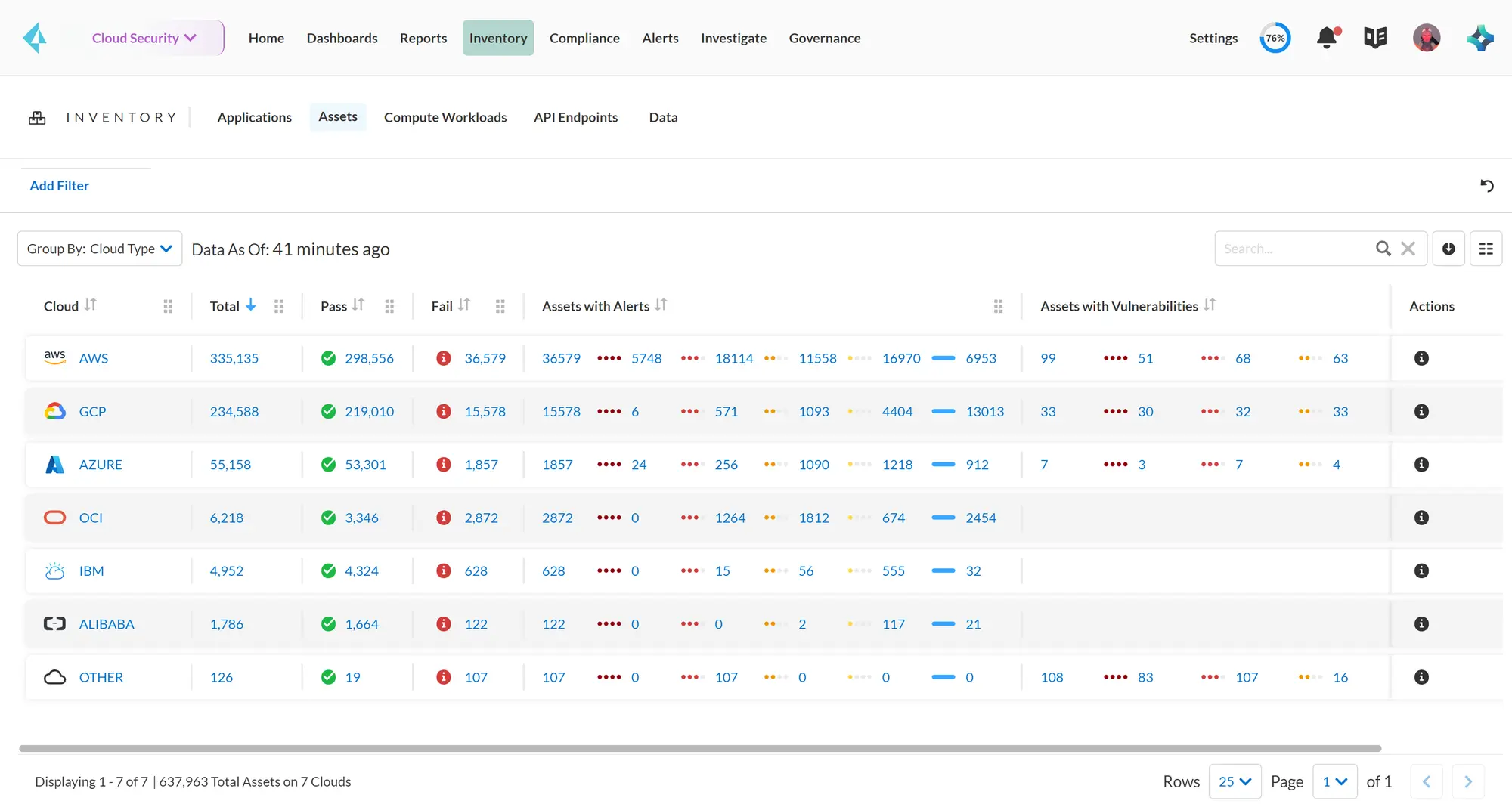
The container security module (inherited from Twistlock) is particularly mature for AKS — it provides runtime protection, vulnerability scanning for ACR images, and Kubernetes admission control.
Best fit: Enterprise organizations that want a single vendor for Azure CSPM, container security, and IaC scanning with strong compliance reporting requirements.
4. Checkov#
Checkov is the most widely used open-source IaC security scanner for Azure infrastructure. It supports Bicep, ARM templates, Terraform, CDK, and Azure DevOps Pipelines YAML natively.
For Azure specifically, Checkov ships 750+ checks covering Azure Storage, AKS, Azure SQL, App Service, Key Vault, NSGs, VNet, ACR, Azure Cache for Redis, Azure Functions, and Service Bus. A checkov -d . --framework bicep or --framework arm scan catches misconfigurations including storage accounts with public blob access, AKS without RBAC, Key Vault without soft delete, and NSGs allowing unrestricted RDP/SSH inbound.
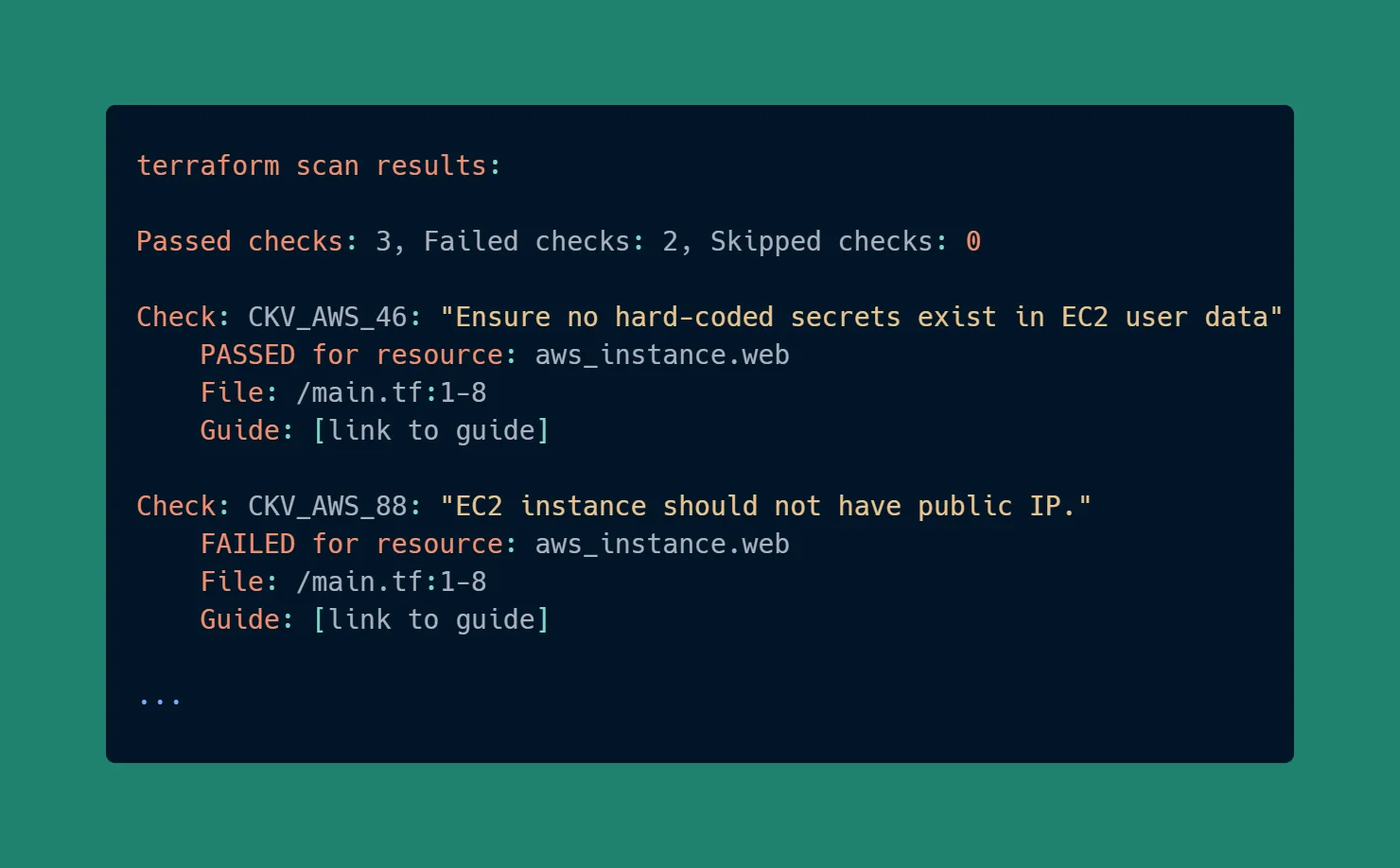
Checkov runs in CI/CD without external services — it’s a Python package with no API calls or licensing requirements for the open-source checks. Custom checks can be written in Python or YAML.
Best fit: Any team deploying Azure infrastructure as code. Checkov belongs in the CI/CD pipeline before terraform apply, Bicep deployment, or ARM stack creation.
5. Trivy#
Trivy is a multi-target open-source scanner from Aqua Security. For Azure environments, it’s most relevant for AKS workloads: scanning container images in Azure Container Registry (ACR), Kubernetes manifests, Helm charts, and Azure-specific IaC files.
Trivy’s trivy k8s --report all command scans a live AKS cluster for vulnerabilities in running container images, configuration issues in Kubernetes resources, and exposed secrets in environment variables. It also scans ACR images directly via trivy image <registry>.azurecr.io/<image>:<tag>.
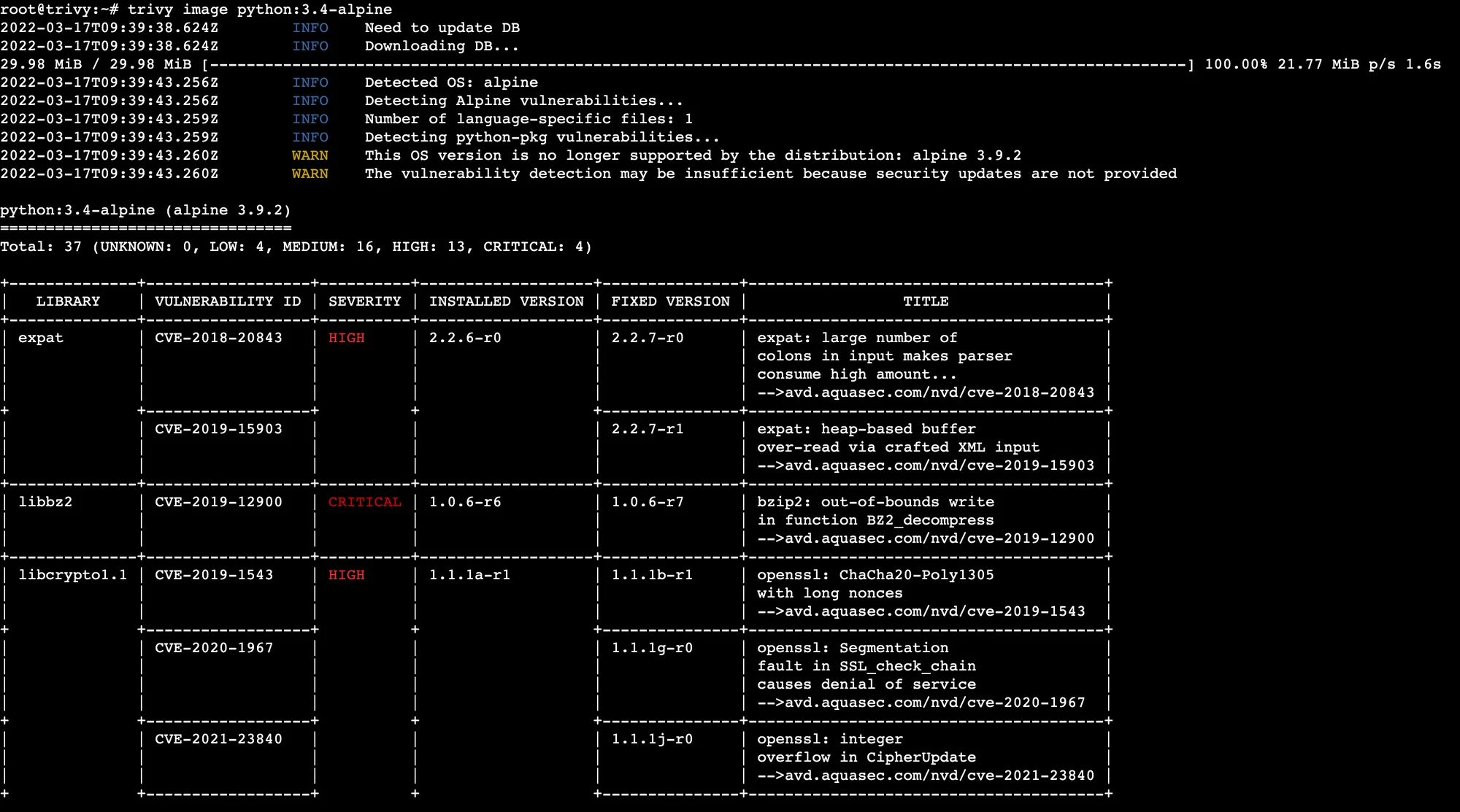
Unlike Checkov, Trivy combines vulnerability scanning (CVEs in OS packages and application dependencies) with misconfiguration detection. A single Trivy scan of an AKS cluster covers both the vulnerability and configuration layers.
Best fit: Teams running containerized applications on AKS who want a single open-source tool covering both CVE scanning and Kubernetes misconfiguration.
6. PurpleKnight#
PurpleKnight by Semperis is a free assessment tool specifically for Active Directory and Entra ID security. It runs against your Entra ID tenant and evaluates hundreds of security indicators — Tier 0 asset exposure, legacy authentication protocol enablement, stale privileged accounts, guest user over-permissions, and Conditional Access policy gaps.
General CNAPP tools like Defender for Cloud and Wiz scan Azure resource configurations but do not go deep on Entra ID identity risk. PurpleKnight fills this gap. It generates a scored report showing which identity indicators are failing and why they matter.
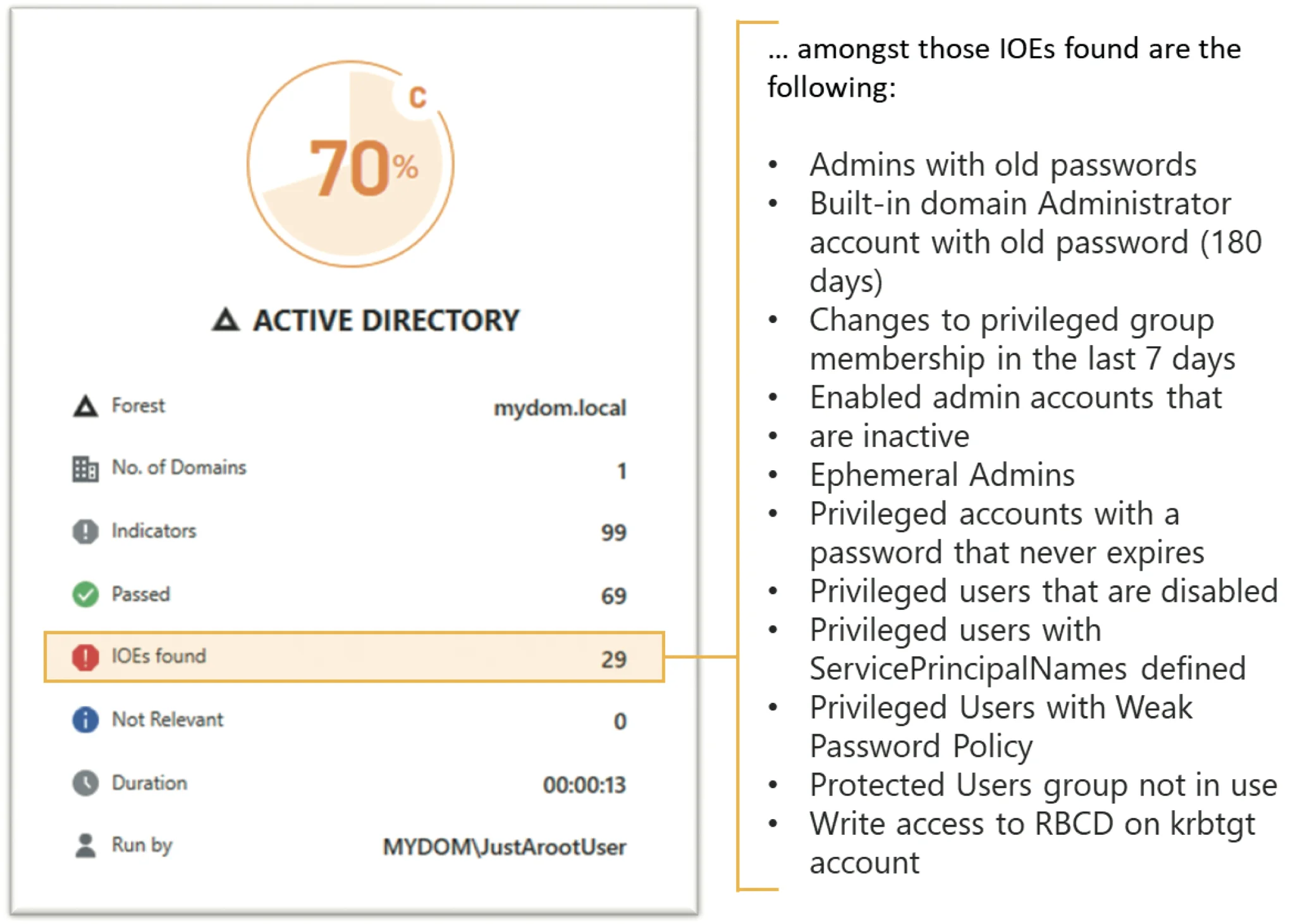
PurpleKnight requires no persistent agent — it runs as a PowerShell-based assessment that can be executed periodically. The free version covers a broad indicator set sufficient for most organizations.
Best fit: Any organization using Entra ID (Azure AD) that needs identity-specific risk assessment beyond what general Azure security tools surface.
7. Azure Advisor Security#
Azure Advisor is Azure’s built-in recommendation engine. Its Security pillar aggregates recommendations from Microsoft Defender for Cloud and surfaces them alongside cost, reliability, and performance guidance.
Security recommendations include: enable Azure Defender plans, enforce MFA for accounts with write permissions, restrict RDP access, apply system updates to VMs, and enable disk encryption. These are basic hygiene checks, not deep vulnerability analysis — but they’re visible to any Azure user at no extra cost.
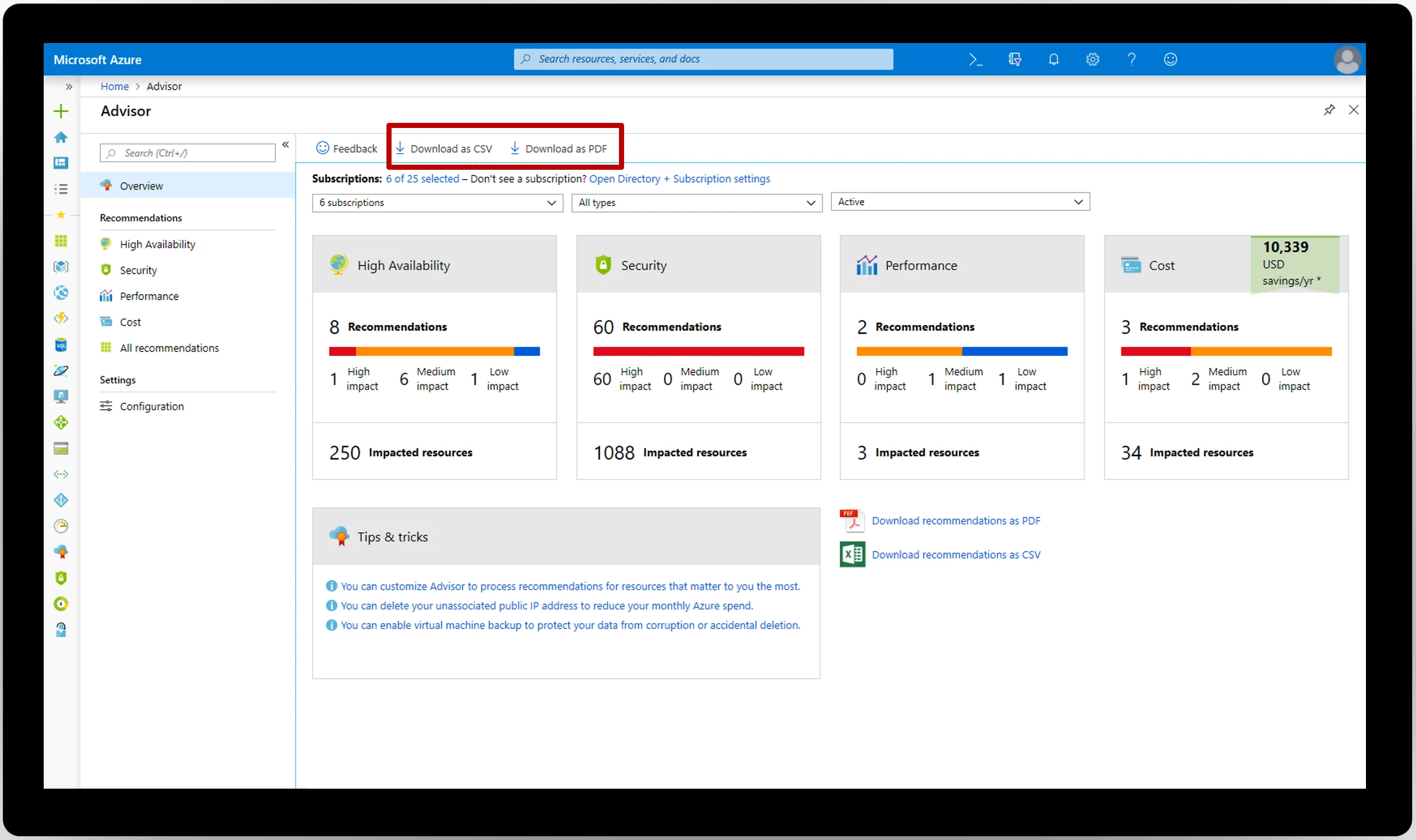
Azure Advisor does not replace a dedicated CSPM tool. It’s most valuable as a prompt for teams that have not yet deployed a dedicated security tool — it ensures the most critical misconfigurations are visible at zero additional cost.
Best fit: Azure teams early in their security program or organizations that want native Azure recommendations without deploying an additional tool.
8. Qualys WAS#
Qualys WAS is a commercial web application security testing platform. For Azure deployments, it’s most relevant for scanning applications running on Azure App Service, Azure Spring Apps, and API Management.
Qualys WAS performs authenticated DAST scanning — it crawls your application, tests for OWASP Top 10 vulnerabilities (SQL injection, XSS, XXE, SSRF, etc.), and reports findings mapped to CWE and CVE identifiers. It integrates with Azure DevOps for CI/CD pipeline scanning and supports custom authentication workflows for applications protected by Entra ID SSO.
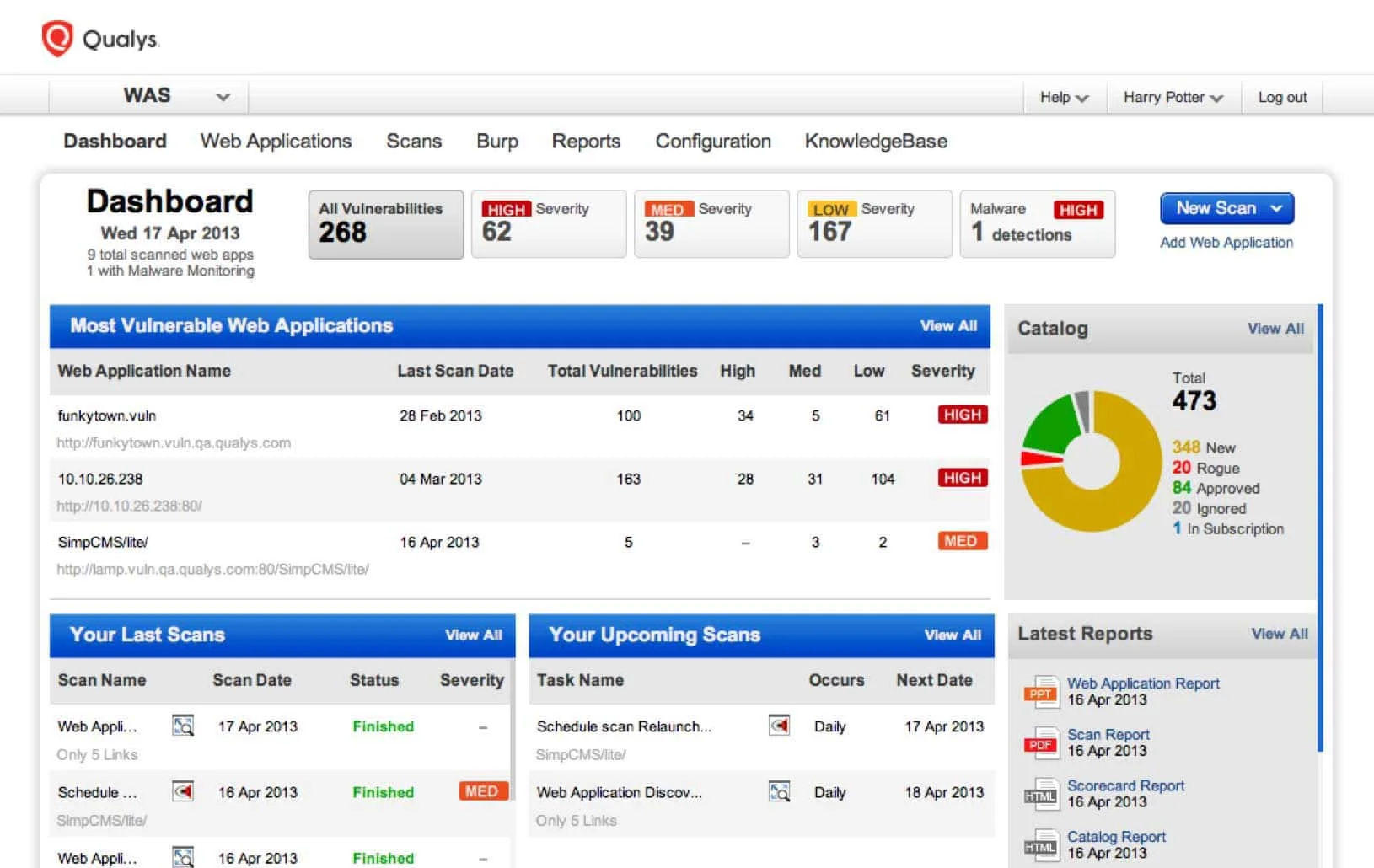
Unlike infrastructure scanners, Qualys WAS tests the running application rather than the configuration of Azure resources. It complements IaC and CSPM tools by addressing the application layer.
Best fit: Teams that need formal DAST coverage for Azure-hosted web applications, especially in regulated industries where OWASP Top 10 testing is a compliance requirement.
Comparison table#
| Tool | Type | Azure Coverage | Deployment | Cost |
|---|---|---|---|---|
| Microsoft Defender for Cloud | CNAPP / CSPM | Native Azure | SaaS (Azure) | Free tier + paid plans |
| Wiz | CNAPP | Azure, multi-cloud | SaaS | Commercial |
| Prisma Cloud | CNAPP | Azure, multi-cloud | SaaS | Commercial |
| Checkov | IaC scanner | Bicep, ARM, TF | CLI / CI | Open source |
| Trivy | Multi-target scanner | AKS, ACR, IaC | CLI / CI | Open source |
| PurpleKnight | Identity security | Entra ID | Local assessment | Free |
| Azure Advisor | Posture recommendations | Native Azure | SaaS (Azure) | Free |
| Qualys WAS | DAST | Web apps on Azure | SaaS | Commercial |
How to choose#
The right tool combination depends on your team’s Azure maturity and primary risk surface.
Starting out: Enable the free tier of Microsoft Defender for Cloud immediately — it’s built into every Azure subscription and costs nothing. Add Checkov to your CI/CD pipeline for IaC scanning. These two tools cover the most common Azure misconfiguration vectors with minimal setup. For teams comparing Azure with other cloud platforms, see appsec tools for AWS and appsec tools for GCP .
Growing teams: Add Trivy for AKS container image and manifest scanning. Run PurpleKnight quarterly against your Entra ID tenant to surface identity risks. These additions cost nothing and address two high-value attack surfaces that Defender for Cloud underserves. For Kubernetes-specific runtime protection on AKS, the Kubernetes runtime security scanners guide covers Falco and admission control options.
Mature teams with commercial budget: Evaluate Wiz or Prisma Cloud for unified CNAPP coverage, attack path visualization, and compliance reporting. Both connect agentlessly and provide capabilities that Defender for Cloud does not — cross-cloud correlation, deep runtime protection, and DSPM.
Regulated industries: Add Qualys WAS for formal DAST coverage of Azure-hosted web applications. Compliance frameworks like PCI DSS and SOC 2 typically require evidence of dynamic application testing, not just infrastructure scanning.
Open source vs commercial#
The free tier covers a lot of ground on Azure. Defender for Cloud (free posture), Checkov (IaC scanning), Trivy (container + Kubernetes), and PurpleKnight (Entra ID identity) give most teams a strong baseline with no additional cost.
Commercial tools — Wiz, Prisma Cloud — add attack path analysis, cross-cloud visibility, DSPM, and runtime protection that the open-source stack cannot match. For organizations with complex Azure environments or multi-cloud footprints, the commercial tools’ ability to correlate risk across the full stack justifies the investment.
The critical gap in the free stack is runtime threat detection. Defender for Cloud’s paid Defender for Containers plan fills this for AKS — it is usually the first commercial upgrade worth making for container-heavy Azure deployments. For Kubernetes-specific runtime security beyond what Defender for Containers provides, see the Kubernetes runtime security scanners guide covering Falco , Kyverno , and Cilium Tetragon.