The AI code problem#
AI-generated code security is the practice of identifying and mitigating vulnerabilities introduced by AI coding assistants like GitHub Copilot, Cursor, and Amazon Q Developer.
AI coding assistants write code faster than humans. They also write vulnerable code at roughly the same rate.
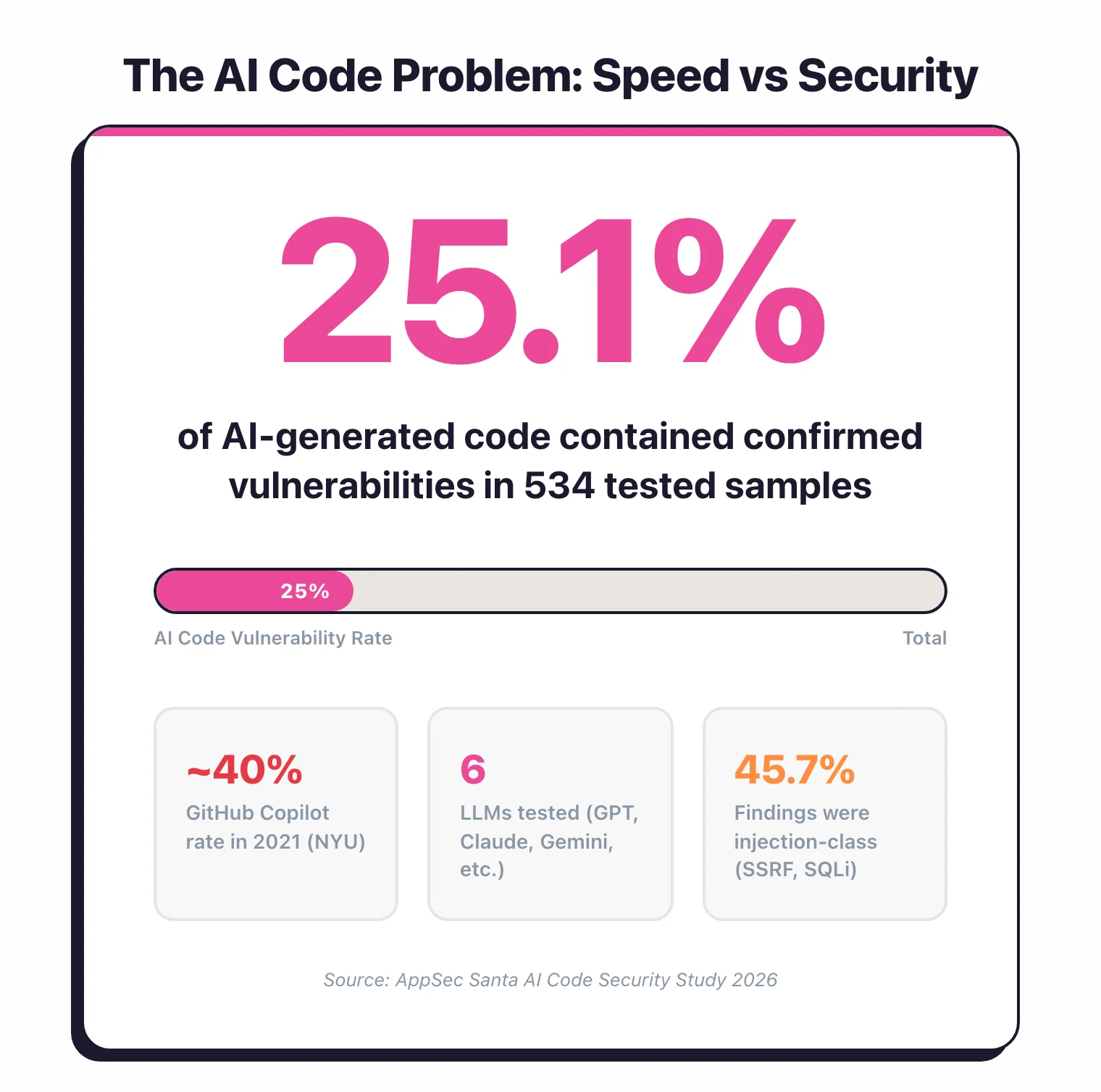
The real issue is not code quality. It is that developers trust AI output more and review it less.
GitHub Copilot, Cursor, Cody, Amazon Q Developer (formerly CodeWhisperer), and similar tools are now embedded in most development workflows. GitHub reported that Copilot generates 46% of code in files where it is enabled .
That is nearly half your codebase being written by a system that has no concept of your threat model or authentication architecture.
In my own testing of 6 major LLMs , about one in four code samples contained a confirmed vulnerability when no security instructions were given.
The speed advantage is real. But speed without security review is technical debt generated at machine pace.
The trust gap#
When you write code yourself, you think about what it does. When Copilot suggests 15 lines that look right, you hit Tab and move on.
According to a 2023 Stanford University study , developers using AI assistants were more likely to introduce vulnerabilities and simultaneously more confident that their code was secure.
That is the core risk. Humans stop checking. My 2026 study put a number on this: three of the six LLMs I tested produced vulnerable code in nearly 30% of samples, and the “safest” model still had a 19% vulnerability rate.
This page focuses on the technical side: what SAST tools catch, research data on vulnerability rates, and organizational policies for AI-assisted development. For the cultural risks specific to vibe coding — non-technical builders shipping AI-generated apps they cannot audit — see Vibe Coding Security .
What AI code generators get wrong#
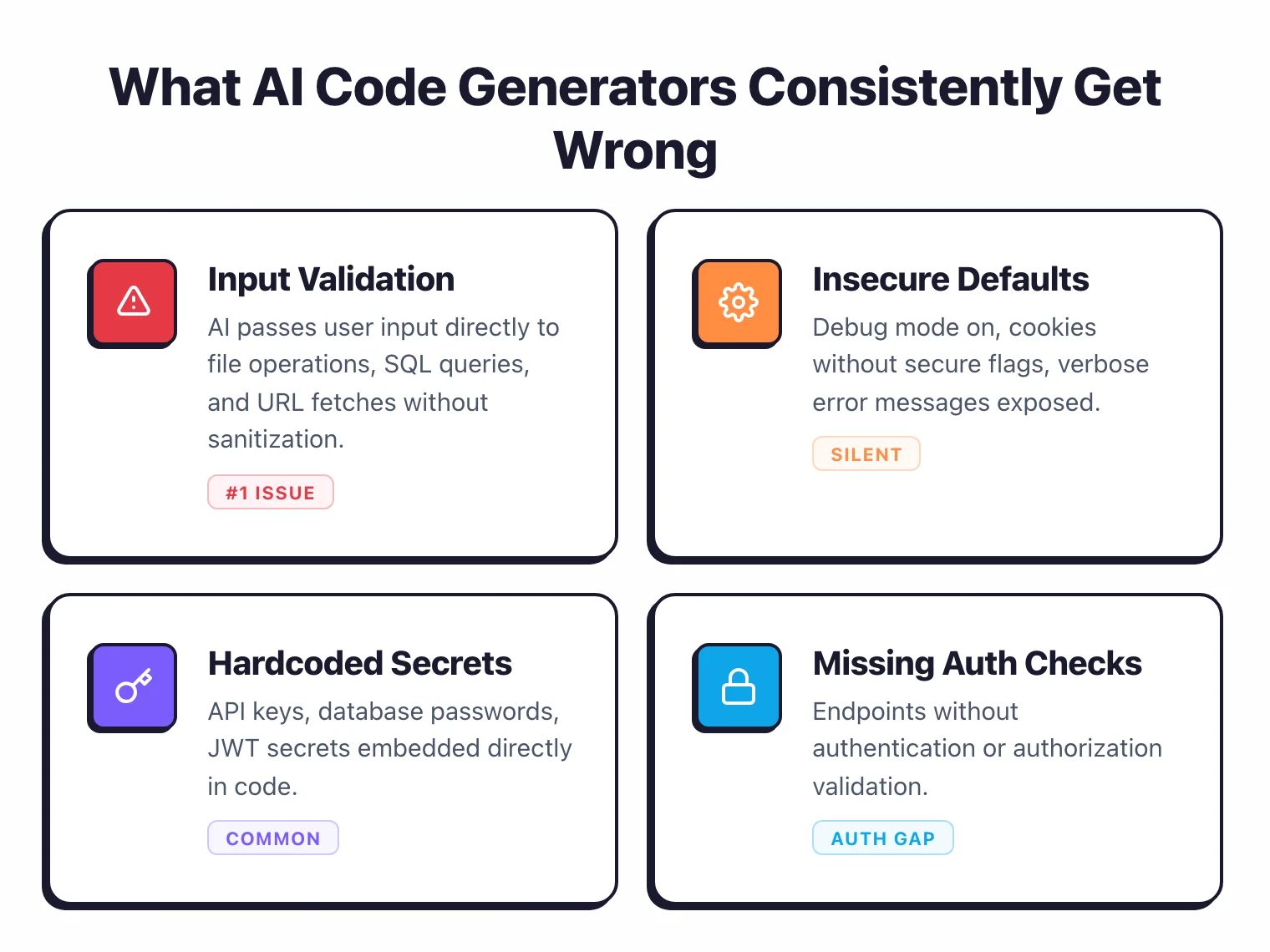
AI coding tools are trained on public repositories, which include plenty of insecure code. They pattern-match against what they have seen, and a lot of what they have seen has security flaws. My study of 6 LLMs confirmed these same patterns at scale — here are the ones that show up repeatedly.
Hardcoded credentials#
AI assistants frequently generate code with placeholder API keys, database passwords, and tokens. The generated code works, the developer tests it, and the hardcoded credential makes it into version control. Example:
# AI-generated database connection
conn = psycopg2.connect(
    host="localhost",
    database="mydb",
    user="admin",
    password="admin123"
)
The model learned this pattern from thousands of tutorials and Stack Overflow answers. It has no concept of secret management.
SQL injection via string concatenation#
AI tools frequently construct SQL queries through string concatenation instead of parameterized queries. They have seen both patterns in training data and do not consistently choose the secure one.
# AI-generated query -- vulnerable
query = f"SELECT * FROM users WHERE username = '{username}'"

# What it should generate
query = "SELECT * FROM users WHERE username = %s"
cursor.execute(query, (username,))
Cross-site scripting#
In web applications, AI assistants generate code that inserts user input into HTML without encoding. JavaScript frameworks that auto-escape (React, Vue) reduce this risk, but server-rendered templates, innerHTML usage, and raw HTML insertion remain common in AI output.
Missing input validation#
AI generates the “happy path” by default. It writes code that handles the expected input but rarely adds boundary checks or malicious input handling.
A file upload handler that skips file type or size checks. A numeric input that accepts negative values. A URL parameter that goes straight through without validation.
Use of deprecated and vulnerable APIs#
Training data includes code from all eras. AI tools suggest deprecated functions and outdated patterns.
Python’s pickle.load() without safety checks. Java’s ObjectInputStream without deserialization filtering. Node.js eval() for JSON parsing.
Path traversal#
File operation code generated by AI often fails to sanitize file paths. It produces code that accepts a filename parameter and joins it directly with a base path, without checking for ../ sequences.
# AI-generated file read -- vulnerable to path traversal
def read_file(filename):
    with open(f"/data/uploads/{filename}", "r") as f:
        return f.read()
Insecure cryptography#
When asked to implement encryption or hashing, AI tools frequently suggest weak algorithms (MD5, SHA-1 for password hashing), ECB mode for AES, or custom cryptographic implementations instead of well-tested libraries.
Mapping AI-introduced flaws to OWASP Top 10#
The categories AI assistants stumble on map cleanly to the OWASP Top 10:2021 for web applications — the same framework I use to classify any other source-code vulnerability. Hardcoded credentials and weak password hashing land under A02 Cryptographic Failures and A07 Identification and Authentication Failures. SQL injection, NoSQL injection, command injection, and SSRF land under A03 Injection. Missing input validation and insecure deserialization show up across A03 and A08 Software and Data Integrity Failures. Path traversal, IDOR-style flaws, and missing endpoint authentication map to A01 Broken Access Control.
I also lean on the OWASP Top 10 for LLM Applications for the prompt-and-context layer (LLM01 Prompt Injection, LLM06 Sensitive Information Disclosure), but the actual code that ships still gets scored against the web Top 10. If you are publishing a security policy for AI-assisted development, anchoring it against both editions makes the policy easier to defend in audits. For the wider risk categories, also see my vibe coding security guide .
Research data#
Several studies have measured the security of AI-generated code. The results provide useful baselines.
Stanford University (2023)#
“Do Users Write More Insecure Code with AI Assistants?” studied developers completing security-sensitive programming tasks. Those using an AI assistant produced measurably less secure code.
The study also found that participants using AI assistants were more likely to believe their code was secure compared to the control group.
This is the most cited study on AI code security because it measured both the vulnerability rate and the trust gap.
GitHub / Microsoft Research (2024)#
GitHub’s analysis of Copilot-generated code found that the vulnerability rate in AI suggestions was comparable to the rate in human-written code in the same repositories.
Their argument is that AI reflects the quality of its training data. In codebases with good security practices, Copilot suggestions tend to be more secure.
In codebases with poor practices, the suggestions mirror those poor practices.
NYU study (2021)#
Researchers from NYU evaluated code generated by GitHub Copilot across 89 security-relevant scenarios . Approximately 40% of the generated programs contained vulnerabilities.
The most common categories were CWE-79 (XSS), CWE-89 (SQL injection) , CWE-798 (hardcoded credentials), and CWE-22 (path traversal).
Snyk / Backslash study (2024)#
An analysis of code generated by multiple AI assistants found that 36% of generated code snippets contained at least one security vulnerability when tested against common CWE patterns. The vulnerability rate varied by language and by the type of task – authentication code had higher vulnerability rates than data processing code.
AppSec Santa study (2026)#
I ran my own test in February 2026. I sent 87 identical coding prompts to 6 LLMs — GPT-5.2, Claude Opus 4.6, Gemini 2.5 Pro, DeepSeek V3, Llama 4 Maverick, and Grok 4 — and scanned all 522 code samples with 5 SAST tools (four open-source plus CodeQL).
Every finding was validated. The overall vulnerability rate was 25.7%, with GPT-5.2 performing best at 19.5% and three models tied at the worst rate (29.9%).
Broken access control (with SSRF and path traversal rolled in under OWASP 2025) and injection were the dominant categories. The full breakdown, interactive charts, and methodology are in my AI Code Security Study 2026 .
What the data tells you#
AI-generated code is not categorically worse than human code. But it is not better either, and the volume is higher.
If your team generates twice as much code using AI assistants, you need your security tooling to handle twice the volume.
The vulnerability rate per line may be comparable, but the total number of vulnerabilities increases with output volume.
SAST tools for catching AI-introduced flaws#
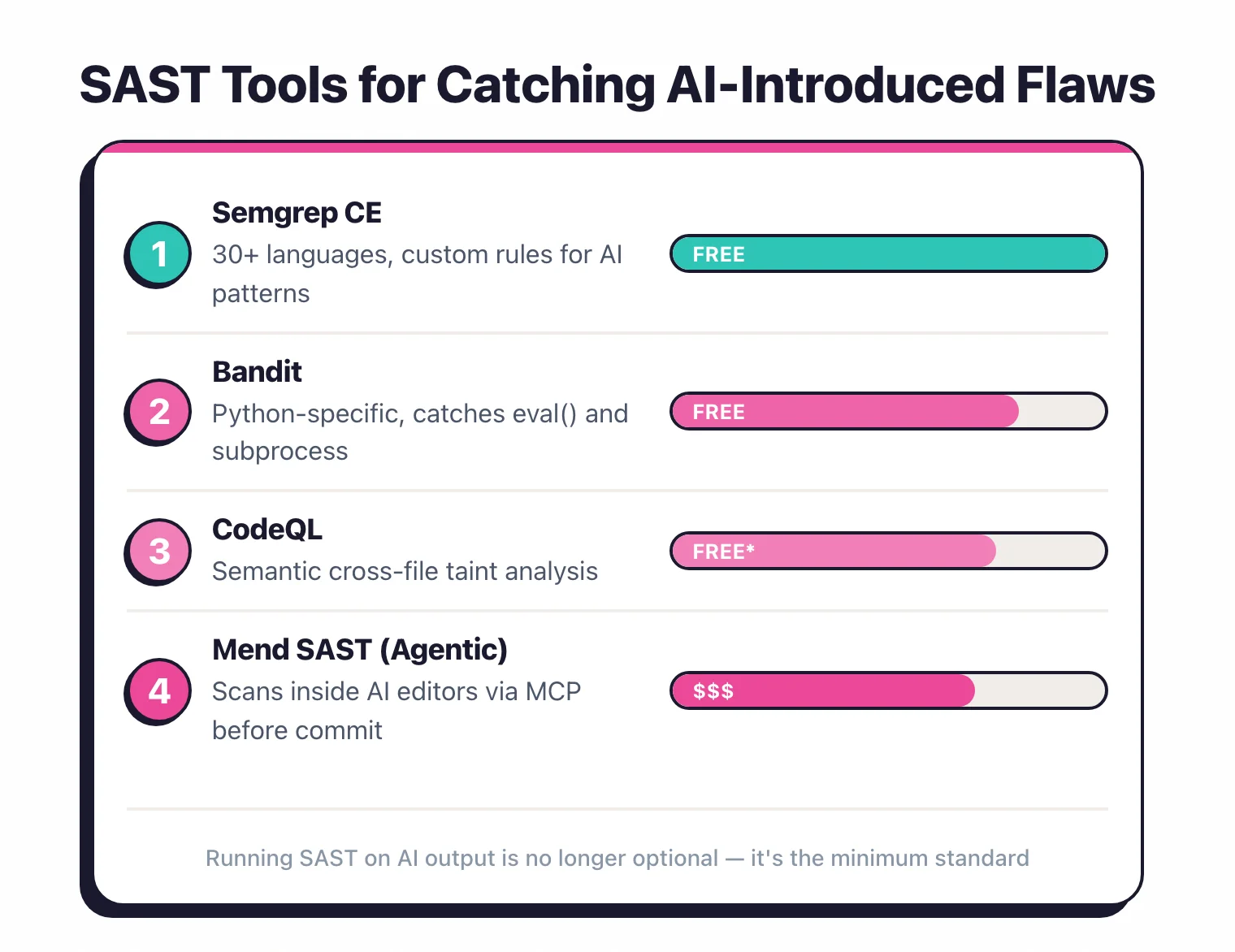
SAST tools scan source code for vulnerabilities regardless of who wrote it. An AI-generated SQL injection is detected the same way as a human-written one. The challenge is coverage and speed.
Which tools to use#
Semgrep is a strong fit for teams dealing with high volumes of AI-generated code.
Its pattern-matching rules are fast (milliseconds per file), it supports 30+ languages, and its rule library covers the exact vulnerability patterns AI tools produce: SQL injection, XSS, hardcoded secrets, path traversal. Custom rules take minutes to write in Semgrep’s YAML syntax.
Run it as a pre-commit hook to catch issues before they leave the developer’s machine.
SonarQube does code quality analysis alongside security scanning. Its 5,000+ rules cover both vulnerabilities and code smells.
The community edition is free and covers 30+ languages. Good for teams that want security and quality checks in one place.
Checkmarx and Snyk Code offer deeper dataflow analysis that traces tainted inputs through the codebase. This catches vulnerabilities where the AI-generated function is secure in isolation but introduces a flaw when connected to the rest of the application.
GitHub CodeQL is free for public repositories and included with GitHub Advanced Security. Its semantic analysis queries are powerful for finding complex vulnerability patterns.
CodeQL catches issues that simpler pattern matching misses, like indirect SQL injection through multiple function calls.
Configuration for AI code#
Standard SAST configurations work for AI-generated code. But consider these adjustments:
Scan on every commit, not just PRs. AI generates code fast.
If you only scan on pull requests, vulnerable code can sit in feature branches for days.
Run SAST incrementally on every commit with tools like Semgrep that support pre-commit hooks.
Enable secret detection. AI-generated hardcoded credentials are one of the most common issues.
Enable secret scanning rules (Semgrep has p/secrets
, SonarQube has built-in secret detection). Pair this with a dedicated secret scanner like GitGuardian
.
Focus on the CWEs that AI generates most. Prioritize rules for CWE-918 (SSRF) , CWE-502 (deserialization) , CWE-943 (NoSQL injection), CWE-22 (path traversal), CWE-78 (command injection), and CWE-798 (hardcoded credentials). My 2026 study found SSRF was the single most frequent weakness across all 6 LLMs tested, with injection-class issues accounting for a third of all confirmed findings.
Run multiple SAST tools, not just one. In my testing , 78% of confirmed vulnerabilities were caught by only a single tool.
Running a second scanner picks up a meaningful chunk of issues that the first one misses.
A newer category turns the same LLMs on the output. DeepAudit runs four cooperating agents over a repository and tries to prove each finding by executing a PoC in a Docker sandbox, which is a different failure mode from pattern matching.
For a full overview of SAST tools and how they work, see What is SAST? .
Organizational policies for AI-assisted development#
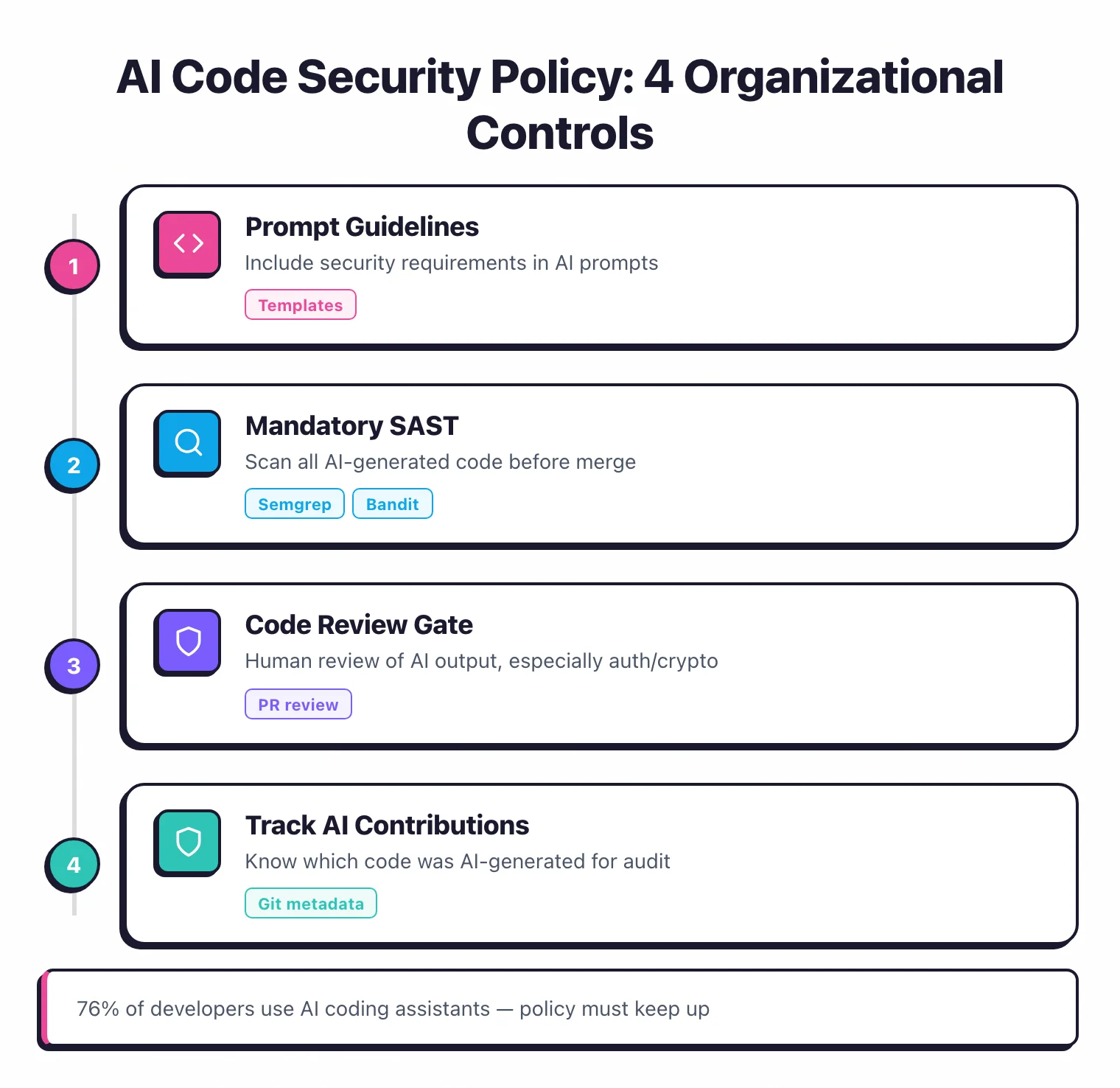
Technical controls catch individual vulnerabilities. Policies prevent systematic risk.
Define where AI coding is allowed#
Not all code should be AI-generated. Classify your codebase by sensitivity.
Authentication modules, cryptographic operations, and access control logic should require human-written code with security review. Data transformation, UI components, and test code are lower risk and better suited for AI assistance.
Document this in your development standards. Make it clear which directories, modules, or components are off-limits for AI generation.
Require SAST on every change#
Make SAST scanning a required pipeline step that cannot be bypassed. Whether code was written by a human or an AI, it must pass the same security checks.
Tools like Semgrep and SonarQube integrate with GitHub Actions, GitLab CI, and Jenkins to block merges on security findings.
Track AI-generated code#
Some organizations tag AI-generated code in commits (using commit message conventions or git metadata) to track the vulnerability rate of AI-assisted code versus human-written code over time. This data helps you calibrate your policies.
GitHub Copilot’s audit logs and Cursor’s usage analytics can provide data on which files and functions were AI-generated.
Establish review standards#
AI-generated code should not receive less scrutiny in code review than human-written code. In practice, it often does because reviewers assume the AI “knows what it’s doing.” Update your code review guidelines to explicitly state that AI-generated code requires the same security-focused review as any other code.
Train developers on AI code risks#
Developers who understand the specific failure modes of AI code generators are better at catching them in review. Share the research data — the Stanford study, the NYU results, and my 2026 LLM benchmark — and walk through examples of AI-generated vulnerabilities in your own technology stack.
Code review practices for AI-generated code#
Code review is your last line of defense before vulnerable code reaches production.
The security-first review mindset#
When reviewing AI-generated code, assume it has not been reviewed for security. The developer may have accepted the suggestion without modification.
Your job as a reviewer is to apply the security scrutiny that the developer might have skipped.
What to check#
Input handling. Does the code validate and sanitize all inputs? Does it use parameterized queries for database access?
Does it encode outputs for the target context (HTML, JavaScript, SQL)?
Authentication and authorization. Does the code check that the caller is authenticated?
Does it verify authorization for the specific operation and resource? AI-generated API handlers frequently omit authorization checks.
Secret management. Are there hardcoded credentials, API keys, or tokens? Does the code use environment variables or a secret manager?
Error handling. Does the code handle errors without leaking internal details?
AI often generates broad exception handlers that either suppress errors entirely or expose stack traces.
Dependencies. Does the code import new dependencies?
If so, are they well-maintained and free of known vulnerabilities? AI tools sometimes suggest obscure or deprecated libraries.
Review tooling#
Use Semgrep as a pre-review gate. If the code has not passed SAST, do not start the review.
This lets you focus human review time on logic and architecture issues rather than catching pattern-based vulnerabilities that tools handle better.
In pull request reviews, SonarQube and Snyk Code add inline annotations that flag security issues right on the changed lines. This surfaces problems before the reviewer even starts reading.
The bottom line#
AI code assistants are productivity tools, not security tools. They write code that works, but “works” and “secure” are different standards. My benchmark of 6 LLMs showed a 10-point spread between the safest and least safe model — your choice of assistant matters, but none of them eliminate the need for scanning.
Your existing security tooling — SAST , SCA , code review — handles AI-generated code the same way it handles human code.
What changes is the volume you need to scan and the vigilance required during review.
For broader AI security considerations, see What is AI Security? . For the unique risks of vibe coding — where non-technical builders ship AI-generated apps without code review — see Vibe Coding Security .
My Research
I tested GPT-5.2, Claude Opus 4.6, Gemini 2.5 Pro, DeepSeek V3, Llama 4 Maverick, and Grok 4 against all 10 OWASP Top 10 categories. See the full data, charts, and methodology.
Read: AI Code Security Study 2026 →